



.png)



















.png)





Benefits of Data Center Virtualization: A Complete Guide
Aug 19, 2026Data center virtualization has become one of the most practical ways for organizations to modernize how they run applications, manage infrastructure, and control costs. In this complete guide, we’ll explore Benefits of Data Center Virtualization in depth—from resource efficiency and energy savings to disaster recovery, security considerations, and real-world implementation steps. If you’ve ever wondered how businesses run more workloads with fewer physical servers (and sleep better at night), virtualization is one of the biggest reasons they can.
What Is Data Center Virtualization?
Data center virtualization is the process of using software to create a “virtual” version of computing resources—such as servers, storage, networks, and sometimes even full application environments—so multiple workloads can run on shared physical hardware. Instead of dedicating one physical machine to one application, virtualization allows you to slice a single server into multiple isolated environments, each behaving like its own dedicated system.
When I first began learning about virtualization, what surprised me most wasn’t just the technology—it was the shift in mindset. Traditional data centers often operate like rigid factories: one machine for one purpose, with wasted space when demand drops and frantic urgency when demand spikes. Virtualization changes that into a flexible system, closer to how cloud and modern software delivery think: allocate what you need, when you need it, and adjust quickly.
At a high level, virtualization typically involves a hypervisor (or virtualization management layer) that abstracts physical hardware and presents virtual machines (VMs) or virtualized infrastructure components to workloads. That abstraction layer enables strong isolation, efficient scaling, and centralized management—features that are essential for modern IT teams dealing with hybrid environments, regulatory constraints, and constantly evolving application demands.
Benefits of Data Center Virtualization
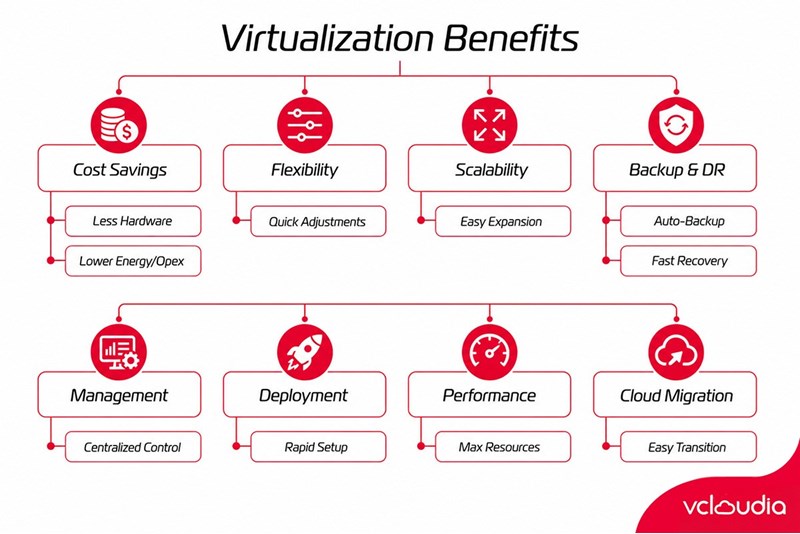
1. Better Utilization of IT Resources
One of the most immediate Benefits of Data Center Virtualization is that it helps you stop wasting compute power. In many traditional setups, physical servers are underutilized: CPU may run at 5–20% most of the time, while memory or storage may sit unused. Virtualization lets you pack multiple workloads onto the same hardware more effectively—so you spend fewer dollars for the same productive capacity.
From a personal perspective, I’ve seen how this changes conversations between infrastructure teams and finance teams. Instead of arguing about “more servers,” virtualization enables a more measurable story: existing servers can do more work. That tends to reduce procurement cycles because the organization can extract more value from investments it already owns.
Better utilization also improves operational readiness. When you need to deploy a new workload, you’re less likely to hit a “hardware wall” immediately. Resources can be allocated from a pool, and that means fewer delays and fewer emergency purchases.
Finally, resource utilization isn’t just about CPU numbers. Virtualization can balance workload placement across hosts to avoid bottlenecks. With proper monitoring and policies, you can keep performance consistent and reduce the likelihood of noisy-neighbor issues—especially when combined with good workload design.
2. Reduced Hardware and Infrastructure Costs
Another core driver behind the Benefits of Data Center Virtualization is cost reduction—particularly in hardware purchases, rack space, and supporting infrastructure. Because you can consolidate workloads onto fewer physical servers, you also reduce the number of systems that require maintenance, power, cooling, firmware upgrades, and replacement cycles.
This matters more than it sounds. Data center costs aren’t only the server itself; they include everything wrapped around it—network switches, cables, storage enclosures, and often additional capacity in cooling and UPS systems. Virtualization can reduce the growth rate of these supporting costs by slowing how quickly you need to expand physically.
Additionally, virtualization can reduce labor costs. When infrastructure is managed through centralized tools, routine tasks—like provisioning, scaling, snapshots, and lifecycle management—become more standardized. That tends to lower the operational overhead for IT teams and reduces the chances of human error.
But here’s a nuance that many guides don’t emphasize: cost savings are real, yet they require thoughtful planning. If you overcommit resources without capacity management, you could end up paying the “hidden cost” in performance issues. The goal is efficient consolidation, not reckless density.
3. Lower Data Center Energy Consumption
Energy is both a financial line item and a sustainability concern. Virtualization often helps reduce electricity usage by reducing the number of physical servers needed for a given workload demand. Fewer servers translate into less power consumption for compute, fewer cooling requirements, and reduced wear on the facility’s electrical systems.
Even when organizations adopt virtualization primarily for cost savings, they often discover a secondary impact: improved carbon efficiency. With regulatory pressure and internal sustainability goals increasing, the ability to show reduced power consumption becomes valuable for reporting and compliance.
From an operational standpoint, virtualization also enables dynamic resource allocation. Workloads can be migrated away from overloaded hosts, and idle systems can be consolidated, powered down, or right-sized. Over time, this can significantly lower energy waste.
However, it’s important to balance the story. Virtualization software itself and the management stack consume some resources too. In practice, though, the consolidation gains typically outweigh those overhead costs—especially for data centers with historically low server utilization.
4. Faster Provisioning and Deployment
If you’ve ever waited for a new server to be purchased, racked, configured, patched, and finally made ready for an application, you understand how slow traditional infrastructure can be. Virtualization changes that timeline dramatically by enabling software-based provisioning of compute environments.
One of the most recognizable Benefits of Data Center Virtualization is speed. Developers and infrastructure teams can spin up new VMs, configure storage and networking, and apply standardized templates much faster than building and configuring physical hardware from scratch. This directly improves time-to-market for applications and reduces friction in project delivery.
In many organizations, the biggest advantage isn’t just faster deployment—it’s the shift from reactive to proactive operations. Instead of scrambling for resources when a project is already behind schedule, IT can prepare templates, baseline images, and standardized configurations.
There’s also a learning curve benefit: because provisioning becomes more repeatable, teams can codify best practices. Once a “golden image” or VM template is created, it becomes easier to maintain consistency, audit changes, and reduce configuration drift. That consistency often leads to fewer production incidents—an outcome that teams don’t always predict at the start.
5. Greater Scalability and Flexibility
Scalability is where virtualization shines for organizations with fluctuating demand. When workload peaks arrive—seasonal traffic, marketing campaigns, batch processing, or temporary expansions—virtualization allows you to add capacity without waiting for new physical hardware immediately.
The Benefits of Data Center Virtualization include elastic-like behavior within on-prem environments. Even if you’re not fully operating in a public cloud, you can still scale within the virtual infrastructure by adding more capacity to the pool (like spinning up additional VMs) and by using migration to redistribute workloads.
Flexibility also shows up in how workloads can be redesigned. You can separate concerns—compute, storage, and networking—and allocate each according to the workload’s needs. Some applications need high IOPS storage; others need CPU-heavy processing; others need low-latency networking. Virtualization provides the mechanism to tailor resource allocation more precisely.
Personal takeaway: I often describe virtualization as “capacity orchestration.” It doesn’t magically eliminate hardware limits, but it makes the hardware limits more manageable. You can plan and respond with greater control, which reduces risk when demand surprises you.
6. Improved High Availability and Business Continuity
High availability (HA) and business continuity are business-critical outcomes, not just technical goals. Virtualization enables features like live migration, clustering, and automated failover, which can reduce downtime during host failures and infrastructure maintenance.
This is one of the most important Benefits of Data Center Virtualization for organizations that can’t afford long outages. Instead of waiting for hardware replacement or manually rebuilding systems, you can orchestrate failover to a healthy host or environment. That translates into improved service reliability and better customer experience.
Business continuity also extends beyond host failure. Virtualization supports consistent backup strategies, snapshotting, and recovery testing, which can be part of a broader resilience plan. Many teams discover that HA and disaster recovery become more manageable once workloads are decoupled from specific physical machines.
A subtle but valuable insight: virtualization doesn’t remove all failure modes. It changes the failure domain and improves your ability to respond. If your storage layer or network fabric is the common bottleneck, those remain risks. But virtualization gives you tools to build redundancy more effectively and to respond faster.
7. Easier Disaster Recovery and Backup
Disaster recovery (DR) is often expensive and difficult—especially when every workload is tied to unique hardware. Virtualization makes it easier to implement DR because virtual machines are portable and snapshots can capture system state in a controlled way.
The Benefits of Data Center Virtualization in DR come from two angles: operational practicality and consistency. You can back up VM images, replicate them, and restore them to a target environment without rebuilding the entire system manually. That reduces recovery time objectives (RTO) and recovery point objectives (RPO) variability.
Also, testing becomes more straightforward. Instead of risking production by attempting DR drills, you can restore to a staging environment, validate application behavior, and refine recovery procedures. Over time, this matures the organization’s resilience capabilities.
From experience, DR becomes more credible when you can measure it. Virtualization improves the measurability of DR because VM-level operations are repeatable. You can track backup success rates, restoration timelines, and failure patterns.
8. Simplified IT Management
Managing a traditional data center often means juggling many physical systems with individual configurations. Virtualization centralizes management through consoles and automation tooling, enabling standardized processes and policy-based administration.
One of the most meaningful Benefits of Data Center Virtualization is that it reduces “configuration chaos.” You can apply consistent settings, patch baselines, and monitoring across VM fleets. That lowers the cognitive load on administrators and reduces the chance that one server behaves differently because of a forgotten tweak.
Centralization also enhances visibility. Instead of manually tracking server utilization and status across hundreds of devices, administrators can monitor clusters and virtual hosts in a unified dashboard. That gives you faster incident detection and better planning.
The operational effect is big: when management becomes simpler, teams can spend more time on optimizing systems and improving applications rather than maintaining infrastructure by hand. This often shows up in improved service levels and lower ticket volumes.
9. Better Workload Isolation
Isolation is a major reason virtualization became mainstream. In a virtualized environment, workloads can run in separate virtual machines with controlled resource boundaries. That helps prevent one application from destabilizing another.
This is one of the underappreciated Benefits of Data Center Virtualization: isolation isn’t only about security. It’s about stability. If an application crashes, it typically affects only its VM (or its resource boundaries), not the entire host. If one service experiences a spike, resource limits can reduce collateral impact.
Isolation also supports multi-tenancy and environments for different teams. Even in internal corporate settings, different departments may need separate environments for development, testing, staging, and production. Virtualization allows those environments to coexist on shared hardware without turning the data center into a tangle of dependencies.
However, isolation depends on configuration. Proper resource limits, secure networking segmentation, and disciplined access controls all contribute. Virtualization provides the capability; good design determines how well it performs in real life.
10. Improved Application Performance and Resource Allocation
At first glance, virtualization might seem like it could reduce performance due to overhead. In practice, modern virtualization platforms are highly optimized, and virtualization can improve performance by enabling smarter resource allocation and workload placement.
One of the Benefits of Data Center Virtualization is performance management through orchestration. You can move workloads away from congested hosts, adjust CPU and memory allocations, and tune storage performance depending on the application profile.
Virtualization also supports consistent environments, which can enhance application performance indirectly. If an application consistently sees the same OS baseline and dependency versions, you reduce performance variability caused by “it works on that one server” problems.
Personal insight: performance improvements often come not from raw speed alone but from reduced bottlenecks and fewer mismatches. When infrastructure is managed as a pool with monitoring and controls, you can see contention early and correct it before users notice.
Additionally, virtualization enables advanced features like snapshots, cloning, and faster environment replication. While those features are often discussed for deployment speed, they also contribute to performance engineering by making it easier to test configurations safely.
How Does Data Center Virtualization Reduce Costs?
Cost reduction through virtualization is usually not a single “silver bullet” but a combination of savings across hardware, operations, power, and lifecycle management. The most visible savings come from server consolidation: fewer physical servers are needed to support the same number of workloads, which reduces capital expenditures (CapEx).
Operational expenses also decrease because virtualization supports automation and centralized management. When patching, provisioning, monitoring, and configuration management become standardized, you often reduce administrative workload and reduce incident rates. Fewer incidents means fewer “firefighting” hours, fewer costly outages, and fewer downtime-related business impacts.
Energy savings are another cost lever. Consolidation reduces the number of servers running and reduces cooling demand. Even small reductions can matter at scale, especially in large facilities where power usage effectiveness (PUE) and total energy consumption are continuously evaluated.
But the most interesting part—often overlooked—is that virtualization reduces cost volatility. In traditional models, growth triggers sudden hardware purchases and data center expansion. With virtualization, you can extend useful life of existing infrastructure and respond to demand more smoothly. That can reduce the risk of overbuying hardware and having underutilized assets later.
Finally, virtualization can lower the “hidden costs” related to time. When provisioning is faster, teams spend less time waiting, reworking, or reverting. That improves productivity and indirectly reduces costs tied to project delays.
How Does Virtualization Improve Data Center Efficiency?
Data center efficiency is about how effectively you convert infrastructure into productive service. Virtualization improves efficiency by enabling better use of compute, storage, and network resources, often through pooling, dynamic allocation, and optimized workload placement.
At the compute layer, efficiency improves because you can allocate CPU and memory to multiple VMs based on real demand rather than fixed physical server boundaries. With monitoring and resource management policies, you can also prevent resource starvation and reduce the probability of bottlenecks.
At the storage layer, virtualization can provide tiering and abstraction that helps match performance to workload needs. Instead of using the same storage type for every application, you can align faster storage with I/O-heavy workloads and use more cost-effective tiers for less demanding workloads.
Networking efficiency benefits too. Virtualization supports logical network segments and virtual switches, enabling flexible traffic management. You can design network policies that reduce unnecessary traffic, improve segmentation, and optimize routing depending on application behavior.
Personally, I’ve found that virtualization’s biggest efficiency win comes from measurement. Once your workloads are virtualized, you gain better metrics: CPU ready time, memory utilization, storage IOPS latency, and network throughput per VM. That granularity helps you tune systems and make evidence-based decisions rather than relying on rough averages.
Efficiency is not just about resources though. It’s also about time-to-deploy, time-to-recover, and time-to-change. Virtualization supports faster change cycles and more repeatable operational processes, which are essential for modern IT environments.
How Does Data Center Virtualization Improve Disaster Recovery?
Disaster recovery improves with virtualization because virtual machines can be backed up, replicated, and restored in a more consistent and controllable manner. In traditional environments, DR often requires rebuilding the server hardware, reinstalling OS components, reconfiguring drivers, and manually restoring applications—steps that increase recovery time and increase the chances of errors.
With virtualization, DR can be performed at the VM level. That means you can restore workloads more quickly and with fewer manual steps. Snapshots and replication allow you to capture system state and transfer it to a DR site, cold standby environment, or even a cloud-based target depending on your strategy.
Another benefit is the ability to test DR procedures more safely. You can restore VMs into a non-production sandbox, validate application dependencies, and ensure the recovery plan works. This transforms DR from a one-time checkbox into an operational capability you can continuously improve.
Virtualization also supports HA and failover architectures. If the plan includes live migration or clustered setups, you can reduce downtime even during non-catastrophic events like host maintenance, switch failures, or patching windows.
However, for DR to truly work, virtualization must be paired with resilient storage and networking. If your virtual machines rely on a single point of failure—like a storage controller or a network segment—then recovery will still be compromised. The most successful DR programs are holistic: compute, storage replication, network routing, and recovery procedures all work together.
What Are the Different Types of Data Center Virtualization?
1. Server Virtualization
Server virtualization is the most common starting point. It uses a hypervisor to create multiple virtual machines on a single physical server. Each VM can run its own operating system and applications, isolated from others.
With server virtualization, organizations can consolidate workloads and improve utilization. It also supports features like live migration and HA clustering, which improve uptime.
2. Storage Virtualization
Storage virtualization abstracts physical storage hardware into logical storage pools. It can include features like snapshot management, thin provisioning, and storage tiering.
Storage virtualization is crucial for decoupling compute from storage. It helps organizations allocate the right storage performance level for each workload without being locked to a one-to-one physical mapping.
3. Network Virtualization
Network virtualization creates logical network segments on top of physical network infrastructure. This enables more flexible traffic management, segmentation, and policy enforcement.
It’s particularly useful in environments with multiple environments (dev/test/prod) and in scenarios requiring micro-segmentation for security and compliance.
4. Desktop Virtualization
Desktop virtualization delivers virtual desktops to users instead of running user environments directly on physical client machines. It can be used for remote work, centralized management, and improved security.
Desktop virtualization can also simplify patching and endpoint management because changes can be applied at the virtual image level.
5. Application Virtualization
Application virtualization runs applications in a way that isolates them from the underlying operating system. This can help address compatibility issues and speed up application delivery.
It’s often used when organizations need to support legacy apps or simplify deployment across heterogeneous environments.
6. Data Center Infrastructure Virtualization
This broader approach virtualizes multiple components across the data center—sometimes including compute, storage, networking, and management orchestration.
Infrastructure virtualization is often tied to automation platforms that manage end-to-end provisioning and lifecycle operations.
7. Private vs. Public vs. Hybrid Virtualized Infrastructure
Virtualization can be deployed as private infrastructure (on-prem data centers), public infrastructure (cloud providers), or hybrid combinations. Each model changes how you manage cost, performance, compliance, and scalability.
Private virtualization offers more control over data and hardware. Public virtualization can improve scalability and reduce infrastructure overhead. Hybrid approaches aim to blend both: keeping sensitive systems on-prem while leveraging the cloud for burst capacity or DR.
In my view, hybrid tends to be the most pragmatic for many enterprises because it supports gradual modernization rather than forcing a “big bang” migration.
Data Center Virtualization vs. Traditional Data Center Infrastructure
The contrast between virtualization and traditional infrastructure is mostly about coupling. Traditional data centers tightly bind applications to specific physical servers. That creates friction when you need to move workloads, scale capacity, patch systems with minimal downtime, or respond quickly to failures.
Virtualization introduces abstraction. Workloads can be moved, resized, replicated, and managed through centralized software tools. That improves operational agility and reduces downtime risks associated with manual hardware operations.
Traditional infrastructure may also have predictable performance characteristics because there’s a 1:1 relationship between workload and hardware. With virtualization, there can be an overhead layer, but modern hypervisors and hardware acceleration features make performance predictable for most enterprise workloads.
Another difference is operational model. Traditional environments require more manual tasks and individualized server management. Virtualization supports templates, automation, and policy-based governance, which reduces configuration drift.
The takeaway is not that traditional infrastructure is “bad.” It can still be efficient for specific fixed workloads. But for most modern organizations—where change is constant and uptime matters—virtualization provides a flexible foundation that adapts better over time.
What Are the Challenges of Data Center Virtualization?
While the Benefits of Data Center Virtualization are compelling, virtualization also introduces challenges that must be managed deliberately. One common challenge is complexity. Even though virtualization can simplify management at scale, it adds layers—hypervisor management, virtual networks, storage abstractions, and monitoring complexity.
Another challenge is performance tuning. Virtualization makes it possible to run many workloads on shared hosts, but it also means contention can occur if resource allocations are poorly configured. CPU scheduling, memory oversubscription, storage IOPS limits, and network throughput constraints need careful planning.
Security is also a challenge. Virtualized environments rely on hypervisor integrity, secure configuration, and correct network segmentation. Misconfigurations can weaken isolation, and vulnerabilities in management components can be high impact.
Cost optimization is another challenge. Organizations often consolidate successfully, but then they might over-provision because “it’s virtual.” That can lead to capacity bloat and reduced cost savings. Good governance, monitoring, chargeback/showback (where applicable), and capacity management are essential.
Finally, there’s operational skill. Teams may need training to manage virtualization platforms effectively, including understanding failover behavior, snapshot lifecycle policies, storage best practices, and recovery testing processes.
In my experience, the best virtualization deployments treat virtualization as an ongoing operational discipline—not a one-time technology project.
How Does Data Center Virtualization Affect Security?
Security in virtualized data centers must be handled with intention because virtualization changes the trust boundaries and dependency structure. On the positive side, virtualization can improve security through isolation: workloads can be segmented into separate VMs, and network traffic can be controlled using virtual switches and security policies.
However, virtualization also creates new attack surfaces. The hypervisor layer, virtualization management interfaces, and centralized orchestration tools become critical components. If these components are compromised, attackers might gain broader control than they could on a single physical server.
Another security concern is misconfiguration. For example, if VLANs or virtual network policies are incorrectly configured, isolation can be weakened. Similarly, if permissions within virtualization management are too broad, unauthorized actions could occur.
From a practical perspective, strong security practices include role-based access control (RBAC), multi-factor authentication for management consoles, encrypted management traffic, regular vulnerability patching, and continuous monitoring.
Encryption also plays a role. Encrypting data in transit between virtual workloads and encrypting storage where needed can reduce the blast radius of potential breaches. Additionally, secure backup strategies and recovery testing matter, because ransomware attacks increasingly target backups.
Overall, virtualization doesn’t automatically make systems secure or insecure. It changes the security model—and with good governance, virtualization can actually strengthen isolation and improve auditability across environments.
How to Implement Data Center Virtualization
Implementing virtualization effectively requires more than installing a hypervisor. It involves planning architecture, designing resource pools, selecting management tools, and building processes for lifecycle management and resilience.
A successful implementation starts with discovery and assessment. Understand current workloads, resource usage patterns, dependencies, and performance requirements. Not every workload should be virtualized in the same way; some might require direct hardware access or special tuning.
Next is design. Decide on clusters, host sizing, storage architecture, network segmentation, and HA/DR topology. Plan for capacity headroom—virtualization can consolidate quickly, so you need to ensure the environment won’t become resource-constrained.
Then comes platform selection and integration. Choose the virtualization platform(s), integrate with identity and access systems, configure monitoring, and align with existing logging and security controls. This stage is where teams can accidentally create long-term operational pain if they ignore integration complexity.
Migration strategy matters. Use phased migration: start with low-risk workloads, validate performance and operational procedures, then expand. Consider building standardized VM templates so new deployments follow consistent configurations.
Finally, after implementation, focus on operational governance: patching strategy, snapshot policies, backup validation, change management, and continuous monitoring. A virtualization environment that isn’t governed becomes expensive and unstable.
How to Choose a Data Center Virtualization Platform?
Choosing a virtualization platform depends on your goals, existing infrastructure, team skills, and long-term strategy. Some organizations prioritize performance and enterprise features; others prioritize ease of management or compatibility with their broader ecosystem.
Key evaluation criteria typically include:
- Scalability and clustering features for your expected growth.
- Storage and networking integration with your current or planned infrastructure.
- High availability, live migration, and backup tooling quality.
- Security controls such as RBAC, secure management, encryption options, and auditing.
- Ecosystem and automation support (APIs, orchestration integrations, and tooling).
- Vendor support and long-term roadmap.
In practice, “the best platform” is often the one that fits your operational model. A powerful platform poorly integrated into your processes can become harder to manage than a simpler solution aligned with your team’s workflow.
Another personal recommendation: run a pilot project with representative workloads. Evaluate not just benchmarks, but also operational experiences—monitoring clarity, troubleshooting workflows, and recovery testing. Those real-world factors often matter more than marketing claims.
Conclusion
Data center virtualization delivers meaningful Benefits of Data Center Virtualization by improving resource utilization, reducing hardware and energy costs, accelerating provisioning, enabling scalability, and strengthening high availability and disaster recovery—while also simplifying IT management through centralized control and better workload isolation; however, realizing these advantages requires careful design, governance, and security planning to avoid performance bottlenecks, configuration drift, and new management-layer risks.
Vcloudia Cloud Server – The Cloud You Can Count On
If you're concerned about the potential limitations of Cloud Servers, Cloud Server by Vcloudia is a reliable solution for businesses of all sizes. With a modern infrastructure and comprehensive customer support, Vcloudia delivers a cloud experience with:
- Powerful connectivity to ensure stable 24/7 access
- Advanced security standards, compliant with international certifications such as ISO 27001:2013, ISO 20000:2018, ISO 9001:2015
- Flexible pricing packages tailored to your specific business needs
- Expert technical support, making migration and system deployment fast, safe, and compatible
Contact information:
- Hotline: +855 888 55 66 08 (free of charge)
- Fanpage: https://www.facebook.com/vcloudia/
- Website: https://vcloudia.com
Featured news
Related news
What is a Snapshot? The Difference Between Snapshot and Backup
Snapshot is a familiar concept in data management and protection. In the context of the information technology boom, where data is a major asset for businesses, understanding Snapshots as well as their application is a key factor for enterprises to maximize technological efficiency.
What is a Firewall? The Role and Importance of Firewalls for Users
In the context of ever-increasing cyberattacks, system security has become a top priority for many enterprises. Alongside deploying antivirus software and controlling connection ports, firewalls are also considered a key solution to effectively enhance cybersecurity.
What is DDoS? Signs, Mitigation Strategies, and Effective Prevention
DDoS is a highly dangerous cyberattack that leaves severe consequences for enterprises. Therefore, gaining a clear understanding of DDoS attacks, as well as how to detect and prevent them, is a topic of significant interest to many.
What is a Trojan? How to Detect, Avoid, and Prevent It
A Trojan is a type of malicious code or software that can cause severe consequences to computer operations. So, what is a Trojan? How can you prevent a Trojan from infiltrating your computer? In the following article, Vcloudia will provide detailed information on these issues.
What is Cloud Backup? Classification, benefits, and limitations
Cloud Backup is a solution that plays an important role in backing up and recovering data when an incident occurs. So what exactly is Cloud Backup? Let's find out the details with Vcloudia in the following article.
What is Cloud Storage? Features and Benefits of Using It
Cloud Storage is the perfect storage solution alternative to bulky, space-consuming physical hard drives. So, what is Cloud Storage? Let's explore the details with Vcloudia through the following article.
What is an API? Characteristics and applications in website design
API, short for Application Programming Interface, is a concept no longer unfamiliar in the information technology field. So what exactly is an API and why is it so important? Let's find out with Vcloudia.
What is Node.js? Instructions on how to install Node.js on cPanel
Currently, it is easy to see that Node.js is being used by quite a lot of people. This is because Node.js can support users in running on multiple platforms and multiple devices.
What is Vultr VPS? Should you use Vultr VPS?
Vultr VPS is one of the best cloud storage solutions in the world. In this article, you will learn the concept: "What is Vultr VPS?", as well as understand its advantages and disadvantages.
Zoom Cloud Meeting: What is it? Basic Things You Should Know About Zoom Cloud Meeting
In 2020, Zoom Cloud Meeting became one of the leading video conferencing software applications. It allows you to virtually interact with colleagues when in-person meetings aren't possible, and it has also been very successful for social events.