



.png)



















.png)





What is a Trojan? How to Detect, Avoid, and Prevent It
Sep 21, 2026A Trojan is a type of malicious code or software that can cause severe consequences to computer operations. So, what is a Trojan? How can you prevent a Trojan from infiltrating your computer? In the following article, Vcloudia will provide detailed information on these issues.
What is a Trojan?
A Trojan is malicious software disguised as a useful program or application. When a user downloads and installs this Trojan, it infiltrates the system and executes destructive actions, stealing vital information and data on the computer.
The operating mechanism of this type of virus is also unusual; a Trojan does not self-replicate by infecting other files or computers. They exist silently within the user's computer to collect information or establish security vulnerabilities to take over the user's device. This type of malicious software can cause massive damage to user devices and threaten personal data stored on them. Unlike other types of viruses that, upon direct attack, are easily detected and eliminated by pre-installed antivirus software, this virus attacks the user's data system through software using extensions such as .exe, .com, .scr, .bat, etc.
Trojans themselves are also divided into various types of viruses, possessing characteristics such as Backdoor, Rootkit, Banker, Game Thief, Fake AV, etc. Therefore, the first step is to clearly distinguish which type of virus it is in order to handle it accurately.
How to detect a computer infected with a Trojan virus
Below are some common signs to identify a computer infected with a Trojan:
- Frequent system errors without a clear reason.
- Documents printing automatically or automatically changing font styles.
- Extremely slow device startup & opening of other programs.
- For Windows operating system users, the Start button does not appear.
- Chat windows automatically opening and closing without user interaction.
- The device automatically turning on and off multiple times.
- Files continuously being hidden.
- The sudden appearance of new applications.
The above are just the basic symptoms when a computer is infected with a virus. With the advancement of technology, malicious codes like Trojans are becoming increasingly sophisticated; they can infiltrate and operate within the system without leaving easily noticeable traces.
To protect systems comprehensively, especially for enterprises, cloud security solutions currently serve as one of the most robust prevention.
Common types of Trojans
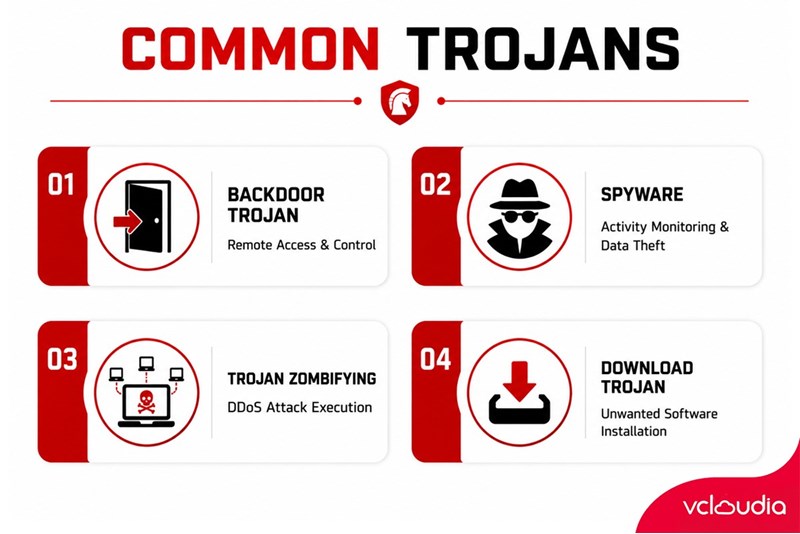
Depending on the purpose of the attack, there are many different types of Trojans. Below are the common types of Trojans today:
- Backdoor Trojan: This type of Trojan creates a backdoor in the victim's system, allowing attackers to access and control the computer remotely.
- Spyware: This is spyware that silently monitors all user activities to steal crucial personal information such as bank accounts.
- Trojan Zombifying: This type of Trojan executes DDoS attacks by seizing control of the computer.
- Download Trojan: This is a type of malicious code that causes the computer to automatically download unwanted software such as adware and junk software.
How a Trojan operates
A Trojan is a type of malicious code capable of hiding itself in normal files or programs to infiltrate a user's computer. It conceals itself in many different forms, such as software applications, page download links, advertising links, etc. At that point, if users are off their guard and click on them, the spyware will swiftly penetrate the computer system to steal user data. Therefore, to prevent these situations, we should avoid clicking on unknown links.
How to prevent Trojans
To prevent Trojans, users must absolutely not open any unfamiliar files, links, or software. This is because Trojans can only spread and propagate within the system when users click on content containing them. In addition, users can apply the following measures to prevent Trojans:
- Use antivirus software or a firewall.
- Regularly update the computer's vulnerability patches.
- Do not access unsafe websites, those without SSL certificates, or URLs that do not use the HTTPS protocol.
- Do not indiscriminately open links in emails unless absolutely certain they are from a legitimate source.
- Do not install programs lacking credibility.
Looking for a high-performance, secure solution?
Explore the services offered by Vcloudia – a leading provider of Cloud Computing and Data Center solutions. Contact us for expert consultation and find the right model for your needs:
- Hotline: +855 888 55 66 08 (free of charge)
- Fanpage: https://www.facebook.com/vcloudia/
- Website: https://vcloudia.com/
Related news
What is SD-WAN? Technology and Practical Applications
SD-WAN addresses the increasing enterprise demands driven by IoT, SaaS, and Cloud alongside escalating cybersecurity needs, where applications demand prioritization and optimization while enterprises require reductions in deployment costs, operational labor, and time.
Software Solutions for Creating Online Virtual Machines You Should Know
Are you looking for software to create online virtual machines, both free and paid? Don't worry, this article is for you. Vcloudia will introduce you to several useful solutions to help you set up an online virtual machine as desired.
What is a free domain name? Should you use one?
A free domain name is a service provided by domain registrars that allows users to register and use a domain without incurring any costs. For an individual or a business, a website domain name is an extremely crucial factor. So, how can you register a free domain? Should you use a domain name that incurs no cost?
Comparing DigitalOcean, Linode, and Vultr VPS: Which Is the Right Choice for Your Business?
A Virtual Private Server means your website will have all the necessary power to handle your growing traffic. Likewise, if you are a developer, this added flexibility might be all you need to take your application ahead of the competition. However, to be the best, you need to work with the best.
What is ASP.NET? How to Analyze the Core Operational Architecture of the ASP.NET Platform
What is ASP.NET? It is an open-source platform chosen by software developers worldwide. The program offers superior utilities along with a distinctive approach to language utilization.
How to choose a server configuration for a business?
Choosing the right cloud configuration for your enterprise is a pivotal factor that helps optimize budgets, enhance operational performance, and ensure the system remains resilient against any changes. If the configuration is oversized, you waste valuable resources; if it is undersized, the system easily overloads, disrupting services.
Demystifying Cloud Security - The Cloud Security Trend Trusted by Enterprises
Cloud security, also known as cloud computing security, protects cloud-based systems, data, and infrastructure. Cloud security services provide cloud security solutions configured to protect data, support regulatory compliance, safeguard customer privacy, and set authentication rules for individual users and devices.
6 Benefits of Creating Virtual Machines That Users Cannot Ignore
Are you interested in creating virtual machines and want to learn more about their role? Creating a virtual machine is highly suitable for individuals or businesses involved in programming or information technology in general due to its usefulness. Creating a virtual machine helps enhance security, facilitates testing, and limits the spread of viruses.
What is a Web Portal? A comprehensive guide to essential knowledge about Web Portals
In practice, a Web Portal is a specially designed website that serves as a single point of access for updating information. However, many users are still vague about what a Web Portal is. So, what exactly is a Web Portal?
What is VXLAN? Everything about VXLAN that users should not ignore
Today, the emergence of VXLAN technology has brought many benefits to users compared to traditional VLAN technology. So what exactly is VXLAN? What makes this technology worth users' attention?