



.png)



















.png)





How to choose a server configuration for a business?
Oct 23, 2026Choosing the right cloud configuration for your enterprise is a pivotal factor that helps optimize budgets, enhance operational performance, and ensure the system remains resilient against any changes. If the configuration is oversized, you waste valuable resources; if it is undersized, the system easily overloads, disrupting services. Join Vcloudia in exploring how to select the most suitable server configuration tailored to actual business demands in the article below.
Why Is Choosing the Right Server Configuration Important?
Selecting the proper Cloud configuration for an enterprise is not merely a technical decision, but also a smart business strategy. A well-matched configuration optimizes performance, saves costs, and guarantees long-term scalability. Below are the key reasons enterprises must pay close attention:
Avoiding Resource and Investment Waste
One of the most common mistakes is over-provisioning. This leads to businesses paying for unutilized resources (CPU, RAM, storage capacity), substantially driving up the total cost of ownership (TCO). Conversely, an under-provisioned setup demands unplanned additional investments and causes service interruptions. Choosing the right Cloud configuration for your enterprise optimizes every spent dollar, ensuring that all allocated resources are effectively leveraged.
Ensuring Stable System Operation Under Load
Cloud infrastructure serves as the backbone for numerous business applications and services. If the configuration is mismatched, the system can become overloaded, resulting in sluggish performance, application freezes, or even complete downtime. This directly impairs the user experience, diminishing business productivity and brand reputation. A carefully selected configuration guarantees that the system maintains sufficient capacity to handle workloads and sustain stable performance even during peak hours.
Increasing Infrastructure Efficiency – Improving Response Speeds
An optimal Cloud configuration not only keeps the system stable but also maximizes overall efficiency. For instance, choosing the appropriate storage type (SSD/NVMe) and CPU architecture can drastically improve data read/write speeds, transaction processing times, and application response latency. This directly elevates customer experience and employee workflow productivity.
Facilitating Seamless Expansion and Upgrades as Scale Grows
Market dynamics and business demands are constantly shifting. One of the greatest advantages of Cloud is flexible scalability. However, if the initial configuration is not thoroughly architected with scalability in mind, enterprises may encounter hurdles when scaling up or down, introducing administrative complexity and unexpected costs. Selecting the right Cloud configuration from the outset - with future growth accounted for - ensures seamless and cost-effective scaling.
Key Factors to Consider When Choosing a Server Configuration
To select the right Cloud configuration for your enterprise, it is vital to thoroughly evaluate multiple factors related to operational characteristics, performance requirements, and system expansion roadmaps. Overlooking any of these factors can lead to resource waste or degraded operational efficiency.
Type of Application or System Deployed
The prerequisite for selecting the proper Cloud configuration is defining the exact type of application or system you plan to deploy. Each application profile carries unique resource requirements, ranging from CPU, RAM, and storage capacity to data read/write speeds.
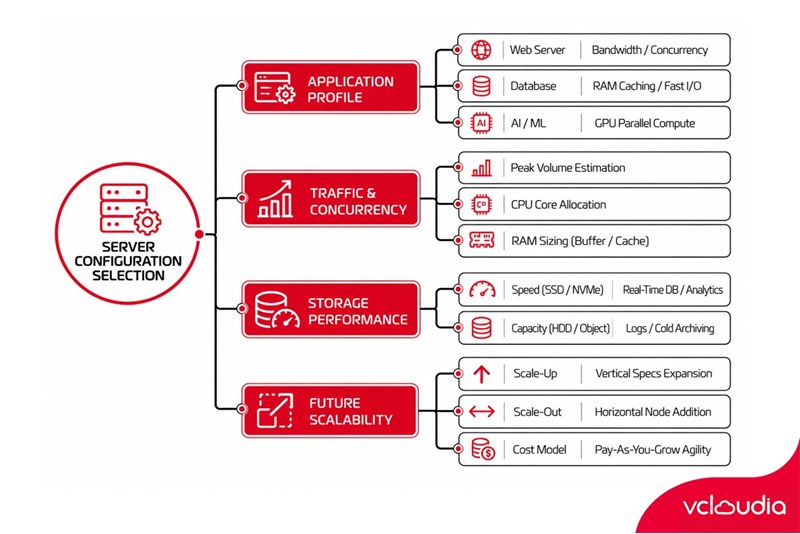
For example, a Web server setup may demand high bandwidth and strong concurrent connection handling, whereas a Database requires robust CPU power, generous RAM to optimize caching, and especially ultra-fast access storage such as SSDs or NVMe. AI/ML (Artificial Intelligence/Machine Learning) applications require specialized GPU resources with superior parallel computing capabilities. Accurately identifying the application’s operational profile enables enterprises to allocate resources efficiently, avoiding spending on unnecessary components or encountering bottlenecks caused by shortages.
Concurrent Users or Traffic Volume
The volume of concurrent users or system access frequency is one of the most critical metrics directly dictating the required CPU and RAM specifications for your Cloud environment. A system serving a few dozen internal users possesses entirely different resource demands compared to a web application serving hundreds or thousands of concurrent visitors.
The higher the concurrent request volume, the more CPU cores the system requires to process tasks, alongside greater RAM capacity to hold temporary data and maintain smooth interactions. Accurately estimating or forecasting user traffic during peak periods, along with user behavior patterns, is essential to architecting a sufficiently resilient configuration that prevents overloads, service downtime, customer dissatisfaction, and productivity loss.
Storage Capacity and Read/Write Speeds
When selecting the right Cloud configuration for your business, assessing storage capacity requirements and read/write speeds cannot be overlooked, as data represents the lifeblood of all business operations. Depending on the data type (big data, media assets, logs, backups, or lightweight configuration files) and access frequency, appropriate storage tiers must be chosen.
For high-performance applications with continuous data access requirements like databases or real-time analytics engines, investing in SSD or NVMe drives with superior read/write speeds is critical to delivering maximum throughput. Conversely, for infrequently accessed data or long-term archiving needs, high-capacity, cost-effective alternatives such as traditional HDDs or cloud object storage present the optimal choice. A well-considered storage architecture not only ensures rapid data retrieval but also optimizes capital expenditure and ongoing operational costs.
Future Scalability
In an ever-evolving business landscape, scalability is a vital factor when selecting an enterprise Cloud configuration. Resource demands can surge unexpectedly over time or during seasonal peaks. Cloud infrastructure delivers an unmatched advantage in agility, allowing businesses to effortlessly scale up (increasing resources on an existing server) or scale out (adding more servers) to accommodate growing workloads.
Unlike physical servers (Bare Metal) that require complex and costly hardware upgrade procedures, Cloud infrastructure enables rapid, flexible resource adjustments while ensuring you only pay for what you actually consume. Factoring in future scalability from the beginning empowers enterprises to proactively adapt to business growth, eliminate service disruptions, and maximize long-term investment returns.
Recommended Server Configurations for Common Use Cases
To help you easily visualize and make informed decisions, below are practical server configuration recommendations aligned with common deployment needs across small, medium, and large enterprises.
Every system has its unique characteristics. To choose the right Cloud configuration for your enterprise, begin with actual operational needs, then evaluate technical requirements and scaling potential.
- Small business websites typically serve low traffic volumes without complex transactional processing; therefore, a modest configuration minimizes expenditure while maintaining stable page load speeds.
- E-commerce websites or high-traffic platforms demand more robust RAM and CPU allocations, alongside ample bandwidth to process numerous concurrent requests, especially during peak promotional campaigns.
- Internal ERP and CRM platforms require high system stability, robust security, and scheduled backups due to the mission-critical business data they handle.
- For AI/ML applications, substantial RAM, high-speed SSDs, and dedicated GPUs (for model training workloads) are essential. As specialized workloads, these are best hosted on Cloud Servers or Bare Metal instances equipped with GPU options.
- Backup repositories or long-term archiving systems can leverage high-capacity HDDs rather than SSDs to significantly cut costs.
- When running virtualization environments, prioritize multi-core CPUs, extensive RAM, and tiered storage architectures (combining SSD and HDD) to ensure high performance and seamless scalability.
- For dev/test and staging environments, lightweight configurations that provision rapidly and do not demand high SLA uptime guarantees are ideal, especially when deployed as flexible Cloud Servers.
Enterprises should base their choices on workload profiles, utilization patterns, and financial capabilities to select a balanced configuration, avoiding both unutilized resource surplus and capacity deficits that trigger service outages.
Common Mistakes When Choosing Server Configurations
Despite understanding the importance of proper Cloud sizing, many organizations still make fundamental errors during deployment, resulting in severe impacts on budget, performance, and scalability. Here are the common pitfalls to avoid:
Over-Provisioning → Incurring Unnecessary Costs
This is among the most frequent mistakes, particularly when businesses lack clear visibility into their actual operational workloads. The mindset of "better safe than sorry" or seeking absolute margins often leads to renting or purchasing server specifications with CPU, RAM, or storage capacities far beyond actual requirements. Consequently, enterprises continuously pay for idle resources, inflating monthly operational expenditures without tangible return. Conducting granular resource utilization analysis is essential to eliminating this waste.
Under-Provisioning → System Bottlenecks and Service Disruptions
In contrast to over-provisioning, excessive cost-cutting or underestimating real-world traffic leads to configurations that cannot sustain operational loads. When visitor traffic or computational workloads increase, the system gets overwhelmed, causing latency spikes, unresponsive interfaces, and even complete crashes or prolonged outages. This degrades customer experience, harms internal employee productivity, and inflicts major financial and reputational damage. Remedying system bottlenecks reactively is far more expensive than sizing infrastructure accurately from day one.
Failing to Project 6 - 12 Month Growth
A server configuration may operate flawlessly today, but if an enterprise fails to factor in growth trajectories over the next 6 to 12 months, the infrastructure will quickly become obsolete and insufficient. This triggers sudden, disruptive emergency upgrades. Forward-looking capacity planning and choosing an agile, scalable architecture are fundamental to maintaining sustainable enterprise cloud infrastructure.
Overlooking IOPS, Bandwidth, and Security
Many organizations focus solely on baseline specs like CPU and RAM while disregarding crucial performance variables like IOPS (Input/Output Operations Per Second) - the metric governing storage disk throughput-network bandwidth, and multi-layer security. Inadequate IOPS will throttle database operations even on machines with massive CPU and RAM allocations. Insufficient bandwidth creates severe bottlenecks during data-intensive transfers.
Furthermore, neglecting defense-in-depth security across infrastructure and application tiers leaves systems vulnerable to breaches, leaks, and operational downtime. Every one of these components must be evaluated when architecting enterprise Cloud environments. Avoiding these common pitfalls is the primary step toward sizing an optimal Cloud deployment that ensures operational reliability and cost efficiency.
Vcloudia Cloud Server – The Cloud You Can Count On
If you're concerned about the potential limitations of Cloud Servers, Cloud Server by Vcloudia is a reliable solution for businesses of all sizes. With a modern infrastructure and comprehensive customer support, Vcloudia delivers a cloud experience with:
- Powerful connectivity to ensure stable 24/7 access
- Advanced security standards, compliant with international certifications such as ISO 27001:2013, ISO 20000:2018, ISO 9001:2015
- Flexible pricing packages tailored to your specific business needs
- Expert technical support, making migration and system deployment fast, safe, and compatible
Contact information:
- Hotline: +855 888 55 66 08 (free of charge)
- Fanpage: https://www.facebook.com/vcloudia/
- Website: https://vcloudia.com
Related news
What is SD-WAN? Technology and Practical Applications
SD-WAN addresses the increasing enterprise demands driven by IoT, SaaS, and Cloud alongside escalating cybersecurity needs, where applications demand prioritization and optimization while enterprises require reductions in deployment costs, operational labor, and time.
Software Solutions for Creating Online Virtual Machines You Should Know
Are you looking for software to create online virtual machines, both free and paid? Don't worry, this article is for you. Vcloudia will introduce you to several useful solutions to help you set up an online virtual machine as desired.
What is a free domain name? Should you use one?
A free domain name is a service provided by domain registrars that allows users to register and use a domain without incurring any costs. For an individual or a business, a website domain name is an extremely crucial factor. So, how can you register a free domain? Should you use a domain name that incurs no cost?
Comparing DigitalOcean, Linode, and Vultr VPS: Which Is the Right Choice for Your Business?
A Virtual Private Server means your website will have all the necessary power to handle your growing traffic. Likewise, if you are a developer, this added flexibility might be all you need to take your application ahead of the competition. However, to be the best, you need to work with the best.
What is ASP.NET? How to Analyze the Core Operational Architecture of the ASP.NET Platform
What is ASP.NET? It is an open-source platform chosen by software developers worldwide. The program offers superior utilities along with a distinctive approach to language utilization.
Demystifying Cloud Security - The Cloud Security Trend Trusted by Enterprises
Cloud security, also known as cloud computing security, protects cloud-based systems, data, and infrastructure. Cloud security services provide cloud security solutions configured to protect data, support regulatory compliance, safeguard customer privacy, and set authentication rules for individual users and devices.
6 Benefits of Creating Virtual Machines That Users Cannot Ignore
Are you interested in creating virtual machines and want to learn more about their role? Creating a virtual machine is highly suitable for individuals or businesses involved in programming or information technology in general due to its usefulness. Creating a virtual machine helps enhance security, facilitates testing, and limits the spread of viruses.
What is a Web Portal? A comprehensive guide to essential knowledge about Web Portals
In practice, a Web Portal is a specially designed website that serves as a single point of access for updating information. However, many users are still vague about what a Web Portal is. So, what exactly is a Web Portal?
What is VXLAN? Everything about VXLAN that users should not ignore
Today, the emergence of VXLAN technology has brought many benefits to users compared to traditional VLAN technology. So what exactly is VXLAN? What makes this technology worth users' attention?