



.png)



















.png)





What is a Data Center? A Complete Guide to Data Centers
Aug 19, 2026When you first hear the phrase “What is Data Center?”, it’s tempting to imagine a single building filled with computers. But in reality, a modern data center is a carefully engineered system—part factory, part power plant, part communications hub, and part security bunker—designed to keep workloads running reliably, even during component failures, power events, and peak demand spikes.
What is a Data Center?
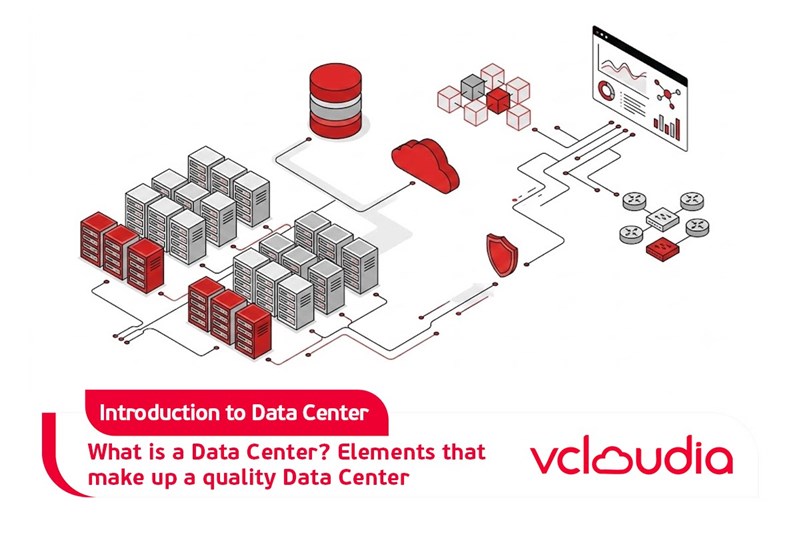
A data center is an infrastructure environment—physical, electrical, and digital—used to house computing systems (servers), networking equipment, and data storage. Its purpose is to ensure that those systems can operate continuously, securely, and at high performance.
If I had to offer a “personal truth” perspective: many people think the value of a data center is the hardware you can see (racks, servers, cables). But the real value is the engineering you can’t easily see—redundant power paths, monitored cooling airflow, resilient networking, strict access controls, and operational processes that prevent downtime from turning into disasters. That’s why “What is Data Center?” is really about reliability engineering as much as it is about technology.
How Does a Data Center Work?
A data center works like a coordinated ecosystem. Requests and data flow in through networks, are processed by servers, stored in storage systems, and then sent out again—while power and cooling systems ensure the hardware stays healthy under continuous load.
1. How Data Enters and Leaves a Data Center
Data enters a data center through network interfaces such as routers, load balancers, switches, and sometimes specialized gateways. External users—customers, applications, or other services—send requests over the internet or private networks.
Leaving happens through the same network stack in the opposite direction: results, responses, and streaming content are routed back to clients with routing policies, traffic shaping, and performance optimization. In many cases, geolocation, CDN integration, and load balancing help ensure that a user is served from the nearest or healthiest path.
2. How Servers Process Data
Once requests arrive, servers—often organized behind load balancers—handle application logic. This may include web servers, API services, middleware, database servers, and other application tiers.
From there, processing involves a lot of orchestration: virtualization or containers schedule workloads, data access layers retrieve or cache data, and performance tuning ensures that queries and computations complete within expected time windows. The goal is predictable response times, not just raw speed.
3. How Data Is Stored and Managed
Data storage in a data center can include SSDs, HDDs, SAN/NAS systems, object storage, and sometimes tape libraries for long-term archives. Data is organized for durability, indexing/search performance, and accessibility by applications.
Management also includes replication strategies, snapshots, backup policies, and lifecycle rules (like moving “cold data” to slower, cheaper storage). Good storage design is less about having more capacity and more about ensuring correct data placement, consistent backups, and fast recovery when something goes wrong.
4. How Data Centers Maintain Continuous Operations
Continuous operations are achieved through redundancy and operational controls. This includes redundant power supplies and UPS systems, multiple network paths, failover configurations, and hardware monitoring.
In real life, maintaining continuous operations is as much about process as technology. Planned maintenance, change management, incident response runbooks, and automated alerts prevent “small failures” from turning into prolonged outages. Reliability is engineered day by day, not merely installed once.
What Are the Main Components of a Data Center?
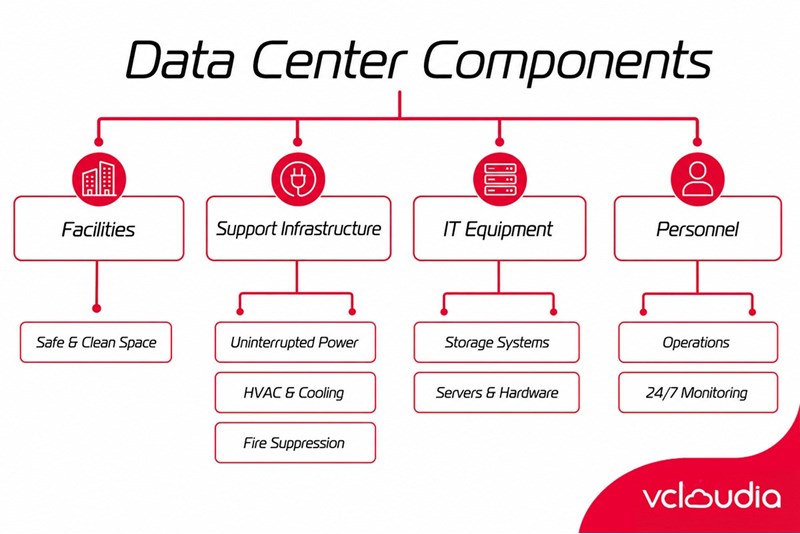
1. Computing Infrastructure
Computing infrastructure typically includes servers (physical or virtual), CPUs, GPUs for acceleration, memory, and virtualization platforms. It can also include orchestration layers like Kubernetes or private cloud management systems.
In modern setups, computing is not just “one machine.” Many data centers implement clusters where workloads can move, scale, and restart quickly. I like to describe this as “digital choreography”—services can shift across nodes to keep availability high.
2. Data Storage Infrastructure
Storage infrastructure includes block storage (for databases), file storage (for shared systems), and object storage (for media, backups, and cloud-like workloads). It also includes controllers, RAID configurations, replication mechanisms, and management software.
A key insight: storage design impacts everything else. If storage is slow or unreliable, servers wait, applications lag, and “availability” becomes theoretical. That’s why storage subsystems are tuned, monitored, and sometimes tiered by performance class.
3. Network Infrastructure
Network infrastructure includes core switches, top-of-rack switches, routers, firewalls, load balancers, and sometimes optical transport equipment. It also includes structured cabling and segmentation strategies.
Network resiliency often depends on redundancy in topology and configuration. Multiple paths, link aggregation, and careful routing design help ensure that a single cable or switch failure does not create an outage.
4. Power Infrastructure
Power infrastructure is one of the most critical components. It includes utility power sources, transformers, switchgear, UPS systems, and backup generators.
What’s interesting is that power systems aren’t just about “having power.” They’re about controlling quality (voltage stability), supporting fast switchover during outages, and preventing cascading failures. A well-designed data center makes power failure a managed event rather than a sudden crisis.
5. Cooling Systems
Cooling systems remove heat from hardware. Common approaches include raised-floor air conditioning, in-row cooling, liquid cooling, or hybrid methods.
Cooling is often underestimated by non-technical stakeholders, but in my view it’s a major “hidden hero.” When airflow is poorly designed, you can get hotspots that degrade performance or shorten hardware life. Great cooling design protects not only uptime but also long-term equipment health.
6. Physical Security Infrastructure
Physical security includes access controls (badges, biometric systems), surveillance cameras, mantraps, locked cages, and strict environmental monitoring. Many facilities also include intrusion detection and visitor logging.
Security isn’t only about stopping unauthorized entry. It’s also about maintaining traceability—knowing who did what, when, and where. That accountability matters for compliance, incident response, and auditing.
What Are the Different Types of Data Centers?
1. Enterprise Data Centers
An enterprise data center is owned and operated by a single organization for its own workloads. It offers maximum control over hardware choices, security policies, and architecture.
The tradeoff is cost and complexity. The organization must hire specialists, manage power and cooling planning, procure hardware, and maintain uptime. For many companies, this is feasible only when scale and expertise justify the investment.
2. Colocation Data Centers
Colocation (or “colo”) data centers rent space, power, cooling, and network connectivity to customers who supply their own servers or buy from providers.
Colocation can be a middle ground: you keep some control while outsourcing facility-level engineering. From a practical standpoint, it reduces the burden of building generators, cooling systems, and compliance-grade physical security from scratch.
3. Cloud Data Centers
Cloud data centers are used by cloud service providers to host infrastructure for many tenants. Services are delivered via APIs and managed platforms.
The main idea is abstraction: users don’t need to manage servers or storage physically. But it also introduces new considerations—service-level agreements, data governance policies, and how workloads behave in multi-tenant environments.
4. Hyperscale Data Centers
Hyperscale data centers are built at enormous scale by large cloud providers and internet companies. They are optimized for massive compute density, automation, and cost efficiency.
Hyperscale designs often incorporate custom hardware, high degrees of automation, and sophisticated cooling/power optimization. The result is impressive performance per unit cost—though they require very long planning cycles and significant capital.
5. Edge Data Centers
Edge data centers are positioned closer to users or industrial environments to reduce latency. Instead of sending requests to a distant central facility, workloads can run nearer the source.
Edge is especially valuable for IoT, real-time analytics, and applications where delays are unacceptable. The tradeoff is that edge sites may have smaller footprints, which requires careful design to maintain consistency and reliability across many locations.
What Are Data Center Tiers?
1. Tier 1 Data Center
Tier 1 data centers provide a baseline level of protection but have limited redundancy. A Tier 1 site may experience downtime during certain maintenance activities or equipment failures.
If you operate services that can tolerate some interruptions, Tier 1 might be acceptable. But if you’re trying to build a “always-on” digital experience, Tier 1 may not offer the reliability you need.
2. Tier 2 Data Center
Tier 2 data centers add redundancy for components like power and cooling subsystems, but not all critical paths are fully redundant. This enables improved uptime and allows maintenance on certain components without full shutdown.
In practice, Tier 2 can be a realistic option for many businesses that want stronger reliability than Tier 1, without the cost complexity of Tier 3 or Tier 4.
3. Tier 3 Data Center
Tier 3 data centers include concurrent maintainability—meaning parts can be maintained or replaced without stopping operations, provided everything is configured correctly. They also include multiple independent distribution paths for critical infrastructure.
For organizations that need high availability and want to minimize risk during maintenance windows, Tier 3 is a common target. It’s a balance between resilience and cost.
4. Tier 4 Data Center
Tier 4 data centers are designed for fault tolerance under worst-case scenarios. Typically, they include fully redundant components with multiple independent distribution paths that can support operations even in the event of an equipment failure.
Tier 4 is usually chosen for mission-critical workloads where the business cost of downtime is extremely high. It comes with higher capital and operational costs, but for the right workloads the investment can be justified.
What Is Data Center Security?
1. Physical Data Center Security
Physical security includes controlling access to rooms where servers and network equipment are located. Common measures include keycards, biometric authentication, secure badges, and restricted pathways.
In well-run facilities, access isn’t just locked—it’s monitored and logged. That matters for compliance and investigations. A secure facility treats physical entry like a privileged action with audit trails.
2. Network and Cybersecurity
Network security includes firewalls, segmentation (separating internal networks from public traffic), intrusion detection/prevention systems, and DDoS mitigation.
Cybersecurity also requires governance: patch management, vulnerability scanning, secure configuration baselines, and monitoring/alerting. The “human factor” is crucial here—many breaches involve compromised credentials or misconfigured systems rather than a direct exploit.
3. Data Security and Backup
Data security includes encryption in transit and at rest, key management, and access controls at the data level. Backup and disaster recovery are part of security because data loss is often as damaging as unauthorized access.
Backups must also be testable. A backup you can’t restore when needed is more like a documentation exercise than a real safety net. In my experience, regular restore testing is one of the highest-value security practices for minimizing downtime.
4. How Do Data Centers Protect Against Physical Disasters?
Physical disasters include fires, floods, earthquakes, and even regional outages that affect utility power. Data centers protect against these risks through fire suppression systems, flood mitigation, generator redundancy, and sometimes site-level structural resilience.
Resilience is usually layered. For example, fire protection might include advanced detection and suppression; power resilience includes UPS and generators; and environmental monitoring detects temperature or smoke early. Together, these layers transform disasters from sudden catastrophes into controlled events.
What Are the Benefits of Using a Data Center?
1. High Availability and Reliability
Data centers are designed for high availability using redundancy in power, cooling, networking, and hardware. Failures are expected to occur occasionally, so the goal is to avoid user-visible downtime.
Reliability isn’t only a facility attribute; it’s also a workload attribute. When applications are designed to be resilient (stateless where possible, with failover strategies), they benefit fully from the data center’s underlying redundancy.
2. Scalability
Data centers make scaling possible by providing capacity on demand—additional servers, storage capacity growth, and bandwidth upgrades. In colocation and cloud, scaling can be faster than building new infrastructure from scratch.
Scalability also includes performance scaling: as demand rises, systems can distribute load across more nodes. Good data centers support predictable growth rather than forcing painful redesigns each time usage expands.
3. Better Data Security
Centralized secure infrastructure allows consistent enforcement of security policies: encryption standards, access controls, monitoring, and physical protections.
While cloud shared responsibility models can be complex, a properly configured environment still improves the baseline security posture compared to ad-hoc infrastructure scattered across many small locations.
4. Improved Performance and Connectivity
Data centers offer high-bandwidth networking, optimized routing, and low-latency paths between services. They also enable faster data access through engineered storage and network designs.
Performance is more than speed; it’s consistency. Predictable throughput and latency improves user experience, reduces timeouts, and allows smoother application behavior under load.
5. Business Continuity and Disaster Recovery
Business continuity planning relies on the ability to keep operating during disruptions and to restore quickly after catastrophic events. Data centers provide the environment for backup systems, replication, and disaster recovery workflows.
Disaster recovery is not merely about backups stored somewhere. It’s about meeting recovery time objectives (RTO) and recovery point objectives (RPO). A strong data center strategy aligns infrastructure and processes with business risk.
6. Cost Optimization
Although data centers require substantial investment, using existing facilities—especially in colocation or cloud—can reduce capital expenses and distribute operational costs across multiple clients.
Cost optimization also includes energy efficiency, better utilization rates, and avoiding “overbuild” in inefficient ways. When you match infrastructure capacity to real demand and leverage efficient cooling/power designs, costs can be controlled without sacrificing reliability.
What Is the Difference Between a Data Center and a Server Room?
A server room is usually a smaller, less complex environment within an office or building. It may contain servers, switches, and storage, but it typically lacks the full redundancy and engineering rigor of a full data center.
The key difference is design intent. A server room is often built for consolidation and basic hosting, while a data center is built for resilience, scale, operational continuity, and sometimes for multi-tenant or cloud-like performance requirements.
What Is the Difference Between a Data Center and the Cloud?
A data center is the physical infrastructure (or the facility) where compute, storage, and networking systems reside. The cloud is a service model that uses data centers to deliver resources over the network.
Put another way: a data center is part of what the cloud needs; cloud is how customers consume compute and storage. I like to think of it as real estate versus a delivery service. One is the location; the other is the product experience.
What Is a Modern Data Center?
1. From Physical Servers to Virtualized Infrastructure
Modern data centers often use virtualization to run multiple workloads on shared hardware. This improves utilization and makes it easier to move workloads during maintenance or failures.
Virtualization changes operations: it enables rapid provisioning, snapshotting, and orchestrated scaling. It also means performance planning must account for hypervisor overhead, resource contention, and storage/network bottlenecks.
2. Software-Defined Data Centers
Software-defined infrastructure uses automation and policy-driven management for networks and sometimes compute/storage layers. Rather than manually configuring every component, administrators use software to implement consistent configurations.
This improves repeatability and reduces human error. When combined with monitoring and orchestration, software-defined approaches can shorten deployment times and improve fault detection.
3. Hybrid and Multicloud Data Centers
Hybrid setups combine on-prem data centers with cloud environments. Multicloud uses multiple cloud providers to diversify risk and match workload needs to the best platform.
This introduces architectural complexity: identity, networking, and data governance must work across environments. But the payoff can be strong—more flexibility, improved resilience, and the ability to choose services based on performance and cost.
4. AI-Ready Data Centers
AI-Ready data centers are optimized for accelerated computing with GPUs and specialized networking to support distributed training. They also require high power and advanced cooling strategies because AI workloads can be extremely energy-intensive.
A key insight is that AI performance is not only about GPUs. It’s also about storage bandwidth, data pipeline throughput, and low-latency networking between nodes for training efficiency.
5. Edge Computing and Distributed Data Centers
Edge computing distributes workloads across multiple locations closer to users or devices. Distributed data centers require careful consistency and centralized observability to avoid operational chaos.
The challenge is standardization at the edges. If every edge site is configured differently, troubleshooting becomes expensive and time-consuming. Modern approaches use standardized blueprints, remote management, and automated deployment to keep edge operations manageable.
How Is Data Center Reliability Measured?
1. Uptime and Availability
Uptime refers to how long systems remain operational. Availability is broader—it includes whether systems are reachable and performing sufficiently during attempts to serve traffic.
A subtle point: a system may technically be “up” but functionally degraded. For example, database latency might spike enough to cause timeouts. That is why availability should be measured at the service level, not just the server-level.
2. Redundancy and Fault Tolerance
Redundancy measures whether multiple components can take over when one fails. Fault tolerance is the ability of the system to continue operating under failure conditions.
These concepts tie back to tiering and architecture. In well-designed environments, redundancy is not only present but also tested through failover drills and controlled maintenance windows.
3. Power Usage Effectiveness (PUE)
PUE is a commonly used metric to estimate how efficiently a data center uses energy. It compares total facility energy use to IT equipment energy use.
While PUE can be a useful indicator, it’s not the whole story. You can optimize PUE at the expense of performance or cooling stability if decisions are mismanaged. The best metric strategy balances efficiency with reliability and workload needs.
4. Network Performance and Latency
Network performance metrics include throughput, packet loss, jitter, and latency. These impact user experience and application responsiveness.
Measuring latency across the full path—from client to edge, through routing, into core and storage layers—provides a realistic view of what users experience. Lower latency is often essential for interactive apps and real-time services.
5. Capacity and Resource Utilization
Capacity metrics track how close systems are to limits (CPU, memory, storage IOPS, network bandwidth). Utilization metrics reveal whether resources are underused or overloaded.
A common “silent failure” mode is resource saturation. When utilization gets too high, even redundant systems may struggle because failover adds additional load. Reliability strategies must therefore include capacity planning and ongoing tuning.
How Much Does It Cost to Build and Operate a Data Center?
1. Data Center Construction Costs
Construction costs include the building shell, structural reinforcements, electrical rooms, cable infrastructure, and installation of major systems. Site selection can heavily influence cost because utility upgrades and permitting vary by region.
Costs also depend on how quickly you need to build. Fast timelines can increase costs significantly due to labor availability and supply chain constraints.
2. IT Infrastructure Costs
IT infrastructure costs include servers, storage arrays, networking equipment, virtualization/cloud management tools, monitoring systems, and cybersecurity tools.
For modern data centers, the “hidden cost” may be software licenses, support contracts, and operational tooling needed to manage the environment. Sometimes the facility and hardware are planned well, but operational readiness lags behind.
3. Power and Cooling Costs
Power and cooling are usually the dominant ongoing operational expenses. Cooling efficiency, power distribution design, and energy usage by IT equipment all influence total cost.
If you select a cooling approach that isn’t optimized for local climate or workload heat profiles, energy costs can rise over time. This is why thermal design reviews matter.
4. Maintenance and Operational Costs
Operational costs include staffing, monitoring, change management processes, spare parts inventory, hardware refresh, and incident response.
A fully operational data center also requires continuous compliance work—security audits, policy updates, and documentation to support reliable operations. These costs often scale with the complexity of systems you deploy.
5. Why Data Centers Have High Energy Requirements?
Data centers require energy because they run compute and move heat. Power drives servers and storage, while cooling systems consume energy to remove heat created by that compute.
A key insight: even idle systems can consume energy, though at reduced levels. That means energy efficiency is not only about performance but also about managing utilization, turning off unused capacity, and using efficient cooling strategies that match workloads.
What Is a Green Data Center?
A green data center is designed to reduce environmental impact through improved energy efficiency, smarter cooling, better hardware utilization, and sometimes renewable energy sourcing.
Green doesn’t necessarily mean “low power at any cost.” It means intelligent energy use—using energy where it improves performance and reliability, and reducing wasted energy across the entire facility.
What Are Data Centers Used For?
Data centers are used for nearly every modern digital service that needs compute, storage, and reliable connectivity. The variety is broad, but the underlying requirement is consistent: maintain performance and availability even under load and failures.
When I think about data centers, I connect them to real outcomes: faster apps, stable transactions, reliable backups, and scalable services. If you’ve ever streamed content smoothly, used a banking app, or participated in an online meeting without interruption, a data center has likely played a role behind the scenes.
1. Cloud Computing
Cloud data centers deliver computing resources—virtual machines, containers, databases, and managed services—over the internet or private networks.
The modern cloud model enables rapid scaling and reduced operational burden for customers. Instead of buying and maintaining hardware, organizations consume resources as services with flexible capacity.
2. Website and Application Hosting
Websites and applications are hosted on servers running web frameworks, application logic, and databases. Load balancers distribute traffic and ensure responsiveness.
High availability techniques—redundant servers and databases, caching, and failover systems—help websites remain operational during peak traffic and component failures.
3. Enterprise IT Infrastructure
Enterprises use data centers for core systems such as email, directory services, internal databases, and collaboration platforms.
Even businesses that move to the cloud often retain on-prem or hybrid infrastructure for latency-sensitive systems, regulatory reasons, or legacy applications that require specific environments.
4. Artificial Intelligence and Machine Learning
AI and ML workloads demand significant compute power, especially for training. GPUs and distributed training environments are common in AI-ready data centers.
Data centers also support the full AI lifecycle: storing training data, processing feature pipelines, training models, and deploying inference services with low latency.
5. Big Data and Analytics
Big data platforms analyze huge datasets using distributed processing frameworks. This requires fast storage, efficient networking, and scalable compute clusters.
Analytics are not only for dashboards. They also power fraud detection, recommendation engines, supply chain planning, and operational forecasting.
6. Video Streaming and Content Delivery
Video streaming requires real-time delivery of large media files, often with adaptive bitrate streaming. Data centers host origin servers and integrate with CDNs to reduce latency.
Content delivery depends on capacity planning and bandwidth optimization. Data centers ensure that streaming continues smoothly during traffic surges and special events.
7. E-commerce and Digital Services
E-commerce depends on rapid response times for product pages, secure payment processing, inventory synchronization, and fraud checks.
Data centers provide the infrastructure for transactional systems and the monitoring needed to prevent failures from disrupting sales. Reliability is especially important during seasonal spikes like Black Friday.
8. IoT and Edge Computing
IoT platforms collect sensor data, process it, and sometimes trigger actions in real time. Edge computing reduces latency by processing some data locally.
Data centers also handle analytics and long-term storage for IoT data, combining streaming inputs with batch processing and machine learning.
How to Choose the Right Data Center for Your Business?
Choosing a data center is not just a technical decision—it’s a business decision affecting risk, cost, compliance, and customer experience. A good choice aligns infrastructure capabilities with your workload needs and operational maturity.
In my view, the best approach is to evaluate both your current environment and your next 12–24 months. Many organizations make procurement decisions based on today’s traffic patterns and then struggle when demand patterns change or when they need faster scaling.
1. Data Center Location
Location affects latency, regulatory compliance, and the cost of network connectivity. If your users are geographically concentrated, choosing a nearby facility can improve performance.
It also influences business continuity strategy. Multi-region redundancy often depends on using facilities in different risk zones to reduce the probability of correlated outages.
2. Availability and Reliability
Evaluate uptime requirements, redundancy architecture, and incident history. Ask about redundancy for power, cooling, and network components and whether failover is tested.
Also evaluate how reliability aligns with your application behavior. Some applications tolerate brief disruptions better than others, which changes how “strict” your facility requirements should be.
3. Security and Compliance
Confirm security measures: physical access control, surveillance, and cybersecurity controls like segmentation and monitoring. Also check certifications relevant to your industry.
Compliance is more than “paperwork.” You want assurance that security controls are actually implemented and maintained. Audits, reports, and transparency from providers matter.
4. Network Connectivity
Look at bandwidth options, peering relationships, and the diversity of network providers. Network design heavily impacts latency and resilience for your services.
It’s also important to understand how traffic is routed and how the data center handles DDoS events. Strong connectivity options can prevent outages caused by upstream dependency failures.
5. Scalability
Ensure the facility can scale your capacity requirements in a time frame that matches your product roadmap. Ask about expansion lead times, power availability, and upgrade processes.
Scalability isn’t only “more space.” It includes network capacity growth, storage scaling, and the ability to increase compute without disruptive reconfiguration.
6. Power and Cooling Infrastructure
Assess power redundancy, UPS and generator capabilities, and how cooling handles your expected compute density. If you plan to deploy GPU workloads, cooling and power become even more critical.
Ask about monitoring and thermal management practices. The goal is to ensure your hardware won’t face temperature stress and performance throttling under load.
7. Cost and Pricing Model
Compare total cost of ownership, not just monthly rent or compute fees. Include power, cooling, bandwidth, management tooling, and potential migration costs.
Pricing models vary—especially across colocation versus cloud. Understanding how pricing changes with usage helps prevent surprises when demand grows.
8. Data Center Tier and Certifications
Tier level can help compare resilience expectations. But also examine certifications and operational maturity.
Certifications provide assurance about processes and controls, while tiering describes infrastructure redundancy. Together they help you estimate reliability and compliance readiness.
Conclusion
What is Data Center? It’s the engineered foundation behind modern digital services—housing computing, storage, and networking inside facilities designed for resilience through redundant power, advanced cooling, and strong security controls. A data center supports continuous operations by managing how data flows in and out, how workloads run and scale, and how infrastructure handles failures without interrupting users. Whether you choose an enterprise facility, colocation, cloud, hyperscale, or edge design, the best outcomes come from aligning tier expectations, reliability metrics, energy and cooling readiness, and security/compliance requirements with your specific business needs.
Vcloudia Cloud Server – The Cloud You Can Count On
If you're concerned about the potential limitations of Cloud Servers, Cloud Server by Vcloudia is a reliable solution for businesses of all sizes. With a modern infrastructure and comprehensive customer support, Vcloudia delivers a cloud experience with:
- Powerful connectivity to ensure stable 24/7 access
- Advanced security standards, compliant with international certifications such as ISO 27001:2013, ISO 20000:2018, ISO 9001:2015
- Flexible pricing packages tailored to your specific business needs
- Expert technical support, making migration and system deployment fast, safe, and compatible
Contact information:
- Hotline: +855 888 55 66 08 (free of charge)
- Fanpage: https://www.facebook.com/vcloudia/
- Website: https://vcloudia.com
Featured news
Related news
What is a Snapshot? The Difference Between Snapshot and Backup
Snapshot is a familiar concept in data management and protection. In the context of the information technology boom, where data is a major asset for businesses, understanding Snapshots as well as their application is a key factor for enterprises to maximize technological efficiency.
What is a Firewall? The Role and Importance of Firewalls for Users
In the context of ever-increasing cyberattacks, system security has become a top priority for many enterprises. Alongside deploying antivirus software and controlling connection ports, firewalls are also considered a key solution to effectively enhance cybersecurity.
What is DDoS? Signs, Mitigation Strategies, and Effective Prevention
DDoS is a highly dangerous cyberattack that leaves severe consequences for enterprises. Therefore, gaining a clear understanding of DDoS attacks, as well as how to detect and prevent them, is a topic of significant interest to many.
What is a Trojan? How to Detect, Avoid, and Prevent It
A Trojan is a type of malicious code or software that can cause severe consequences to computer operations. So, what is a Trojan? How can you prevent a Trojan from infiltrating your computer? In the following article, Vcloudia will provide detailed information on these issues.
What is Cloud Backup? Classification, benefits, and limitations
Cloud Backup is a solution that plays an important role in backing up and recovering data when an incident occurs. So what exactly is Cloud Backup? Let's find out the details with Vcloudia in the following article.
What is Cloud Storage? Features and Benefits of Using It
Cloud Storage is the perfect storage solution alternative to bulky, space-consuming physical hard drives. So, what is Cloud Storage? Let's explore the details with Vcloudia through the following article.
What is an API? Characteristics and applications in website design
API, short for Application Programming Interface, is a concept no longer unfamiliar in the information technology field. So what exactly is an API and why is it so important? Let's find out with Vcloudia.
What is Node.js? Instructions on how to install Node.js on cPanel
Currently, it is easy to see that Node.js is being used by quite a lot of people. This is because Node.js can support users in running on multiple platforms and multiple devices.
What is Vultr VPS? Should you use Vultr VPS?
Vultr VPS is one of the best cloud storage solutions in the world. In this article, you will learn the concept: "What is Vultr VPS?", as well as understand its advantages and disadvantages.
Zoom Cloud Meeting: What is it? Basic Things You Should Know About Zoom Cloud Meeting
In 2020, Zoom Cloud Meeting became one of the leading video conferencing software applications. It allows you to virtually interact with colleagues when in-person meetings aren't possible, and it has also been very successful for social events.