



.png)



















.png)





Zoom Cloud Meeting: What is it? Basic Things You Should Know About Zoom Cloud Meeting
Sep 21, 2026In 2020, Zoom Cloud Meeting became one of the leading video conferencing software applications. It allows you to virtually interact with colleagues when in-person meetings aren't possible, and it has also been very successful for social events. In this article, let's join Vcloudia to learn more closely about this solution.

What is Zoom Cloud Meeting?
Zoom Cloud Meeting is a cloud-based video conferencing service you can use to virtually meet with others by video, audio, or both. And it lets you record those sessions to view later. Over half of Fortune 500 companies reportedly used Zoom Cloud Meeting in 2019, and in 2020, it reached even greater heights, achieving a 227% year-over-year growth.
In Cambodia, Zoom Cloud Meeting emerged as a lifesaver for the majority of businesses when the Covid-19 pandemic hit, forcing all businesses to shift to online operations. Users know Zoom Cloud Meeting for the video quality and many other utilities that this software provides.
Key Features of Zoom Cloud Meeting
Below are the core features of Zoom Cloud Meeting
- One-on-one meetings: Host unlimited one-on-one meetings even with the free plan.
- Group video conferencing: Host up to 500 participants (if you pay extra). However, the free plan allows you to host video conferences for up to 40 minutes and a maximum of 100 participants.
- Screen sharing: Meet one-on-one or with large groups and share your screen with them so they can see what you see.
- Recording: You can also record your meetings or events.
What is the Difference Between Paid and Free Zoom Cloud Meeting?
There are a few notable differences between the paid and free Zoom Cloud Meeting plans.
Free Users
You can download the Zoom Cloud Meeting app on your computer or phone and join any meeting using the provided meeting ID. You can mute audio or video before joining. You can create a free Zoom Cloud Meeting account and from there you can start a new meeting, schedule a meeting, join a meeting, share a screen, add contacts, etc.
Paid Users
You can sign up and download Zoom Cloud Meeting to your computer using your work email if your system administrator has a Pro, Business, or Enterprise account. You'll then want to sync Zoom Cloud Meeting with your calendar so you can schedule Zoom Cloud Meeting meetings and invite remote participants.
If you are setting up a Zoom Room, you will need a computer to sync and run Zoom Cloud Meeting and another computer for attendees to launch Zoom Cloud Meeting. You'll also need a microphone, camera, and speakers to display remote meeting participants, an HDMI cable to share computer screens, and an internet cable for your connection.
You'll also need to download "Zoom Rooms for Conference Room" on the computer in the room and "Zoom Room Controller" for the tablet in the meeting room. You can then sync those rooms to your company's shared calendar so employees can see which meeting rooms are available.
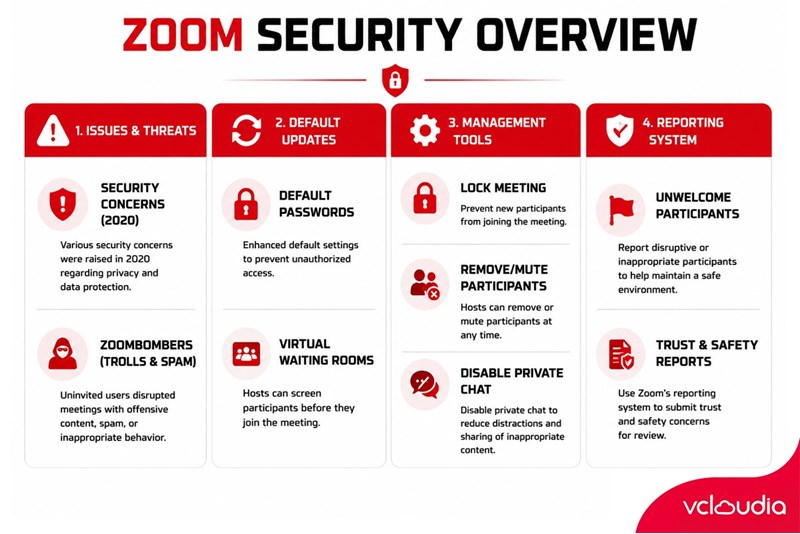
Security Issues and Updates on Zoom Cloud Meeting
In early 2020, concerns were raised about Zoom Cloud Meeting regarding both security and problems with uninvited guests dubbed Zoombombers.
The company has made moves to combat these issues and reassure users of the importance of security and privacy. This includes simple things like removing the meeting ID from the title bar of a call so that if a user shares a screenshot online, the meeting won't be abused in the future.
What are Zoombombers?
The prominence of Zoom Cloud Meeting made the service subject to abuse by internet trolls. Some individuals hunted for public and unsecured Zoom meetings to join, then "spammed" others on the call with graphic videos, pornography, and other inappropriate content.
This, in addition to creating short-term frustration for users, also compromised the safety and security of the participants in that conversation themselves. This very phenomenon sparked a scandal between users and Zoom Cloud Meeting at that time.
Default Security Updates
Zoom Cloud Meeting has been updated with security changes to reassure users. One of these was a requirement for passwords as default for Zoom meetings. This, combined with virtual waiting rooms, ensures that only people who have been invited to a call are actually allowed in.
Existing Zoom Cloud Meeting Security Tools
Zoom Cloud Meeting has made it easier for you to manage and secure your meetings while they are taking place. There is now a range of security tools you can access with a few clicks, including the ability to lock a meeting when it starts so no new people can join, remove current participants on a call, mute participants, and disable private chat.
To access Zoom Cloud Meeting security tools, you can simply click the security button that appears in the window while the call is taking place or hover over a participant to interact specifically with them - such as removing them from the call.
Reporting Other Participants
It's now possible to report participants on a call who are unwelcome or causing trouble. As well as removing them from the call, you can now send a report to the Zoom Trust and Safety team to handle misuse of the system. This will help block them from the service in the future and disrupt other calls. To do so, click on the security button on the meeting and then click on report.
Conclusion
Zoom Cloud Meeting has brought much value to users recently. It seems this is one of the industries benefiting from this Covid-19 pandemic. Besides Zoom Cloud Meeting, there are many tools created to solve this problem for the community. However, with the first-mover advantage, Zoom Cloud Meeting currently holds the majority of market share in Cambodia.
Looking for a high-performance, secure solution?
Explore the services offered by Vcloudia – a leading provider of Cloud Computing and Data Center solutions. Contact us for expert consultation and find the right model for your needs:
- Hotline: +855 888 55 66 08 (free of charge)
- Fanpage: https://www.facebook.com/vcloudia/
- Website: https://vcloudia.com/
Featured news
Related news
What is a Proxy Server? How It Works, Types, and Benefits
Proxy servers appear in many familiar activities, such as accessing websites, managing internal networks, protecting web servers, or controlling Internet traffic. However, many people still perceive a proxy merely as an "IP-hiding" tool without fully understanding its true nature.
What Is REST API? Everything About REST API That Users Should Not Overlook
Currently, REST API or RESTful API has been and continues to be used quite commonly and widely in the information technology field. But have you been able to grasp and clearly understand what REST API is? And what notable advantages does it possess?
What is IDaaS? Understanding Identity as a Service and Its Applications
Identity as a Service (IDaaS) is a cloud-based model where a third-party provider manages authentication and identity for enterprises. It supports capabilities like adaptive multi-factor authentication, single sign-on, and centralized user directories.
What is NaaS? Advantages & Challenges of Network as a Service
NaaS (Network as a Service) is a cloud service model in which users lease network services from cloud service providers. The service allows users to operate their own private network rapidly without purchasing hardware or setting up, managing, and maintaining their own network infrastructure.
What is MySQL? Things You Need to Know About MySQL
In the modern world of information technology, databases serve as the heart of every application. MySQL, holding its status as the planet's most popular database management system, has become the gold standard for web developers.
What is Kubernetes? An Overview of the K8s Container Orchestration Platform
When applications scale across multiple containers, manual management becomes an enterprise bottleneck. So, what is the Kubernetes solution? Often compared to a coordinating ship captain, K8s is an open-source system that fully automates the deployment, scaling, and management of containers across any cloud environment.
Understanding What Cyber Security Is: Methods to Ensure Cyber Security
Cyber Security is a collection of measures, processes, and technologies designed to protect computer systems, networks, programs, and data from attacks and unauthorized access. To better understand its importance and effective cyber security protection methods, let us explore the details in the article below.
What is Unlimited Hosting? Pros, Cons, and How to Choose the Optimal Solution
Unlimited Hosting is a web hosting service where the provider does not impose specific caps on disk storage or bandwidth. However, this does not mean truly infinite resources, but rather "unlimited within the scope of fair usage."
DigitalOcean vs Linode vs Vultr: Choosing the Best Cloud Hosting Provider For Your Business
The concept of Infrastructure as a Service (IaaS) took shape in 1961 when John McCarthy at MIT proposed that computing could be organized as a public utility, just like the telephone system. Evolving from traditional data centers to sophisticated cloud platforms, IaaS offers scalable and flexible solutions for hosting, storage, and computing needs.
What is Linux Hosting? A to Z Guide and How to Choose the Optimal Plan
Linux Hosting is a hosting service that stores multiple websites on a single server running the Linux operating system connected to the Internet. Linux Hosting service maximizes support for today's most popular open-source software such as PHP, XML, MySQL, and Python.