



.png)



















.png)





What is Node.js? Instructions on how to install Node.js on cPanel
Sep 21, 2026Currently, it is easy to see that Node.js is being used by quite a lot of people. This is because Node.js can support users in running on multiple platforms and multiple devices. In this article, Vcloudia will share with readers in more detail about the concept of what Node.js is, along with how to install Node.js on cPanel.
What is Node.js?
Node.js is a software system designed for writing internet applications for high scalability, particularly Web servers. The program is written in the JavaScript language, utilizing event-driven and asynchronous input/output techniques to optimize costs while still enhancing scalability. Node.js includes Google's V8 JavaScript engine, libUV, and several other libraries.
In particular, when understanding clearly what Node.js is, users will see it is different from most Javascript programs. Node.js will not run on a browser, but it will run on a Server. Node.js uses many technical specifications of CommonJS and provides a REPL environment for users to conduct interactive testing.
Characteristics of Node.js
Below are four main characteristics of Node.js:
1. Asynchronous
When learning about what Node.js is, users will see that all of Node.js's APIs are asynchronous, meaning it will primarily rely on the Node.js Server foundation and then wait for the Server to return data. The server moving to the subsequent APIs after a call, along with Node.js's event notification mechanism, also helps the server get a response from previous API calls (Realtime).
2. Speed
Node.js is built on the V8 Javascript Engine platform, so program execution speed is very fast. And this is something that quite a lot of users are interested in when learning about what Node.js is.
Node.js uses a single-threaded program, and similar programs can provide services for a significantly larger number of requests compared to traditional server requirements like Apache HTTP Server. When you understand what Node.js is, you will find this truly amazing.
3. No buffering
Node.js does not buffer any data, and these applications primarily output data.
4. Licensed
Node.js is licensed under the MIT License. If you did not learn about what Node.js is, you probably wouldn't notice this.
Instructions on how to install Node.js on CPanel
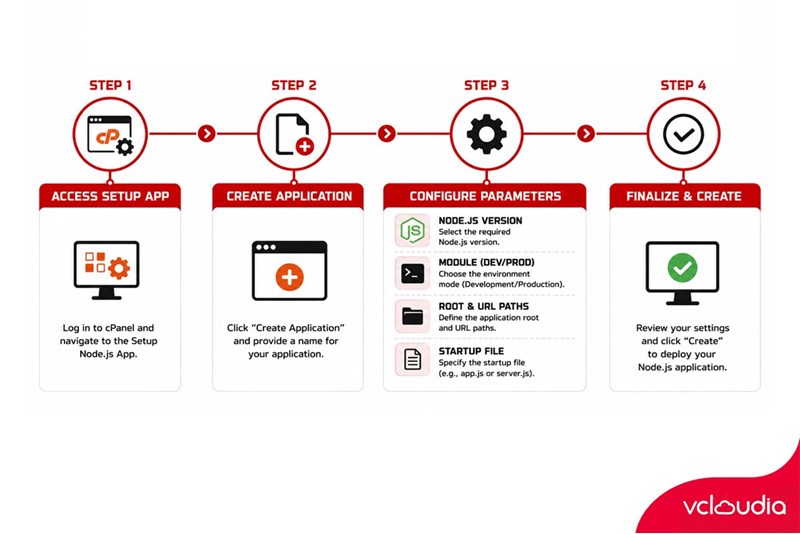
- Step 1: To install Node.js, users need to access cPanel, and in the “Software” section, users click on “Setup Node.js App”.
Starting the process of installing Node.js on cPanel
- Step 2: Next, users continue to select “Create Application”.
- Step 3: At this time, a new interface page will appear; the user's task is to fill in all the information completely and accurately, then select “Create”.
+ Node.js version: Users should select the latest versions. This is what many users choose once they clearly understand what Node.js is.
+ Application module: Depending on usage needs, users can select “Development” or “Production”.
+ Application root: Users need to enter the path to the folder containing the application's code, calculated from the root directory when accessing the hosting.
+ Application URL: Users select the domain name to be used to run the Node.js application. Note that this domain name must point to the hosting's IP, then continue to enter the path to the directory containing the code
+ Application startup file: Enter the path to the file that will be used to run the script.
- Step 4: After clicking “Create”, the creation process will begin, and then the system will notify the user that the Node.js application has been successfully created.
Conclusion
In reality, clearly understanding and grasping the concept of what Node.js is, along with how to install Node.js on cPanel, is not too difficult. Using Node.js will bring quite a few notable advantages for users. Hopefully, this article by us will bring readers a lot of useful information and knowledge.
Looking for a high-performance, secure solution?
Explore the services offered by Vcloudia – a leading provider of Cloud Computing and Data Center solutions. Contact us for expert consultation and find the right model for your needs:
- Hotline: +855 888 55 66 08 (free of charge)
- Fanpage: https://www.facebook.com/vcloudia/
- Website: https://vcloudia.com/
Related news
What is SD-WAN? Technology and Practical Applications
SD-WAN addresses the increasing enterprise demands driven by IoT, SaaS, and Cloud alongside escalating cybersecurity needs, where applications demand prioritization and optimization while enterprises require reductions in deployment costs, operational labor, and time.
Software Solutions for Creating Online Virtual Machines You Should Know
Are you looking for software to create online virtual machines, both free and paid? Don't worry, this article is for you. Vcloudia will introduce you to several useful solutions to help you set up an online virtual machine as desired.
What is a free domain name? Should you use one?
A free domain name is a service provided by domain registrars that allows users to register and use a domain without incurring any costs. For an individual or a business, a website domain name is an extremely crucial factor. So, how can you register a free domain? Should you use a domain name that incurs no cost?
Comparing DigitalOcean, Linode, and Vultr VPS: Which Is the Right Choice for Your Business?
A Virtual Private Server means your website will have all the necessary power to handle your growing traffic. Likewise, if you are a developer, this added flexibility might be all you need to take your application ahead of the competition. However, to be the best, you need to work with the best.
What is ASP.NET? How to Analyze the Core Operational Architecture of the ASP.NET Platform
What is ASP.NET? It is an open-source platform chosen by software developers worldwide. The program offers superior utilities along with a distinctive approach to language utilization.
How to choose a server configuration for a business?
Choosing the right cloud configuration for your enterprise is a pivotal factor that helps optimize budgets, enhance operational performance, and ensure the system remains resilient against any changes. If the configuration is oversized, you waste valuable resources; if it is undersized, the system easily overloads, disrupting services.
Demystifying Cloud Security - The Cloud Security Trend Trusted by Enterprises
Cloud security, also known as cloud computing security, protects cloud-based systems, data, and infrastructure. Cloud security services provide cloud security solutions configured to protect data, support regulatory compliance, safeguard customer privacy, and set authentication rules for individual users and devices.
6 Benefits of Creating Virtual Machines That Users Cannot Ignore
Are you interested in creating virtual machines and want to learn more about their role? Creating a virtual machine is highly suitable for individuals or businesses involved in programming or information technology in general due to its usefulness. Creating a virtual machine helps enhance security, facilitates testing, and limits the spread of viruses.
What is a Web Portal? A comprehensive guide to essential knowledge about Web Portals
In practice, a Web Portal is a specially designed website that serves as a single point of access for updating information. However, many users are still vague about what a Web Portal is. So, what exactly is a Web Portal?
What is VXLAN? Everything about VXLAN that users should not ignore
Today, the emergence of VXLAN technology has brought many benefits to users compared to traditional VLAN technology. So what exactly is VXLAN? What makes this technology worth users' attention?