



.png)



















.png)





What is Cloud Backup? Classification, benefits, and limitations
Sep 21, 2026Cloud Backup is a solution that plays an important role in backing up and recovering data when an incident occurs. So what exactly is Cloud Backup? Let's find out the details with Vcloudia in the following article.
What is Cloud Backup?
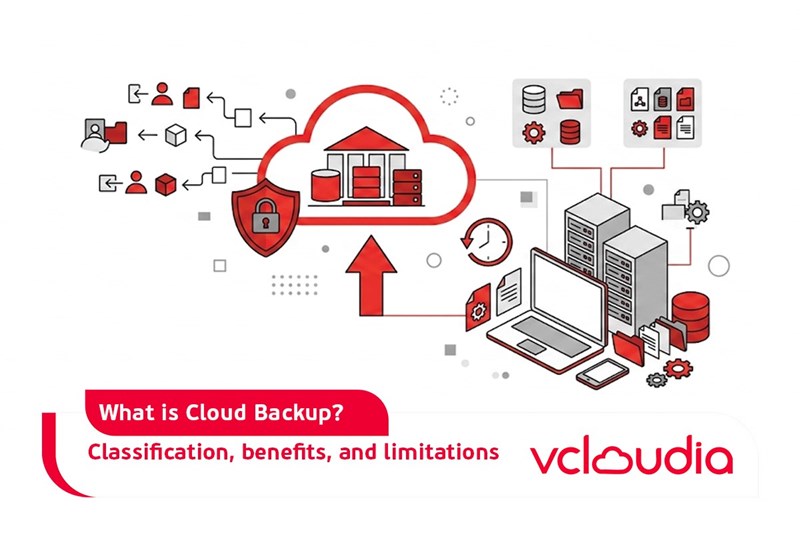
Cloud Backup (cloud data backup) is a data storage solution on remote servers typically managed by cloud service providers. Instead of storing data directly on a computer or local storage device, you will copy data to a cloud computing platform.
The backup of cloud data - Cloud Backup can help enhance the protection of critical data for businesses, especially when software errors, malware infections, or hacker attacks,... occur frequently as they do today. These very issues will cause businesses to lose important data, but with Cloud Backup services, the data will be safely protected.
Popular types of Cloud Backup
Full Backups
This is the method of backing up all data during a specific period (weekly, monthly,...) and can be used for recovery if an incident occurs. However, this backup method takes up quite a lot of cloud storage space.
Incremental Backups
Incremental backups only copy data that has changed since the last backup. Therefore, unchanged data will not need to be backed up again, helping to increase backup speed.
However, recovering all data in this case can take a lot of time. For example, when an incident occurs on Thursday, you will have to review all backups from Sunday to Wednesday to identify the changes and recover them gradually.
Differential Backups
Differential backups will proceed to copy all data that has changed since the last full backup. For example, if the most recent full backup falls on Sunday, the backup on Wednesday will copy all data that has changed since Sunday (including changes from Monday and Tuesday). The data recovery speed of this backup method will be faster than incremental backup because the recovered data only requires the last full backup and the first full backup.
Comparison between Cloud Backup and traditional data backup
In this section, we will explore what makes using Cloud Backup different compared to traditional backup.
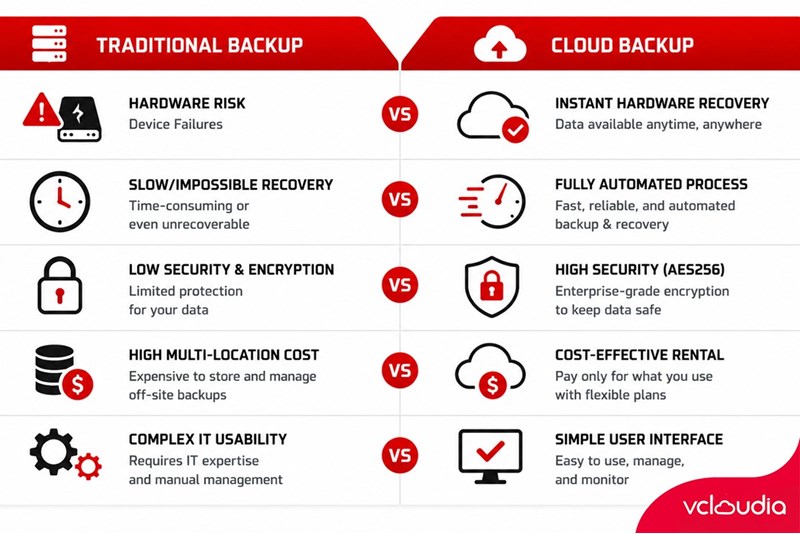
Traditional data backup
- Hardware failure issues: In the event of storage device failures, this causes the loss of important data.
- Recovery issues: When data is lost, it takes a considerable amount of time and effort to recover the data. Even in some cases, this recovery is almost impossible to perform.
- Security issues: Security is a major issue. Managing a physical server to ensure secure storage is not an easy task, especially for small businesses. Data encryption is not guaranteed, and information security is low.
- Cost issues: Backing up data at multiple locations is quite expensive and time-consuming.
- Usability issues: When users want to check the status of their data, or the data backup process itself is also an issue. It is particularly difficult for those without IT expertise.
Cloud Backup
- Hardware failure issues: When users unfortunately encounter data trouble, the recovery process with Cloud Backup is not a problem; this only takes a short amount of time.
- Recovery issues: Data backup on Cloud Backup happens completely automatically, without the need for user intervention. This is extremely easy and convenient.
- Security issues: Besides the automatic backup feature, the backup process is also constantly updated for users. When using Cloud Backup, data is encrypted with the latest standards (AES256, DES 64, RC2 128,...) ensuring a high level of security. Data is stored at the Data Center, widely distributed across server rooms nationwide. Data on Cloud Backup stored on storage devices and the cloud can help reduce service downtime.
- Cost issues: By renting individual service packages, users can save the maximum amount of costs they would spend on their data backup needs.
- Usability issues: Using Cloud Backup is quite simple with a relatively easy-to-use UI/UX interface. For the most part, these are basic operations intended for non-professionals.
Benefits of using Cloud Backup
For users utilizing data backup services, an element that they pay special attention to is the issue of security. If important data is unfortunately leaked or distributed externally, it will cause a lot of trouble for the users. Imagine when using Cloud Backup, data will be uploaded to the cloud via the Internet. Therefore, to secure information, Cloud Backup service providers will proceed to encrypt the data throughout the transit process.
Besides the fact that Cloud Backup can back up data conveniently, users can easily access it from multiple locations. Thus, access control on Cloud Backup is executed well to further ensure data security. Users can decentralize access permissions to the backups previously stored on the cloud. Not only that, but users can also set various modes such as read-only or write-only to help protect the backup data from being overwritten, altered, or deleted.
Potential limitations of Cloud Backup
Besides the outstanding benefits above, using Cloud Backup still has some limitations such as:
- Backup speed depends on bandwidth and latency.
- Costs can increase significantly when backing up a large amount of data to the cloud.
- User control over data is limited.
Conclusion
Thus, the online data backup service - Cloud Backup will make it more convenient and easier for users to back up data, with high security and rapid data recovery. Hopefully, this article by Vcloudia will give you a better overview in choosing between Cloud Backup and traditional data backup.
Looking for a high-performance, secure solution?
Explore the services offered by Vcloudia – a leading provider of Cloud Computing and Data Center solutions. Contact us for expert consultation and find the right model for your needs:
- Hotline: +855 888 55 66 08 (free of charge)
- Fanpage: https://www.facebook.com/vcloudia/
- Website: https://vcloudia.com/
Related news
What is SD-WAN? Technology and Practical Applications
SD-WAN addresses the increasing enterprise demands driven by IoT, SaaS, and Cloud alongside escalating cybersecurity needs, where applications demand prioritization and optimization while enterprises require reductions in deployment costs, operational labor, and time.
Software Solutions for Creating Online Virtual Machines You Should Know
Are you looking for software to create online virtual machines, both free and paid? Don't worry, this article is for you. Vcloudia will introduce you to several useful solutions to help you set up an online virtual machine as desired.
What is a free domain name? Should you use one?
A free domain name is a service provided by domain registrars that allows users to register and use a domain without incurring any costs. For an individual or a business, a website domain name is an extremely crucial factor. So, how can you register a free domain? Should you use a domain name that incurs no cost?
Comparing DigitalOcean, Linode, and Vultr VPS: Which Is the Right Choice for Your Business?
A Virtual Private Server means your website will have all the necessary power to handle your growing traffic. Likewise, if you are a developer, this added flexibility might be all you need to take your application ahead of the competition. However, to be the best, you need to work with the best.
What is ASP.NET? How to Analyze the Core Operational Architecture of the ASP.NET Platform
What is ASP.NET? It is an open-source platform chosen by software developers worldwide. The program offers superior utilities along with a distinctive approach to language utilization.
How to choose a server configuration for a business?
Choosing the right cloud configuration for your enterprise is a pivotal factor that helps optimize budgets, enhance operational performance, and ensure the system remains resilient against any changes. If the configuration is oversized, you waste valuable resources; if it is undersized, the system easily overloads, disrupting services.
Demystifying Cloud Security - The Cloud Security Trend Trusted by Enterprises
Cloud security, also known as cloud computing security, protects cloud-based systems, data, and infrastructure. Cloud security services provide cloud security solutions configured to protect data, support regulatory compliance, safeguard customer privacy, and set authentication rules for individual users and devices.
6 Benefits of Creating Virtual Machines That Users Cannot Ignore
Are you interested in creating virtual machines and want to learn more about their role? Creating a virtual machine is highly suitable for individuals or businesses involved in programming or information technology in general due to its usefulness. Creating a virtual machine helps enhance security, facilitates testing, and limits the spread of viruses.
What is a Web Portal? A comprehensive guide to essential knowledge about Web Portals
In practice, a Web Portal is a specially designed website that serves as a single point of access for updating information. However, many users are still vague about what a Web Portal is. So, what exactly is a Web Portal?
What is VXLAN? Everything about VXLAN that users should not ignore
Today, the emergence of VXLAN technology has brought many benefits to users compared to traditional VLAN technology. So what exactly is VXLAN? What makes this technology worth users' attention?