



.png)



















.png)





What is a Snapshot? The Difference Between Snapshot and Backup
Sep 21, 2026Snapshot is a familiar concept in data management and protection. In the context of the information technology boom, where data is a major asset for businesses, understanding Snapshots as well as their application is a key factor for enterprises to maximize technological efficiency. In this article, Vcloudia will share important information about Snapshots, from their concept, mechanism of operation, and classification to their role and the difference between Snapshot and Cloud Backup.
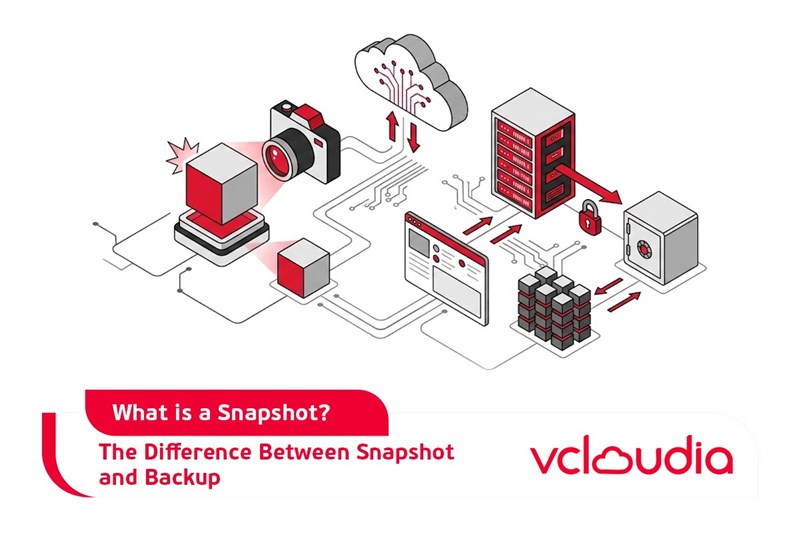
What is a Snapshot?
A Snapshot is an image or a record of the data state at a specific point in time (Point in Time - PIT). This is a data storage tool that includes a collection of reference markers and detailed logs recording data changes over time. Snapshots provide fast and flexible data storage capabilities. When data within an application changes, the Snapshot will record and store those changes, creating continuous records. These records can be used to restore data to a desired state, thereby minimizing the Recovery Point Objective (RPO) - a metric measuring the time data could be lost between two backups.
Snapshots are commonly used to protect data in the event of a system/application failure, revert a system to its pre-incident state, perform software testing, or analyze data without affecting the original data.
The Role of Snapshots
Snapshots play a crucial role in protecting and managing data, especially for systems that require high continuity. Below are some prominent roles:
Data Protection
Snapshots record the data state at specific points in time, helping to minimize the risk of data loss due to hardware failures, software errors, or security incidents.
Data Recovery and Disaster Recovery
Compared to traditional backup methods, snapshots allow for faster data recovery because they only require reverting the system's state to a specific recovery point, without the need to copy the entire data. Furthermore, with rapid data copying capabilities, Snapshots are also frequently applied to recover data in situations such as data loss due to user, hardware, or software errors.
Supporting Testing and Development
Snapshot copies can be used to create testing or analysis environments without affecting the original system. This is highly beneficial for testing bug patches or software updates.
Optimizing Storage Resources
Snapshots record data changes instead of backing up the entire dataset, which helps reduce the necessary storage capacity compared to traditional backup methods.
Snapshot Classifications
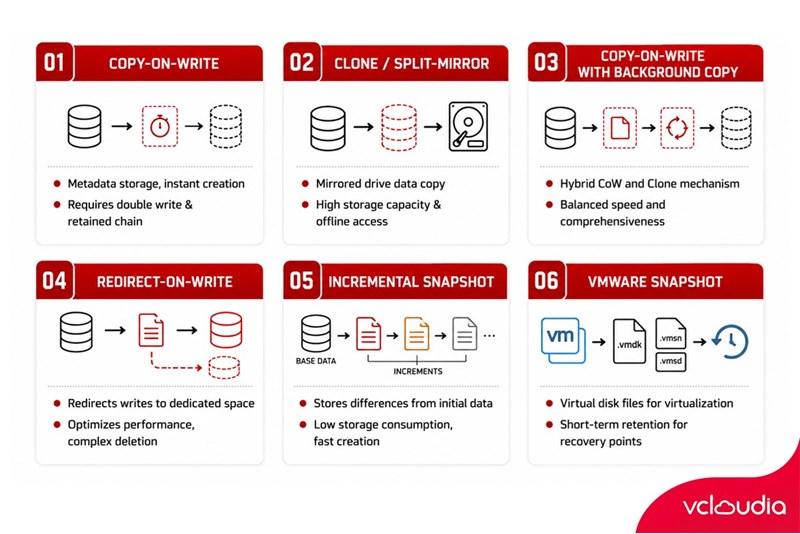
Snapshots can be divided into various types based on their operating mechanism and data storage method. Each type offers benefits suited for different usage purposes.
Copy-on-write Snapshot
A Copy-on-write Snapshot is one of the most common types, operating by storing the metadata of the original data instead of copying the entire dataset when the Snapshot is created. This mechanism allows Snapshots to be created instantly with virtually no impact on system performance. By preserving the data at the exact time the Snapshot is generated, Copy-on-write Snapshots are typically used in scenarios that require rapid recovery when an incident occurs, such as software failures or malware attacks.
However, to perform the storage or recovery of all data across a network or storage device, all previous Snapshots must be retained. This requires each Copy-on-write process to read the data once and write it twice, as the data must be read and written to a different location before being overwritten.
Clone/Split-Mirror Snapshot
A Clone or Split-mirror Snapshot utilizes a mechanism that references all data on mirrored drives. Once created, the Snapshot will copy the entire data of a partition rather than just recording new or altered data. This enables users to access the data offline and simplifies the process of recovering, duplicating, or storing the entire dataset.
However, this type of Snapshot takes more time to create and demands a large storage capacity equivalent to the original data. Therefore, Clone/Split-Mirror Snapshots are better suited for scenarios requiring the full dataset without demanding rapid execution speeds.
Copy-on-write with background copy Snapshot
This is a Snapshot type that combines the Copy-on-write and Clone mechanisms. The data stored from a Copy-on-write process will be copied to the Snapshot storage location via a background process. Subsequently, a replica of the original data is created, striking a balance between processing speed and the comprehensiveness of the stored data.
This type of Snapshot is considered a hybrid solution that leverages the advantages of both mechanisms, making it suitable for systems needing flexibility alongside secure storage of the original data.
Redirect-on-write Snapshot
Redirect-on-write features a mechanism similar to Copy-on-write, but instead of copying data before overwriting it, this type of Snapshot redirects write operations to a dedicated storage space allocated for Snapshots. This eliminates the requirement to write data twice, helping to optimize performance.
However, when a redirect-on-write Snapshot is deleted, the modified data must be copied back and synchronized with the original partition. Creating multiple Snapshots of this type can complicate accessing the original data, causing some performance limitations during long-term use.
Incremental Snapshot
An Incremental Snapshot is designed to create timestamps that allow users to revert to any point in time. This Snapshot type is generally created faster and more frequently compared to other types. Since it only stores the differences from the initial data, an Incremental Snapshot consumes less storage capacity and can be retained longer without impacting system performance. When an Incremental Snapshot is created, the original Snapshot is updated to maintain data comprehensiveness.
VMware Snapshot
VMware Snapshots are designed specifically for VMware virtualization environments to copy virtual disk files and restore virtual machines to a specific recovery point in the event of an error.
VMware Snapshots are usually deleted within an hour to avoid putting pressure on system resources. Multiple Snapshots can be created for a single virtual machine, providing various recovery points to choose from, making them suitable for complex virtualization systems requiring high flexibility in data management.
Each Snapshot type possesses its own advantages and disadvantages, and selecting the appropriate Snapshot type depends on the specific needs of the system and the organization using it.
How Do Snapshots Work?
Snapshots operate based on recording and managing data changes over time. Below is the operational mechanism of a Snapshot:
Creating a Full Backup
The first Snapshot is a full backup of the entire data at the current point in time. This serves as the initial baseline for the Snapshot system to record and manage subsequent data changes. Similar to a traditional backup, this initial backup contains the complete data state of the application or system.
Recording Data Changes (Delta/Differencing)
Each subsequent snapshot created only records the data changes (delta) compared to the previous snapshot, rather than backing up all the new data entirely. This helps minimize storage capacity and accelerates snapshot creation speed.
Relational Tree Management Mechanism
Snapshots are organized in a tree structure with parent-child relationships. Each newly created Snapshot becomes a branch in the data tree structure. Each branch stores specific changes at a given time, creating a complex index that records the entire history of data alterations.
Limited Lifecycle of a Snapshot
A Snapshot does not last forever. Snapshots are created frequently, for example, every 30 minutes, but their value gradually diminishes over time. To minimize storage requirements and the risk of data corruption, older Snapshots are consolidated into a new full backup, restarting the change recording cycle.
Are Snapshots the Same as Cloud Backup?
Snapshots and Cloud Backup are two entirely different technologies. Specifically:
Snapshots and Cloud Backup both have their own advantages, suiting the diverse usage needs of individual businesses. If Snapshots are appropriate for cases requiring short-term data protection, Cloud Backup is the ideal choice for enterprises needing long-term data storage and protection.
Currently, many providers, including Vcloudia, have developed Cloud Backup solutions that help back up data according to business needs and store it on cloud computing infrastructure, ensuring maximum data safety against increasingly sophisticated and dangerous cybersecurity threats.
Conclusion
A Snapshot is a useful solution in data protection and management, bringing flexibility and efficiency in situations requiring rapid recovery or software testing. Understanding Snapshots clearly, from their operational methods and applications to their classifications, will assist businesses in selecting the appropriate Snapshot solution and mechanism.
Looking for a high-performance, secure solution?
Explore the services offered by Vcloudia – a leading provider of Cloud Computing and Data Center solutions. Contact us for expert consultation and find the right model for your needs:
- Hotline: +855 888 55 66 08 (free of charge)
- Fanpage: https://www.facebook.com/vcloudia/
- Website: https://vcloudia.com/
Featured news
Related news
What is a Firewall? The Role and Importance of Firewalls for Users
In the context of ever-increasing cyberattacks, system security has become a top priority for many enterprises. Alongside deploying antivirus software and controlling connection ports, firewalls are also considered a key solution to effectively enhance cybersecurity.
What is DDoS? Signs, Mitigation Strategies, and Effective Prevention
DDoS is a highly dangerous cyberattack that leaves severe consequences for enterprises. Therefore, gaining a clear understanding of DDoS attacks, as well as how to detect and prevent them, is a topic of significant interest to many.
What is a Trojan? How to Detect, Avoid, and Prevent It
A Trojan is a type of malicious code or software that can cause severe consequences to computer operations. So, what is a Trojan? How can you prevent a Trojan from infiltrating your computer? In the following article, Vcloudia will provide detailed information on these issues.
What is Cloud Backup? Classification, benefits, and limitations
Cloud Backup is a solution that plays an important role in backing up and recovering data when an incident occurs. So what exactly is Cloud Backup? Let's find out the details with Vcloudia in the following article.
What is Cloud Storage? Features and Benefits of Using It
Cloud Storage is the perfect storage solution alternative to bulky, space-consuming physical hard drives. So, what is Cloud Storage? Let's explore the details with Vcloudia through the following article.
What is an API? Characteristics and applications in website design
API, short for Application Programming Interface, is a concept no longer unfamiliar in the information technology field. So what exactly is an API and why is it so important? Let's find out with Vcloudia.
What is Node.js? Instructions on how to install Node.js on cPanel
Currently, it is easy to see that Node.js is being used by quite a lot of people. This is because Node.js can support users in running on multiple platforms and multiple devices.
What is Vultr VPS? Should you use Vultr VPS?
Vultr VPS is one of the best cloud storage solutions in the world. In this article, you will learn the concept: "What is Vultr VPS?", as well as understand its advantages and disadvantages.
Zoom Cloud Meeting: What is it? Basic Things You Should Know About Zoom Cloud Meeting
In 2020, Zoom Cloud Meeting became one of the leading video conferencing software applications. It allows you to virtually interact with colleagues when in-person meetings aren't possible, and it has also been very successful for social events.