



.png)



















.png)





What is a Firewall? The Role and Importance of Firewalls for Users
Sep 21, 2026In the context of ever-increasing cyberattacks, system security has become a top priority for many enterprises. Alongside deploying antivirus software and controlling connection ports, firewalls are also considered a key solution to effectively enhance cybersecurity. So, what is a firewall? What benefits does this system bring to businesses? Let's explore the detailed answers with Vcloudia through the following article!
What is a Firewall?
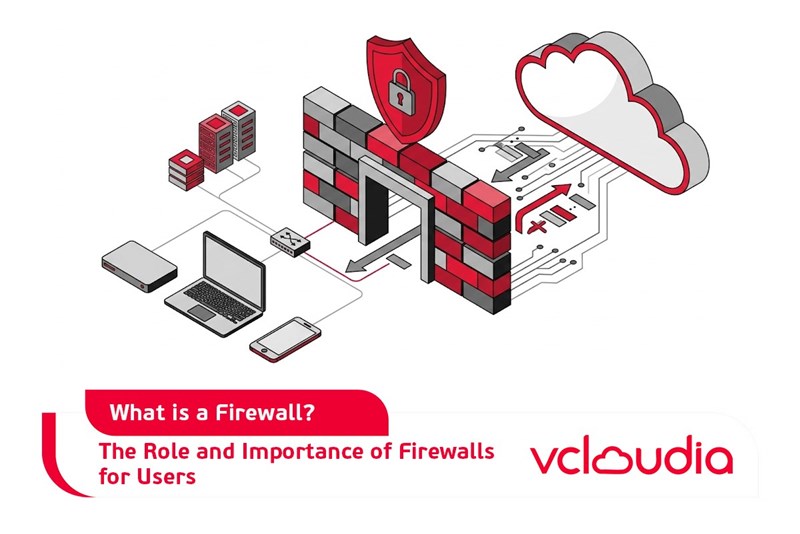
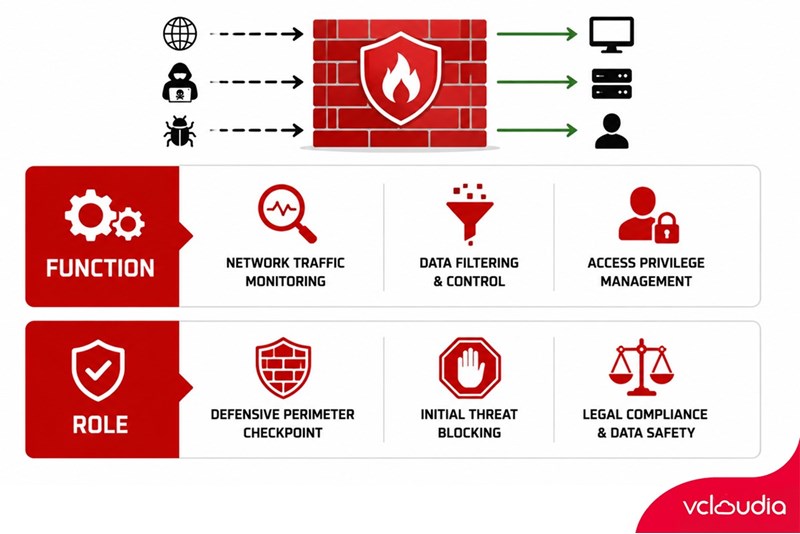
A firewall is a security solution designed to protect computer networks or cloud computing systems from external threats. This solution operates by monitoring and controlling network traffic, performing data filtering, and strictly managing access privileges to prevent unauthorized actions from malicious software, ensuring that internal data and resources are always kept safe.
The Role and Importance of Firewalls
For over two decades, firewalls have affirmed their role as a robust defensive shield in the cybersecurity landscape. This system acts as a checkpoint at the boundary between the internal network and the Internet, forcing all traffic to pass through for analysis and evaluation. Such an operating mechanism ensures that only trusted data is allowed to be transmitted, while invalid or potentially threatening data packets are immediately blocked from the start.
A firewall does not directly scan data to detect malicious software but primarily focuses on blocking network traffic that shows abnormal signs from the initial stage, helping to protect the system against threats more comprehensively.
Not limited to its role in network security protection, a firewall also supports enterprises in meeting legal compliance requirements according to best practices. Many current regulations make the use of firewalls mandatory to protect sensitive customer information. Therefore, deploying a firewall can help businesses both comply with these regulations and avoid the risk of facing potential penalties.
Classification of Firewalls
Typically, each type of firewall has its own operating method and features, developed to outperform previous generations of firewalls. Let's explore in detail some popular types of firewalls through the following classification table:
How Firewalls Work
Fundamentally, a firewall operates by filtering between trusted and untrusted data, between secure connections and potential threats. First, this system analyzes the data packets entering and exiting the network based on configured security rules to determine the validity of the traffic. The analysis process includes inspecting IP addresses, ports, protocols, and related information.
Based on the analysis results, the firewall will decide to allow or block data packets. If a data packet fully meets the security criteria, it will be permitted to transmit across the network. Conversely, data that does not meet the requirements will be rejected immediately.
Furthermore, for stateful firewalls, they not only inspect individual data packets but also track the state of active network connections, distinguishing established connections from individual packets, thereby applying appropriate control rules for each type.
This entire operating process is performed in the background; users do not intervene or interact, ensuring seamless security without disrupting the user experience.
How to Use a Firewall
Enabling or disabling a firewall on Windows can be easily executed through a few simple steps below:
Step 1: Open the search bar on your computer, enter the keyword “Windows Defender Firewall”, then press Enter and select the item with the same name in the displayed results.
Step 2: In the Windows Defender Firewall window, find and click on the “Turn Windows Defender Firewall on or off” option to begin configuring the firewall's status.
Step 3: To activate, select “Turn on Windows Defender Firewall” for both options displayed on the screen. Then click “OK” to complete. At this point, the firewall has been enabled and is ready to operate.
How to Disable the Firewall on Windows
Step 1: Press the Windows + S key combination, enter “Windows Security” into the search box, and select “Firewall & network protection” from the list.
Step 2: Select Private Network if you are using the Internet at home, or Public Network when connecting in a public place.
Step 3: Within the selected network settings interface, toggle off the “Windows Defender Firewall” option. This action will disable the firewall on the user's device.
Overall, it can be seen that firewalls have proven their value through impressive applications. At the Vorarlberg University of Applied Sciences (Austria), the deployment of the Barracuda CloudGen firewall created a secure network environment for the university's digital factory, allowing students to practice manufacturing under optimal security conditions.
However, not all firewall use cases yield positive results. In 2019, a power grid provider in the United States faced a Denial-of-Service (DoS) vulnerability, causing the perimeter firewall to enter a reboot loop for 10 hours, severely disrupting system operations. Investigations revealed that this vulnerability stemmed from an unpatched firmware flaw, coupled with a lack of update testing procedures prior to firewall deployment.
Although the incident did not lead to any significant network intrusion, it emphasized an important lesson that regular software updates and the implementation of rigorous testing procedures are key factors in ensuring system safety in all situations.
Conclusion
Through this article, Vcloudia hopes to have helped readers better understand the role, operation, and importance of Firewalls in maintaining system security. Choose and deploy a suitable solution to ensure your network remains safe from all potential risks.
Looking for a high-performance, secure solution?
Explore the services offered by Vcloudia – a leading provider of Cloud Computing and Data Center solutions. Contact us for expert consultation and find the right model for your needs:
- Hotline: +855 888 55 66 08 (free of charge)
- Fanpage: https://www.facebook.com/vcloudia/
- Website: https://vcloudia.com/
Featured news
Related news
What is a Snapshot? The Difference Between Snapshot and Backup
Snapshot is a familiar concept in data management and protection. In the context of the information technology boom, where data is a major asset for businesses, understanding Snapshots as well as their application is a key factor for enterprises to maximize technological efficiency.
What is DDoS? Signs, Mitigation Strategies, and Effective Prevention
DDoS is a highly dangerous cyberattack that leaves severe consequences for enterprises. Therefore, gaining a clear understanding of DDoS attacks, as well as how to detect and prevent them, is a topic of significant interest to many.
What is a Trojan? How to Detect, Avoid, and Prevent It
A Trojan is a type of malicious code or software that can cause severe consequences to computer operations. So, what is a Trojan? How can you prevent a Trojan from infiltrating your computer? In the following article, Vcloudia will provide detailed information on these issues.
What is Cloud Backup? Classification, benefits, and limitations
Cloud Backup is a solution that plays an important role in backing up and recovering data when an incident occurs. So what exactly is Cloud Backup? Let's find out the details with Vcloudia in the following article.
What is Cloud Storage? Features and Benefits of Using It
Cloud Storage is the perfect storage solution alternative to bulky, space-consuming physical hard drives. So, what is Cloud Storage? Let's explore the details with Vcloudia through the following article.
What is an API? Characteristics and applications in website design
API, short for Application Programming Interface, is a concept no longer unfamiliar in the information technology field. So what exactly is an API and why is it so important? Let's find out with Vcloudia.
What is Node.js? Instructions on how to install Node.js on cPanel
Currently, it is easy to see that Node.js is being used by quite a lot of people. This is because Node.js can support users in running on multiple platforms and multiple devices.
What is Vultr VPS? Should you use Vultr VPS?
Vultr VPS is one of the best cloud storage solutions in the world. In this article, you will learn the concept: "What is Vultr VPS?", as well as understand its advantages and disadvantages.
Zoom Cloud Meeting: What is it? Basic Things You Should Know About Zoom Cloud Meeting
In 2020, Zoom Cloud Meeting became one of the leading video conferencing software applications. It allows you to virtually interact with colleagues when in-person meetings aren't possible, and it has also been very successful for social events.