


.png)














.png)





What is DaaS (Desktop as a Service)?
Jan 29, 2026With its ability to deliver flexible work experiences, high-level security, and centralized management, DaaS is increasingly becoming an inevitable trend in the technology strategies of modern enterprises. Together with Vcloudia, let’s explore in depth the concept, operation, architecture, benefits, limitations, and popular platforms of DaaS to gain a comprehensive understanding of this breakthrough technology.
What is DaaS?
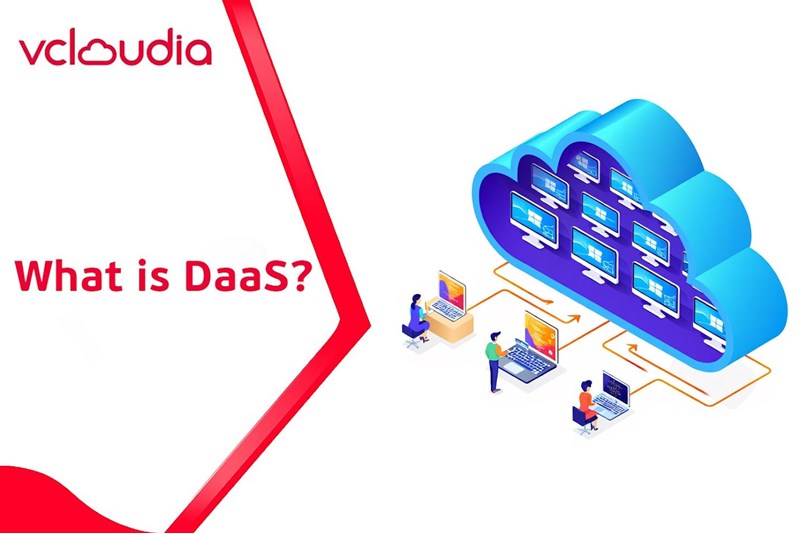
DaaS, commonly known as Desktop as a Service, is a model for delivering virtual desktops via cloud platforms. Unlike traditional solutions such as Virtual Desktop Infrastructure (VDI), DaaS is a cloud-based service provided by third-party vendors to serve both enterprise and individual users.
This concept plays a crucial role in the era of rapid digital transformation. DaaS helps organizations reduce infrastructure investment costs, optimize management processes, and enhance security for critical data and applications. As a result, employees can easily and flexibly access their work environments without limitations related to location or device.
Beyond operational optimization, DaaS also offers flexibility and convenience, enabling organizations to quickly adapt to changing market conditions and remote working trends—especially evident during the recent global pandemic.
How does DaaS work?
Understanding how DaaS operates helps clarify the value it brings to businesses. In this model, virtual desktops are deployed in the cloud, allowing users to access their work environments from multiple devices without complex software installation or concerns about hardware limitations.
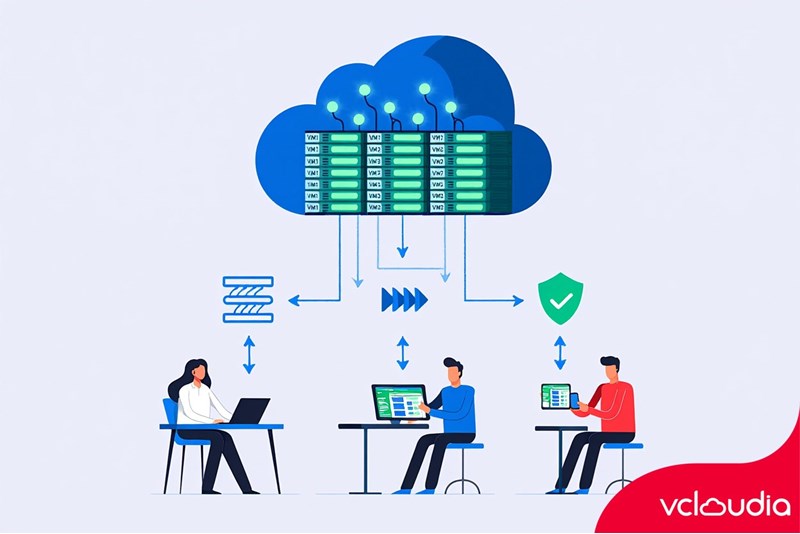
When a user connects to a virtual desktop, a secure connection is established between their personal device and the DaaS provider’s data center. During this process, the system authenticates the user, controls access permissions, and delivers a desktop environment tailored to individual or group configurations. All data, applications, and settings are securely stored in the cloud and synchronized over the internet.
DaaS also involves centralized management, enabling administrators to monitor, update, and optimize the system easily. This eliminates the burden of managing physical hardware and maintaining individual devices, improving productivity while reducing the risk of data loss or service disruption.
Architecture of a Desktop as a Service System
A DaaS system operates on a complex architecture composed of multiple tightly integrated components to ensure smooth performance, strong security, and optimal user experience. Understanding this architecture allows organizations to customize and optimize the system to their needs.
1. Endpoint
The endpoint is the client device used by users to access the virtual desktop environment. It can be a desktop computer, laptop, tablet, or smartphone. These devices must support stable connectivity, compatible browsers, and remote access software. This is the first point where users connect and interact with the DaaS system.
In practice, endpoints are often optimized to ensure fast data transmission, reduced latency, and improved user experience. Effective endpoint management also allows organizations to control which devices are permitted to access the system, thereby strengthening information security.
2. Virtual Desktop Infrastructure (VDI)
VDI is the core of the DaaS system, where virtual desktops are created, managed, and operated. It enables organizations to deploy large numbers of virtual desktops tailored to different user needs—from administrative work to graphic design and software development.
VDI also supports software distribution, automatic operating system updates, data backup, and remote administration tasks, significantly reducing traditional maintenance efforts. Importantly, it serves as the control layer for access policies and data security at each user level.
3. Cloud Platform
The cloud platform provides the infrastructure on which all other components run. It integrates computing, storage, and networking services. Thanks to cloud infrastructure, DaaS can scale up or down flexibly based on organizational demand without concerns about physical hardware investment.
Cloud providers also offer built-in security services, access control, and backup features, ensuring data availability and protection under all circumstances. The stability of the cloud platform directly determines the reliability of the entire DaaS system.
4. Connection Broker
The Connection Broker plays a central role in authenticating, distributing, and managing connections between endpoints and virtual desktops. When users log in, it verifies their identity, checks permissions, and connects them to the appropriate desktop while synchronizing personal settings.
This function ensures a seamless, fast, and secure access process. Additionally, the Connection Broker monitors the status of virtual desktops to detect and resolve issues promptly, improving overall system reliability.
5. Identity & Access Management (IAM)
IAM ensures that only authorized users can access virtual desktops, applications, and sensitive data. It allows organizations to implement strict security policies and define permissions based on roles, groups, or individuals.
IAM systems often support multi-factor authentication, data encryption, and activity logging for auditing and cybersecurity purposes. The overall security of a DaaS system depends heavily on the effectiveness of identity management.
6. Storage & Profile Management
This component focuses on optimizing the management of user data, personal profiles, and related resources. Data is stored in the cloud and organized efficiently, enabling real-time synchronization and fast access.
Profile management ensures consistent desktop configurations even when users log in from different devices or after multiple restarts. This improves user experience, reduces setup time, and minimizes synchronization issues.
Benefits of DaaS for Businesses
Adopting DaaS offers numerous advantages, helping organizations optimize operations, improve productivity, and strengthen data security.
1. Flexible Remote Work
In an era where remote work has become the norm, DaaS enables businesses to maintain productivity regardless of employee location. Users only need an internet-connected device and a browser to access their personal desktops anytime, anywhere.
This is especially beneficial for multi-location organizations, reducing geographical barriers and supporting effective collaboration without work interruptions.
2. Enhanced Data Security
Corporate data is a valuable asset and a common target for cyberattacks, especially in remote working environments. With DaaS, all data is stored securely in the cloud, significantly reducing the risk of data loss or leakage.
Secure access mechanisms, multi-factor authentication, and strict permission controls help protect sensitive information. Users no longer need to store data locally on personal devices, minimizing risks in cases of device loss or damage.
3. Centralized Management
One of DaaS’s key strengths is centralized administration. IT administrators can monitor, update, manage users, and configure systems from a single interface, saving time, effort, and operational costs.
Centralized management also allows organizations to respond quickly to new requirements, deploy updates, and adjust permissions without manual intervention on individual devices, improving control and reducing operational errors.
4. Reduced Hardware Costs
Traditional desktop deployment requires significant investment in hardware, software, and maintenance. With DaaS, most of these costs shift to a cloud-based service model, easing financial burdens.
Employees no longer need frequent device upgrades, as processing is handled in the cloud. This allows organizations to optimize budgets and reduce dependence on costly physical infrastructure.
5. Scalable on Demand
As businesses grow, DaaS enables rapid scaling in terms of users, storage, and services without complex installation or infrastructure management.
With just a few configuration changes, organizations can quickly meet new demands without disrupting operations—making DaaS ideal for periods of expansion or strategic transformation.
Limitations of DaaS
Despite its benefits, DaaS also has certain limitations that organizations should consider before implementation.
1. Dependence on Internet Connectivity
DaaS relies heavily on stable, high-speed internet. Network disruptions can prevent access to virtual desktops, causing downtime and potential data access issues.
This limitation is particularly evident in regions with underdeveloped network infrastructure, requiring organizations to invest in backup connectivity solutions.
2. Potential Cost Overruns
While DaaS reduces initial hardware investment, poor configuration or inappropriate service selection can lead to higher-than-expected operational costs. Cloud services typically charge based on resource usage, bandwidth, user count, and additional features.
Careful monitoring, selecting appropriate plans, and optimizing configurations are essential to cost control.
3. Latency Can Affect User Experience
For tasks requiring real-time responsiveness—such as graphic design, video editing, data analysis, or gaming—latency in DaaS environments can negatively impact user experience and productivity.
Proper system architecture, sufficient bandwidth, and optimized server configurations are critical to minimizing this issue.
4. Limited Customization Compared to Physical Desktops
Since DaaS operates on cloud infrastructure, deep customization of hardware and system configurations may be limited. This can be problematic for specialized workloads requiring unique hardware or external device integration.
Organizations with such requirements should carefully evaluate compatibility before migration.
DaaS vs. VDI
Both DaaS and VDI deliver virtual desktops through virtualization technologies, but they differ significantly in deployment models.
DaaS is a cloud-based service offering flexibility, scalability, and lower upfront costs. VDI, on the other hand, typically requires substantial on-premises infrastructure investment and internal management.
DaaS suits organizations seeking agility and cost efficiency, while VDI is more suitable for enterprises with strong internal infrastructure and a desire for full system control. Both models can coexist depending on organizational strategy, size, and application needs.
When Should Businesses Use DaaS?
DaaS is ideal for organizations that require remote work capabilities, flexible environments, and simplified management—especially during periods of disruption or digital transformation.
It is also suitable for companies aiming to reduce infrastructure investment, optimize management, and improve scalability. Additionally, organizations prioritizing strong data security and centralized access control should consider DaaS as a strategic solution.
When Should Businesses Avoid DaaS?
DaaS may not be suitable for organizations handling extremely sensitive data or requiring high-performance hardware. Workloads demanding ultra-low latency or heavy data processing may suffer performance limitations in cloud environments.
Companies operating in areas with unreliable internet infrastructure should also be cautious unless they can implement robust connectivity solutions. Furthermore, organizations must avoid excessive dependence on providers by establishing clear data governance and risk management policies.
Popular DaaS Platforms Today
The DaaS market offers a variety of solutions suitable for different industries and business sizes, including:
- Microsoft Windows 365 – Provides a cloud-based Windows 10/11 desktop experience, ideal for organizations using Microsoft ecosystems.
- Amazon WorkSpaces – An AWS service offering scalable virtual desktops optimized for cost efficiency.
- Citrix Virtual Apps and Desktops – A powerful solution for organizations requiring advanced customization and security.
- VMware Horizon Cloud – A flexible platform that integrates well with existing VMware ecosystems.
- Google Workspace (with Google services customization) – Suitable for cloud-native work environments.
Choosing the right platform is crucial to maximizing DaaS benefits, ensuring performance, security, and long-term scalability.
Conclusion
In today’s rapidly evolving digital landscape, DaaS (Desktop as a Service) stands out as an innovative and effective solution that helps businesses adapt to market changes and remote work trends. By providing secure virtual desktops, centralized management, and flexible scalability, DaaS has become a top choice for organizations seeking higher efficiency, reduced costs, and stronger data protection.
However, like any technology, DaaS comes with limitations that must be carefully evaluated to ensure optimal investment outcomes. Hopefully, this article has provided a comprehensive overview of DaaS, helping you make informed decisions for your organization’s technology strategy.
In summary, DaaS represents a significant step in enterprise digital transformation, unlocking new opportunities for flexible, secure, and efficient operations. Embracing this technology is not just about following trends—it is a strategic move to enhance competitiveness in an increasingly challenging business environment.
Explore the services offered by Vcloudia – a leading provider of cloud computing and data center solutions. Contact us for expert consultation and find the right model for your needs:
- Hotline: +855 888 55 66 08 (free of charge)
- Fanpage: https://www.facebook.com/vcloudia/
- Website: https://vcloudia.com
Featured news
Related news
What is a Snapshot? The Difference Between Snapshot and Backup
Snapshot is a familiar concept in data management and protection. In the context of the information technology boom, where data is a major asset for businesses, understanding Snapshots as well as their application is a key factor for enterprises to maximize technological efficiency.
What is a Firewall? The Role and Importance of Firewalls for Users
In the context of ever-increasing cyberattacks, system security has become a top priority for many enterprises. Alongside deploying antivirus software and controlling connection ports, firewalls are also considered a key solution to effectively enhance cybersecurity.
What is DDoS? Signs, Mitigation Strategies, and Effective Prevention
DDoS is a highly dangerous cyberattack that leaves severe consequences for enterprises. Therefore, gaining a clear understanding of DDoS attacks, as well as how to detect and prevent them, is a topic of significant interest to many.
What is a Trojan? How to Detect, Avoid, and Prevent It
A Trojan is a type of malicious code or software that can cause severe consequences to computer operations. So, what is a Trojan? How can you prevent a Trojan from infiltrating your computer? In the following article, Vcloudia will provide detailed information on these issues.
What is Cloud Backup? Classification, benefits, and limitations
Cloud Backup is a solution that plays an important role in backing up and recovering data when an incident occurs. So what exactly is Cloud Backup? Let's find out the details with Vcloudia in the following article.
What is Cloud Storage? Features and Benefits of Using It
Cloud Storage is the perfect storage solution alternative to bulky, space-consuming physical hard drives. So, what is Cloud Storage? Let's explore the details with Vcloudia through the following article.
What is an API? Characteristics and applications in website design
API, short for Application Programming Interface, is a concept no longer unfamiliar in the information technology field. So what exactly is an API and why is it so important? Let's find out with Vcloudia.
What is Node.js? Instructions on how to install Node.js on cPanel
Currently, it is easy to see that Node.js is being used by quite a lot of people. This is because Node.js can support users in running on multiple platforms and multiple devices.
What is Vultr VPS? Should you use Vultr VPS?
Vultr VPS is one of the best cloud storage solutions in the world. In this article, you will learn the concept: "What is Vultr VPS?", as well as understand its advantages and disadvantages.
Zoom Cloud Meeting: What is it? Basic Things You Should Know About Zoom Cloud Meeting
In 2020, Zoom Cloud Meeting became one of the leading video conferencing software applications. It allows you to virtually interact with colleagues when in-person meetings aren't possible, and it has also been very successful for social events.