



.png)



















.png)





What is SQL? How to Download and Install SQL Server from A to Z
Sep 15, 2026SQL Server is one of the many relational database management systems commonly used today. Developed by Microsoft, SQL Server offers a comprehensive range of versions tailored to meet all the development needs of you and your business.
What is SQL Server?
SQL (Structured Query Language) is a specialized programming language that enables users to communicate with relational databases. SQL Server is a type of Relational Database Management System (RDBMS). Developed by the technology giant Microsoft in 1989, it remains widely used today.
Seeing the word "server" might cause some misunderstandings. Let's clarify the concept of SQL Server together by examining its key characteristics below:
- First, a server is a hardware device, whereas SQL Server is fundamentally a software product. It was built and developed by Microsoft engineers nearly 30 years ago. Because it is a software product, it is installed on hardware devices such as servers.
- Second, its primary function is to store and retrieve data as requested by other software applications. We store data within it and use commands to search for that data when needed.
- Third, it utilizes SQL commands (Transact-SQL) to exchange data between the client machine and the machine running SQL Server.
Basic structure of SQL Server
SQLOS
SQLOS stands for SQL Server Operating System. This is the lowest layer in the overall SQL Server architecture. It is responsible for handling tasks such as memory management, task scheduling, and data locking to prevent unexpected conflicts that may arise during update operations.
Database engine
This is an engine responsible for managing data storage, processing, and security. It encompasses a wide variety of tools, including a storage engine that manages files, tables, pages, indexes, data buffers, and database transactions.
External protocol
These are the protocols utilized to communicate with the Database engine. They include TCP/IP and VIA (Virtual Interface Adapter), among others.
What is SQL Server used for?
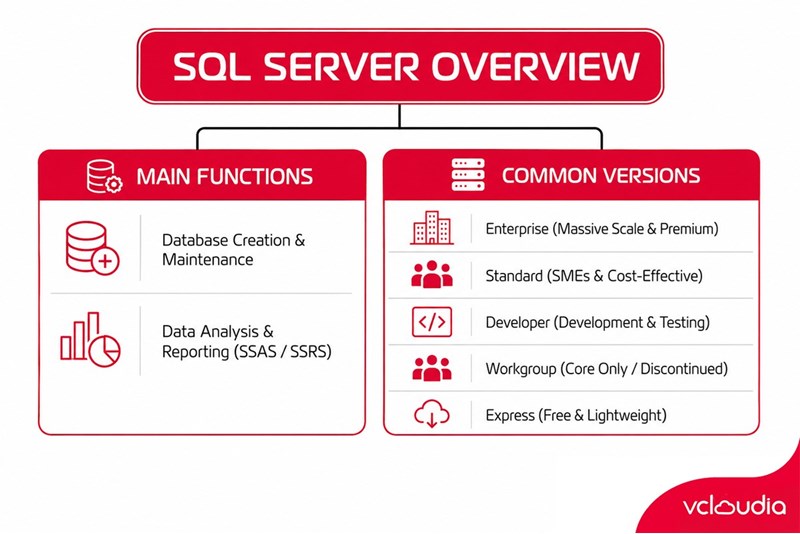
Creating and maintaining databases
The primary purpose of SQL Server is to store and maintain databases. At this stage, you can envision SQL Server as a hub. Data is aggregated and channeled into this hub.
However, the data here is not stored arbitrarily or without rules. To facilitate user queries when searching for data within this hub, data inserted into SQL Server is stored purposefully. Users can leverage existing storage tools to categorize and organize data logically.
Analyzing data and creating reports
Once data is intentionally stored within SQL Server, we can perform analysis on that data using SSAS – SQL Server Analysis Services.
Additionally, another feature of SQL Server is its support for exporting reports based on the stored data. Naturally, this requires the use of specialized reporting tools called SSRS – SQL Server Reporting Services.
Versions of SQL Server
Before delving into this section, there is an important point we would like to note. By nature, a Relational Database Management System (RDBMS) serves as the foundation for many different database systems, not just SQL Server. Examples include IBM DB2, Oracle, MySQL, and Microsoft Access.
However, within the scope of this article, we will focus exclusively on the SQL Server database system. Therefore, in this section, we will explore some of the common versions of this relational database management system.
- Enterprise (Enterprise Edition): This version encapsulates almost the entirety of SQL Server's premium capabilities. Notable features include the core database engine and accompanying services, along with tools for creating and managing SQL Server clusters. The Enterprise version is designed for massive databases up to 524 petabytes and supports up to 640 processors.
- Standard (Standard Edition): This version is highly suitable for small and medium-sized enterprises. This is partly due to its significantly lower cost compared to the Enterprise version, and partly because SMBs typically do not handle such massive data volumes.
- Developer (Developer Edition): This version includes all the features of the Enterprise version but is explicitly customized for application development and testing purposes.
- Workgroup (Workgroup Edition): This version of SQL Server includes only the core database functionality without the accompanying services. Notably, Microsoft discontinued this version starting with SQL Server 2012.
- Express (Express Edition): This version of SQL Server is widely regarded as easy to use. It is primarily intended for simple database management. Microsoft integrates it with Microsoft Visual Studio, making it easier to develop data-centric applications. Most notably, this is a free version. You will not face limitations on the number of databases or users. However, its drawback is that it is restricted to 1 CPU, 1 GB of memory, and a 10 GB database file size. If you are a new application developer or frequently build small applications, this offering from Microsoft will be highly beneficial for you.
How to download and install SQL Server
Step 1: Download SQL Server
- Access the Microsoft website to download SQL Server Express:
- Select the SQL Server Express version and click Download now.
Step 2: Install SQL Server
- Launch the installation file SQL2022-SSEI-Expr.exe.
- Select Basic to perform a basic installation.
- Read and accept Microsoft's terms of use > Click Accept to continue.
- Choose the installation directory for SQL Server or keep the default. Click Install to begin the installation process.
- Wait for the installation process to complete.
Step 3: Install SQL Server Management Studio (SSMS)
SQL Server Management Studio (SSMS) is the management and development tool for SQL Server. To install SSMS, follow these steps:
Access the official Microsoft website to download SQL Server Management Studio > Click the download link to download the SSMS installation file > Launch the installation file > Choose the installation directory > Wait for the installation process to complete.
Step 4: Connect to SQL Server using SSMS
Launch SSMS > Connect to SQL Server via the Connect to Server window and enter your connection details: Server type: Select Database Engine, Server name: Enter the server name, Authentication: Select Windows Authentication or SQL Server Authentication > Click Connect.
Things you need to remember about SQL Server
By now, everyone should have a clear understanding of what SQL Server is and its available versions. For any enterprise, data is the lifeblood. Effective database management helps businesses save and optimize costs for long-term objectives. Before concluding this article, let's review a few key takeaways together:
- First, SQL Server is one of many relational database management systems. It is used to store and manage data for application development, testing, and more. With the various services integrated into SQL Server, you can easily generate reports or analyze the stored data.
- Second, the SQL Server relational database management system offers numerous versions tailored to different user purposes and requirements. Depending on your specific needs, you can select the most appropriate version for yourself.
Looking for a high-performance, secure solution?
Explore the services offered by Vcloudia – a leading provider of Cloud Computing and Data Center solutions. Contact us for expert consultation and find the right model for your needs:
- Hotline: +855 888 55 66 08 (free of charge)
- Fanpage: https://www.facebook.com/vcloudia/
- Website: https://vcloudia.com
Related news
What is SD-WAN? Technology and Practical Applications
SD-WAN addresses the increasing enterprise demands driven by IoT, SaaS, and Cloud alongside escalating cybersecurity needs, where applications demand prioritization and optimization while enterprises require reductions in deployment costs, operational labor, and time.
Software Solutions for Creating Online Virtual Machines You Should Know
Are you looking for software to create online virtual machines, both free and paid? Don't worry, this article is for you. Vcloudia will introduce you to several useful solutions to help you set up an online virtual machine as desired.
What is a free domain name? Should you use one?
A free domain name is a service provided by domain registrars that allows users to register and use a domain without incurring any costs. For an individual or a business, a website domain name is an extremely crucial factor. So, how can you register a free domain? Should you use a domain name that incurs no cost?
Comparing DigitalOcean, Linode, and Vultr VPS: Which Is the Right Choice for Your Business?
A Virtual Private Server means your website will have all the necessary power to handle your growing traffic. Likewise, if you are a developer, this added flexibility might be all you need to take your application ahead of the competition. However, to be the best, you need to work with the best.
What is ASP.NET? How to Analyze the Core Operational Architecture of the ASP.NET Platform
What is ASP.NET? It is an open-source platform chosen by software developers worldwide. The program offers superior utilities along with a distinctive approach to language utilization.
How to choose a server configuration for a business?
Choosing the right cloud configuration for your enterprise is a pivotal factor that helps optimize budgets, enhance operational performance, and ensure the system remains resilient against any changes. If the configuration is oversized, you waste valuable resources; if it is undersized, the system easily overloads, disrupting services.
Demystifying Cloud Security - The Cloud Security Trend Trusted by Enterprises
Cloud security, also known as cloud computing security, protects cloud-based systems, data, and infrastructure. Cloud security services provide cloud security solutions configured to protect data, support regulatory compliance, safeguard customer privacy, and set authentication rules for individual users and devices.
6 Benefits of Creating Virtual Machines That Users Cannot Ignore
Are you interested in creating virtual machines and want to learn more about their role? Creating a virtual machine is highly suitable for individuals or businesses involved in programming or information technology in general due to its usefulness. Creating a virtual machine helps enhance security, facilitates testing, and limits the spread of viruses.
What is a Web Portal? A comprehensive guide to essential knowledge about Web Portals
In practice, a Web Portal is a specially designed website that serves as a single point of access for updating information. However, many users are still vague about what a Web Portal is. So, what exactly is a Web Portal?
What is VXLAN? Everything about VXLAN that users should not ignore
Today, the emergence of VXLAN technology has brought many benefits to users compared to traditional VLAN technology. So what exactly is VXLAN? What makes this technology worth users' attention?