



.png)



















.png)





What is a Virtual Host? How to Set Up Virtual Hosts on XAMPP
Sep 16, 2026Virtual Hosts are arguably one of the most popular technologies in the storage technology field. This is a method through which a server can serve multiple different websites simultaneously. If you do not know much about Virtual Hosts, this article is for you!
What is a Virtual Host?
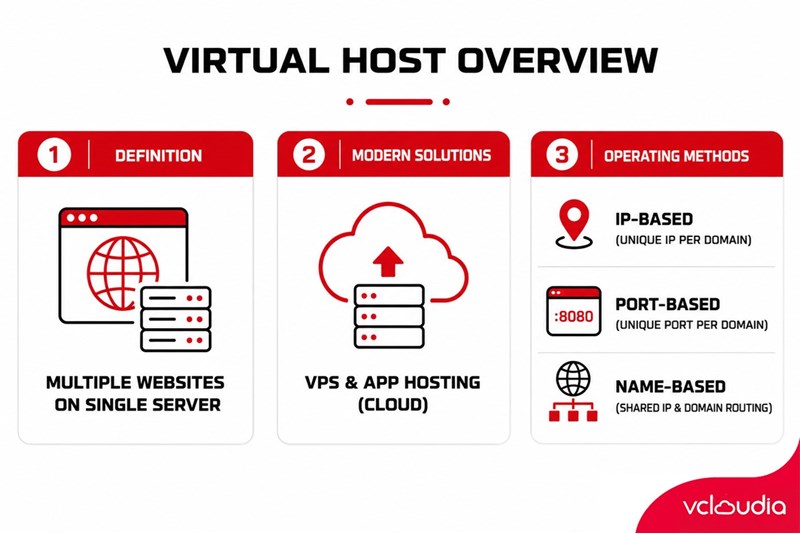
As mentioned, Virtual Hosts (virtual servers) were created for the purpose of serving the hosting of more than 2 websites (e.g., Website1.com, Website2.com,...) on a single server. This means that the websites share hardware resources such as CPU or memory capacity. These resources are allocated and utilized by the server in a rational manner to achieve the highest efficiency.
In today's Industry 4.0 era, alongside the development of Cloud Computing technologies, virtual solutions serving various purposes have emerged and developed more than ever before. Some specific examples include: Virtual Private Server (VPS) hosting solutions, virtual application hosting solutions,...
How a Virtual Host Works
There are several methods for a Virtual Host to operate, and typically, a Virtual Host operates based on the 3 ways below:
- IP-based
- Port-based
- Name-based
IP-based
This is one of the simplest methods among the three mentioned above. The server uses different IP addresses for each domain, and from there provides resources and assigns tasks to each separate domain based on the IP address.
Multiple IPs can point to a single domain of the server, and there will be only one IP for the server. This virtual hosting method can be implemented by creating multiple IP addresses for a single server.
Port-based
Port-based Virtual Hosts operate similarly to IP-based ones, with only one small difference: instead of using different IP addresses for each virtual server, here, Virtual Hosts use different ports and the servers are configured to assign tasks for each website based on that port.
Name-based
Name-based Virtual Hosts are considered the most popular and commonly used virtual hosting technique today. In this case, Virtual Hosts use a single IP address for all domain names on the server.
At this point, when a browser wants to connect to the server, it sends a notification to the server regarding the domain name it wants to access. After the server receives the information, it checks the stored configuration and thereby fulfills the browser's request with the correct website.
How to Create Virtual Hosts on XAMPP
XAMPP acts as a development environment used to create Virtual Hosts to serve users. Let's check out the guide on how to create Virtual Hosts on XAMPP through the instructions below.
First, download XAMPP from the homepage https://www.apachefriends.org. After installation is complete, open <xampp_installation_directory>/apache/conf/httpd.conf and find the line Include conf/extra/httpd-vhosts.conf. If you see a # symbol at the beginning of the line, remember to delete it; this is the line that loads configuration from another file into httpd.conf.
Next, open <xampp_installation_directory>/apache/conf/extra/httpd-vhosts.conf and copy the code snippet below, then paste it into the httpdvhosts.conf file.
<VirtualHost *:80>
DocumentRoot ""
ServerName yourdomain.com
ErrorLog "logs/yourdomain.com-error.log"
CustomLog "logs/yourdomain.com-access.log" common
<Directory "">
Options FollowSymLinks
AllowOverride All
DirectoryIndex index.php
Require all granted
</Directory>
</VirtualHost>
The next step is to restart Apache by restarting the XAMPP software. If Apache is running, stop and restart it, and if Apache is turned off, simply start it again. After completing the above steps, you can now install Virtual Hosts on XAMPP.
Looking for a high-performance, secure solution?
Explore the services offered by Vcloudia – a leading provider of Cloud Computing and Data Center solutions. Contact us for expert consultation and find the right model for your needs:
- Hotline: +855 888 55 66 08 (free of charge)
- Fanpage: https://www.facebook.com/vcloudia/
- Website: https://vcloudia.com/
Related news
What is SD-WAN? Technology and Practical Applications
SD-WAN addresses the increasing enterprise demands driven by IoT, SaaS, and Cloud alongside escalating cybersecurity needs, where applications demand prioritization and optimization while enterprises require reductions in deployment costs, operational labor, and time.
Software Solutions for Creating Online Virtual Machines You Should Know
Are you looking for software to create online virtual machines, both free and paid? Don't worry, this article is for you. Vcloudia will introduce you to several useful solutions to help you set up an online virtual machine as desired.
What is a free domain name? Should you use one?
A free domain name is a service provided by domain registrars that allows users to register and use a domain without incurring any costs. For an individual or a business, a website domain name is an extremely crucial factor. So, how can you register a free domain? Should you use a domain name that incurs no cost?
Comparing DigitalOcean, Linode, and Vultr VPS: Which Is the Right Choice for Your Business?
A Virtual Private Server means your website will have all the necessary power to handle your growing traffic. Likewise, if you are a developer, this added flexibility might be all you need to take your application ahead of the competition. However, to be the best, you need to work with the best.
What is ASP.NET? How to Analyze the Core Operational Architecture of the ASP.NET Platform
What is ASP.NET? It is an open-source platform chosen by software developers worldwide. The program offers superior utilities along with a distinctive approach to language utilization.
How to choose a server configuration for a business?
Choosing the right cloud configuration for your enterprise is a pivotal factor that helps optimize budgets, enhance operational performance, and ensure the system remains resilient against any changes. If the configuration is oversized, you waste valuable resources; if it is undersized, the system easily overloads, disrupting services.
Demystifying Cloud Security - The Cloud Security Trend Trusted by Enterprises
Cloud security, also known as cloud computing security, protects cloud-based systems, data, and infrastructure. Cloud security services provide cloud security solutions configured to protect data, support regulatory compliance, safeguard customer privacy, and set authentication rules for individual users and devices.
6 Benefits of Creating Virtual Machines That Users Cannot Ignore
Are you interested in creating virtual machines and want to learn more about their role? Creating a virtual machine is highly suitable for individuals or businesses involved in programming or information technology in general due to its usefulness. Creating a virtual machine helps enhance security, facilitates testing, and limits the spread of viruses.
What is a Web Portal? A comprehensive guide to essential knowledge about Web Portals
In practice, a Web Portal is a specially designed website that serves as a single point of access for updating information. However, many users are still vague about what a Web Portal is. So, what exactly is a Web Portal?
What is VXLAN? Everything about VXLAN that users should not ignore
Today, the emergence of VXLAN technology has brought many benefits to users compared to traditional VLAN technology. So what exactly is VXLAN? What makes this technology worth users' attention?