















Hosting Servers in a Technical Room or a Tier III Data Center – Which is the Right Choice for Businesses?
Aug 21, 2026Server infrastructure is fundamental to a business's entire IT system, encompassing data storage, transaction processing, and the operation of internal applications and services. Consequently, the chosen server hosting location impacts not only operational performance but also the security and continuous availability of the entire system. In this article, Vcloudia will provide a thorough analysis of two options: hosting servers in a technical room versus a Tier III Data Center, assisting businesses in making the most appropriate and effective decision.
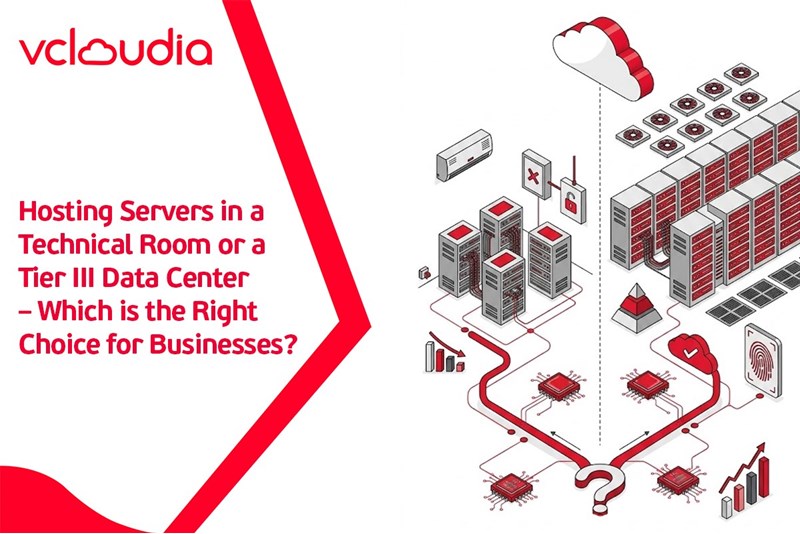
Why Does the Server Hosting Location Directly Affect System Performance and Security?
For businesses, most operational tasks, including data storage, transaction processing, and managing internal processes, rely on the server system. Essentially, the server serves as the operational bedrock of a business's entire digital infrastructure. Therefore, the server hosting location is more than just a technical detail; it directly influences operational stability, information security, and disaster recovery capabilities. Below are four crucial factors significantly impacted by the server hosting location:
Processing Speed
When a server is situated in a location with robust network infrastructure and a high-bandwidth connection, processing speed is optimized due to minimal data transmission latency.
Conversely, if a server is housed in a suboptimal location lacking dedicated network infrastructure, the business can easily face bandwidth limitations and insufficient optimal transmission solutions. This leads to network congestion, slow response times, and potential system crashes during traffic spikes.
Stability & Uptime
A server system must maintain near-continuous operation, aiming for 99.9% uptime or higher. Therefore, hosting servers within professional infrastructures that feature backup power systems (UPS, generators), cooling air conditioning, 24/7 monitoring, and other amenities will ensure the server consistently operates under ideal conditions.
Physical & Data Security
Not only the data residing on the system but also the server hardware itself requires protection from physical threats such as unauthorized access, theft, or data destruction. Thus, by hosting servers in a location with stringent security control layers, including biometric checks, CCTV, and physical intrusion prevention systems, businesses can avert severe data security risks.
Disaster Recovery Capability (DR – Backup)
In the event of incidents like fire, flooding, or cyberattacks, the ability to recover data largely depends on the server hosting location. A suitable server hosting location, with internationally standardized systems, often includes professional DR (Disaster Recovery) procedures, facilitating quick system backup and restoration. Conversely, hosting a server in a place without backup infrastructure exposes the business to the risk of complete data loss or prolonged recovery times.
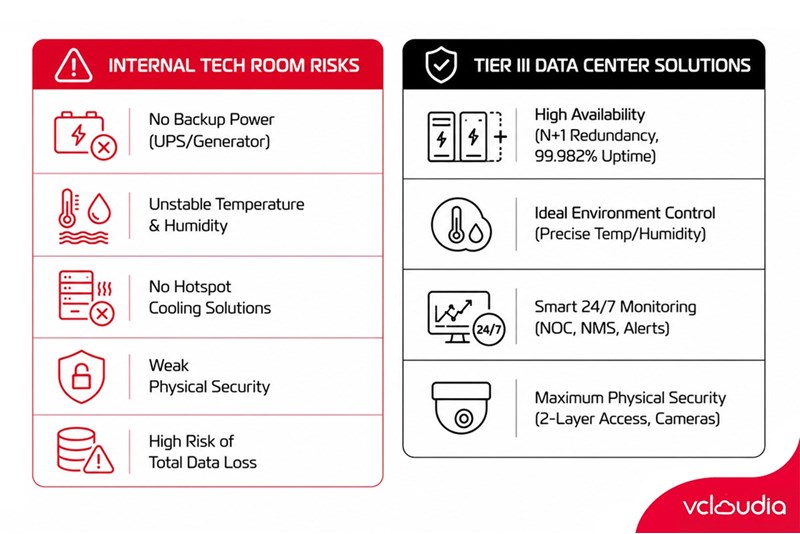
The Internal Technical Room is a Popular Choice but Harbors Many Risks
Many small and medium-sized enterprises in Cambodia frequently opt to host servers within their own internal technical room to reduce initial investment costs and simplify management. However, this solution presents numerous risks, particularly as demands for security, performance, and redundancy become increasingly stringent amidst digital transformation efforts:
No Backup Power System (UPS, Generator)
Most internal technical rooms lack UPS (Uninterruptible Power Supply) systems or backup generators. This implies that even a momentary power outage can immediately halt the entire server system. The absence of a stable power source not only causes downtime but also risks hardware damage and the loss of unsaved data.
Inability to Control Stable Temperature & Humidity → Reduced Hardware Lifespan
Internal technical rooms are typically not designed to maintain a stable temperature and humidity environment as required by IT equipment standards. When temperatures rise, especially on hot days, the server's built-in cooling system often proves inadequate. Operating under prolonged overheating conditions consequently causes components to degrade rapidly, increasing the risk of failure and significantly shortening hardware lifespan.
No Hotspot Cooling Solutions
Beyond general temperature control, server systems also require solutions for localized heat generation points (hotspots), which commonly arise in densely packed rack areas or near walls in enclosed rooms. However, most internal technical rooms lack specialized cooling solutions, such as cold-hot aisle airflow systems, leading to hotspot formation. These hotspots compel some servers to operate under thermal overload, easily resulting in system errors or sudden shutdowns.
Weak Physical Security – Prone to Loss and Unauthorized Access
Unlike a Data Center environment with strict access control, surveillance cameras, and dedicated security personnel, an internal technical room is often merely an open space with basic security measures. This increases the likelihood of unauthorized intrusion, equipment sabotage, data theft, or unintentional incorrect actions by non-specialized personnel.
Encountering Incidents (Power Outage, Fire, Flooding) → Risk of Total Data Loss
In many businesses, server systems located in internal technical rooms are often not designed to withstand disaster scenarios such as fire, flooding, or extended power outages. Without a DR (Disaster Recovery) system or a regular data backup plan, recovery after an incident becomes extremely difficult, if not impossible. This places all operational data at risk of complete loss, leading to severe consequences: abrupt operational halts, financial losses, and detrimental impacts on the business's reputation and recovery capabilities.
Tier III Data Center – The Internationally Standardized Server Hosting Solution
In an era where businesses increasingly rely on technology infrastructure for their operations, hosting servers in standardized environments like a Tier III Data Center not only helps ensure system continuity but also delivers numerous significant benefits:
High Availability and Continuous Operation
A Tier III Data Center guarantees a minimum N+1 redundancy for critical equipment, including: substations, UPS, generators, air conditioning, and backbone network cables. This ensures that:
- Even if one device malfunctions, the system continues to operate without interruption.
- Businesses can perform equipment maintenance at any time without impacting services.
- Generators operate with a 1+1 mechanism, combined with a dedicated oil tank, ensuring continuous operation during any power outage.
This is a crucial factor enabling businesses to maintain high uptime (99.982%), thereby minimizing system disruptions and business losses caused by downtime.
Ideal Environment Control - Optimizing Hardware Lifespan
The air conditioning system in a Tier III Data Center goes beyond general cooling; it is precisely calibrated:
- Temperature is accurately maintained within ±1°C.
- Humidity is strictly controlled within ±5%, preventing static electricity buildup or condensation that could harm equipment.
- The system also monitors air filters and regulates fan speeds, effectively eliminating hotspots and ensuring stable air circulation.
Thanks to this optimal operating environment, business server equipment is less susceptible to damage, extending hardware lifespan and reducing maintenance costs.
Smart Monitoring Helps Detect and Promptly Handle Incidents
The Network Operations Center (NOC) and the Network Management System (NMS) within a Tier III Data Center operate non-stop, 24/7:
- The NOC continuously monitors real-time parameters related to power, network status, temperature, fire prevention and fighting, and data center security.
- The MRTG Network Monitor tool aids in tracking traffic, detecting changes in connection status, and issuing immediate alerts when risks are identified.
- The NMS facilitates monitoring of equipment and transmission lines, allowing for remote administration when necessary.
With these systems, businesses do not need to be concerned about monitoring capabilities, as everything is automated and ensures timely intervention before serious incidents occur.
Physical Security and Strict Access Control
Unlike internal technical rooms susceptible to unauthorized access, a Tier III Data Center is equipped with:
- A dual-layer access control system utilizing access codes, restricting entry to authorized personnel only.
- 24/7 surveillance cameras, complemented by continuous guard protection.
- All personnel and customers must register for access prior to entry.
This guarantees that business data and equipment receive maximum physical protection, which is particularly vital for businesses in the financial and medical sectors or those with stringent compliance requirements.
In summary, a Tier III Data Center is more than just a server hosting location; it represents a comprehensive infrastructure platform that provides businesses with an internationally standardized, stable, secure, and flexible operating environment.
Should Businesses Host Servers in a Technical Room or a Tier III Data Center?
The choice of server hosting location directly impacts performance, stability, and data security. Below are typical scenarios that help businesses decide whether to host servers in a technical room or a Tier III Data Center:
Scenarios where hosting servers in a technical room is advisable:
- Small-scale businesses with simple IT systems and few services requiring continuous processing.
- Small-scale businesses with available space, power sources, and basic cooling systems that can ensure minimum operating conditions for the server.
- Internal access needs are predominant, not requiring high-bandwidth connections or high uptime.
- Not processing sensitive data, thus not requiring compliance with strict security standards.
- Limited investment budget, seeking to save initial outsourcing costs.
Scenarios where hosting servers in a Tier III Data Center is advisable:
- Businesses that require a 24/7 stable operating system, serving customers or online applications.
- Internal infrastructure is insufficient to meet requirements for backup power, temperature and humidity control, and physical safety.
- Needing to ensure high data security, complying with standards such as ISO 27001, PCI DSS, Decree 53, etc.
- The IT environment is undergoing rapid growth, necessitating flexible expansion or the deployment of a hybrid cloud architecture.
- Wanting to mitigate the risk of data loss during incidents (fire, flooding, power outage, etc.), ensuring quick recovery capabilities (DR/BCP).
Conclusion
The decision to host servers in a technical room or a Tier III Data Center significantly influences a business's performance, stability, and system security. While an internal technical room often presents numerous risks concerning power, temperature, security, and redundancy, a Tier III Data Center, with its internationally standardized infrastructure, 24/7 monitoring, and N+1 redundancy architecture, offers a safe, stable, and expandable operating environment. Therefore, this represents a sustainable choice for businesses on their long-term growth and digitalization journey.
Vcloudia Cloud Server – The Cloud You Can Count On
If you're concerned about the potential limitations of Cloud Servers, Cloud Server by Vcloudia is a reliable solution for businesses of all sizes. With a modern infrastructure and comprehensive customer support, Vcloudia delivers a cloud experience with:
- Powerful connectivity to ensure stable 24/7 access
- Advanced security standards, compliant with international certifications such as ISO 27001:2013, ISO 20000:2018, ISO 9001:2015
- Flexible pricing packages tailored to your specific business needs
- Expert technical support, making migration and system deployment fast, safe, and compatible
Contact information:
- Hotline: +855 888 55 66 08 (free of charge)
- Fanpage: https://www.facebook.com/vcloudia/
- Website: https://vcloudia.com
Featured news
Where Are Databases Stored?
20/11/2026Is Free Cloud Storage Worth Considering?
20/11/2026Related news
Where Are Databases Stored?
A database is a collection of structured information that is systematically organized and stored, making data management, querying, and manipulation easier and more efficient. Data within a database may include information about products, customers, transactions, or any other type of information related to business operations.
The Safest Data Storage Methods for Businesses
Data is an invaluable asset for businesses and the foundation of all business operations. Alongside today's rapid technological advancements, data is increasingly exposed to risks of loss, theft, or damage due to various causes. So, what are the safest data storage methods for businesses?
10 Popular and Secure Cloud Storage Services Today
Cloud Storage is currently the most popular solution for storing and managing data online. As a result, this service is continuously evolving, offering users an increasingly diverse range of options.
Is Free Cloud Storage Worth Considering?
Free cloud storage is currently a trend among many businesses because it not only helps optimize time and space to improve work efficiency but also saves the costs of on-premises server storage. However, businesses still face many challenges when using free plans.
On-Premise, Off-Premise, and Cloud – Which Storage Solution Is Right for Businesses?
There are three main infrastructure models that organizations can choose to deploy and manage their systems and applications: On-Premise, Off-Premise, and Cloud. So, which is the most suitable choice for businesses?
Is Cloud Storage Capacity Limited?
Storage capacity is one of the important factors that businesses need to understand before deploying a data storage system on a cloud computing platform. So, is Cloud Storage capacity limited? Join Vcloudia as we explore the answer in the following article.
How Can Small Clinics Securely Store Electronic Medical Records Without Extensive IT Infrastructure?
Does managing electronic medical records necessarily require a massive IT system? How can small clinics securely store electronic medical records without extensive IT infrastructure?
When Should You Stop Using Hard Drives and Switch to Cloud Storage?
In the following article, Vcloudia will help you understand the differences between traditional hard drives and Cloud platforms, while identifying the signs that indicate when businesses should change their storage methods to optimize security and improve system performance.
Should accounting and financial data be stored on the Cloud?
Many businesses remain quite hesitant about the security capabilities of the Cloud, especially when it comes to sensitive data. So, should accounting and financial data be stored on the Cloud? Let's join Vcloudia in finding the answer through the article below.
Differences Between HDD Servers and SSD Servers: Which Should Businesses Choose?
When choosing a storage server, businesses often consider HDD (Hard Disk Drive) and SSD (Solid State Drive) to ensure performance, speed, and costs that meet their needs. So, how do HDD and SSD servers differ? And which is the optimal choice for businesses?