



.png)



















.png)





Do Data Centers and Cloud conflict? How should they be used in parallel?
Aug 20, 2026In this age of digital transformation, asking "Cloud or Data Center?" is no longer a mandatory question. Instead, the focus is on: "Do Data Centers and Cloud conflict? How should they be used in parallel?" Vcloudia invites you to discover the best strategy for your business.
Common misconceptions about Data Centers and Cloud
While both Data Centers and Cloud are vital platforms in contemporary IT (information technology) infrastructure, several misconceptions persist, potentially leading to suboptimal business decisions. These preconceptions might inadvertently cause businesses to miss opportunities for operational optimization, cost savings, and increased flexibility.
The myth that Cloud will completely replace Data Centers
Many people hold the common misconception that Cloud was created to "eliminate" traditional Data Centers. In reality, Cloud represents a different virtualized deployment model built upon physical infrastructure—which is precisely what Data Centers provide—and it caters to various needs and applications. These two concepts are not mutually exclusive; rather, they can complement each other very effectively when combined appropriately. In numerous scenarios, Data Centers continue to be essential for hosting core systems and critical enterprise data.
Thinking that only one of the two should be chosen
Many organizations believe they must select either a Data Center or Cloud exclusively. However, opting for a single model can sometimes restrict a business's growth potential. The current trend involves a flexible combination of both models (Hybrid Cloud) to harness the benefits of each platform and address diverse requirements for performance, cost, and security. For varying needs such as long-term data storage, system scaling for campaigns, or rapid application deployment, a combination of Cloud and Data Center offers a more effective solution.
Concerns that Cloud is not as secure as physical servers located at an IDC
Some businesses are hesitant to adopt Cloud, perceiving it as less secure, citing initial security worries when migrating data to the Cloud. However, reputable Cloud service providers have made significant investments in advanced security measures, which can often surpass the self-protection capabilities of many organizations, particularly small and medium-sized enterprises. Modern Cloud environments feature multiple layers of security, 24/7 monitoring, and strict adherence to international standards like ISO 27001, PCI-DSS, among others. Security issues on Cloud typically stem from improper configuration and management of services. In fact, security vulnerabilities often arise from misconfigurations or a lack of access control—problems that a suitable Hybrid solution can completely address.
Neglecting the Hybrid combination capability to optimize cost and performance
Failing to recognize the potential of the Hybrid Cloud model causes businesses to miss opportunities for optimizing IT infrastructure investments and operational costs. By selecting the appropriate platform for each application and workload, organizations can achieve optimal performance at the most reasonable cost.
Understanding and dispelling these misconceptions is a crucial first step for businesses to make informed decisions regarding the use of Data Centers and Cloud, and to effectively leverage the Hybrid Cloud model.
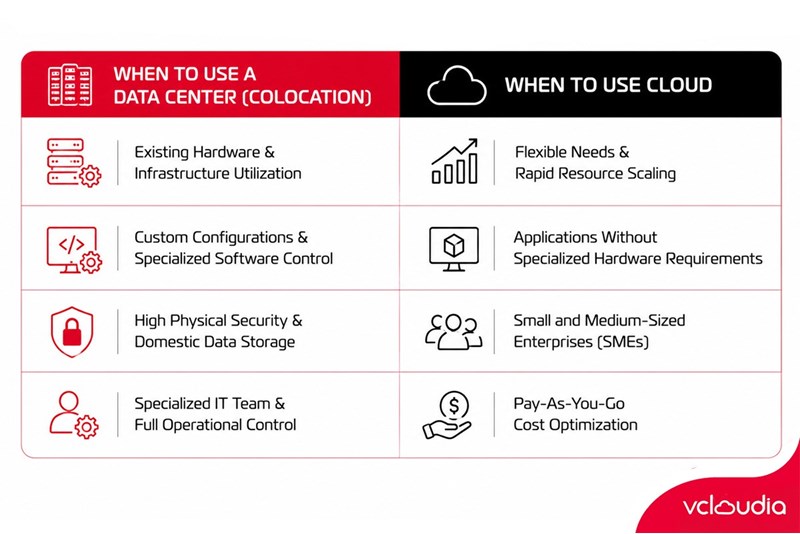
When to use a Data Center (server colocation)?
Even though Cloud offers numerous benefits in terms of flexibility and scalability, Data Centers (specifically server colocation) maintain a vital role in the IT infrastructure strategies of many businesses, especially organizations with proprietary IT infrastructure, stringent security demands, and operational control requirements.
Enterprises with existing IT infrastructure, wanting to utilize equipment
If a business has already made substantial investments in IT hardware (servers, storage systems, network devices) and aims to maximize their value, renting server colocation space at a reputable Data Center can be a cost-effective option. The business retains ownership and control over its hardware while benefiting from the Data Center's professional infrastructure, including power supply, network connectivity, cooling systems, and physical security.
Specific applications requiring custom configurations, specialized software, hardware control
Certain specific applications, such as large ERPs, core banking systems, medical software, and others, necessitate direct control at the hardware level or the integration of specialized equipment (e.g., hardware keys, control devices, peripheral connection ports). In these scenarios, housing physical servers in a Data Center allows businesses to exercise full control and customize the environment according to the application's specific requirements, offering an optimal solution for direct control while ensuring a secure operating environment.
High physical security requirements, domestic data storage
For businesses with extremely strict physical security demands and a desire to ensure data is stored entirely within the country (to comply with specific legal regulations or internal policies), renting server colocation at a domestic Tier III/IV standard Data Center is a suitable choice for legal compliance without compromising performance. The enterprise can directly control physical security measures within its server colocation area.
Having a specialized IT operations team, needing full control
If an enterprise has a robust IT team and wishes to maintain complete control over server systems, operating systems, and network configurations, server colocation enables them to do so, from installation and monitoring to maintenance and troubleshooting. They can manage and operate their entire infrastructure independently within the secure and stable environment of the Data Center. Renting server colocation empowers them to proactively handle all technical aspects without relying on a third party.
Data Centers (server colocation) can still be considered a strategic choice for businesses that want to utilize existing infrastructure, have specific applications, require high physical security, or seek to maintain full control over their IT systems.
When to use Cloud?
Cloud computing has demonstrated its flexibility and efficiency across many business operations, offering advantages like no upfront investment in physical servers and easy resource scaling with just a few clicks. It is particularly well-suited for flexible models that demand cost optimization and rapid deployment.
Below are the situations where enterprises should prioritize using Cloud services:
Flexible needs, rapid resource scaling
One of Cloud's greatest benefits is its ability to flexibly and quickly scale resources on demand. When a business needs to increase or decrease resources (CPU, RAM, storage capacity, bandwidth) due to fluctuating workloads or business growth, Cloud can respond almost instantly without requiring investment in additional physical hardware or waiting for deployment. For instance, during peak seasons or marketing campaigns that cause traffic spikes, Cloud allows resources to be expanded instantly, eliminating the need to procure and install physical servers. When demand decreases, resources automatically shrink, leading to significant savings.
Running applications that do not require specialized hardware
For web applications, mobile apps, common management software (CRM, ERP), or data analytics services, highly specialized hardware configurations are typically not necessary. Cloud provides a powerful and diverse virtualized environment capable of effectively meeting the performance and requirements of these applications. Running these applications on Cloud helps optimize costs and performance. Resources such as CPU, RAM, disk drives, and bandwidth can be expanded or reduced according to actual usage needs.
Small and medium-sized enterprises (SMEs)
These organizations often lack the resources to build and maintain a highly specialized IT team. Cloud offers Managed Services, enabling businesses to deploy and operate applications quickly and easily without the burden of complex infrastructure management. This model is ideal for startups, clinics, and small service companies due to its rapid deployment capabilities and minimal requirement for complex technical skills. The Cloud provider manages the entire infrastructure, operations, and maintenance, allowing businesses to concentrate on developing their products and services.
Prioritizing operational cost optimization, pay-as-you-go
The pay-as-you-go billing model of Cloud means businesses only pay for the resources they actually consume. This helps optimize IT infrastructure operational costs, prevents resource waste when there is no demand, and simplifies monthly cost prediction.
Cloud is an excellent choice for businesses that require flexibility and rapid scalability, have applications that do not demand specialized hardware, operate on a small scale, and aim to optimize IT infrastructure operational costs.
Do Data Centers and Cloud conflict?
Instead of viewing Data Centers and Cloud as two mutually exclusive options, businesses should perceive them as complementary pieces that can be combined to form a powerful and flexible IT infrastructure solution. In reality, these two models do not conflict but rather enhance each other, especially within the current trend of flexible combination (Hybrid IT). When coordinated correctly, businesses can leverage both the power of hardware and the flexibility of the cloud platform, yielding many significant benefits.
Utilizing Data Centers to run core systems, store large data, and control equipment
Data Centers remain the optimal choice for core systems demanding high stability, specific applications requiring direct hardware control, or the storage of large volumes of sensitive data where the business seeks to maintain physical control.
Using Cloud to rapidly deploy services, scale flexibly, backup – DR
Here, Cloud excels in its ability to rapidly deploy new services, respond to sudden resource expansion needs (e.g., during marketing campaigns), and provide effective backup and Disaster Recovery (DR) solutions at reasonable costs.
Notably, what businesses care about most is optimizing costs by avoiding the need to expand physical servers when Cloud support is available. When resource demand spikes suddenly or seasonally, businesses can utilize Cloud resources instead of investing in additional physical servers in the Data Center, which helps optimize both capital expenditure (Capex) and operational expenditure (Opex).
Furthermore, redundancy is always ensured. If the IDC system experiences an incident, traffic will be immediately rerouted to the Cloud. The Hybrid Cloud model allows for the establishment of flexible redundancy solutions. For example, if the system at the Data Center encounters an issue, some critical workloads can be shifted to the Cloud environment to ensure business continuity.
Thus, Data Centers and Cloud are not in conflict at all; conversely, they can complement each other to create a flexible, powerful IT infrastructure that meets diverse enterprise needs. The decision on which model to use or how to combine them depends on each enterprise's business strategy, technical requirements, and budget.
Vcloudia Cloud Server – The Cloud You Can Count On
If you're concerned about the potential limitations of Cloud Servers, Cloud Server by Vcloudia is a reliable solution for businesses of all sizes. With a modern infrastructure and comprehensive customer support, Vcloudia delivers a cloud experience with:
- Powerful connectivity to ensure stable 24/7 access
- Advanced security standards, compliant with international certifications such as ISO 27001:2013, ISO 20000:2018, ISO 9001:2015
- Flexible pricing packages tailored to your specific business needs
- Expert technical support, making migration and system deployment fast, safe, and compatible
Contact information:
- Hotline: +855 888 55 66 08 (free of charge)
- Fanpage: https://www.facebook.com/vcloudia/
- Website: https://vcloudia.com
Featured news
Related news
What is a Snapshot? The Difference Between Snapshot and Backup
Snapshot is a familiar concept in data management and protection. In the context of the information technology boom, where data is a major asset for businesses, understanding Snapshots as well as their application is a key factor for enterprises to maximize technological efficiency.
What is a Firewall? The Role and Importance of Firewalls for Users
In the context of ever-increasing cyberattacks, system security has become a top priority for many enterprises. Alongside deploying antivirus software and controlling connection ports, firewalls are also considered a key solution to effectively enhance cybersecurity.
What is DDoS? Signs, Mitigation Strategies, and Effective Prevention
DDoS is a highly dangerous cyberattack that leaves severe consequences for enterprises. Therefore, gaining a clear understanding of DDoS attacks, as well as how to detect and prevent them, is a topic of significant interest to many.
What is a Trojan? How to Detect, Avoid, and Prevent It
A Trojan is a type of malicious code or software that can cause severe consequences to computer operations. So, what is a Trojan? How can you prevent a Trojan from infiltrating your computer? In the following article, Vcloudia will provide detailed information on these issues.
What is Cloud Backup? Classification, benefits, and limitations
Cloud Backup is a solution that plays an important role in backing up and recovering data when an incident occurs. So what exactly is Cloud Backup? Let's find out the details with Vcloudia in the following article.
What is Cloud Storage? Features and Benefits of Using It
Cloud Storage is the perfect storage solution alternative to bulky, space-consuming physical hard drives. So, what is Cloud Storage? Let's explore the details with Vcloudia through the following article.
What is an API? Characteristics and applications in website design
API, short for Application Programming Interface, is a concept no longer unfamiliar in the information technology field. So what exactly is an API and why is it so important? Let's find out with Vcloudia.
What is Node.js? Instructions on how to install Node.js on cPanel
Currently, it is easy to see that Node.js is being used by quite a lot of people. This is because Node.js can support users in running on multiple platforms and multiple devices.
What is Vultr VPS? Should you use Vultr VPS?
Vultr VPS is one of the best cloud storage solutions in the world. In this article, you will learn the concept: "What is Vultr VPS?", as well as understand its advantages and disadvantages.
Zoom Cloud Meeting: What is it? Basic Things You Should Know About Zoom Cloud Meeting
In 2020, Zoom Cloud Meeting became one of the leading video conferencing software applications. It allows you to virtually interact with colleagues when in-person meetings aren't possible, and it has also been very successful for social events.