



.png)



















.png)





Data Center vs Cloud Computing: Which Model Should You Use?
Aug 19, 2026Data Center and Cloud Computing—each model offers distinct advantages, catering to various requirements and objectives. So, which option is best for maximizing business efficiency and minimizing costs? This article will provide a detailed comparison of these two technology models to assist you in selecting the most suitable solution for your enterprise.
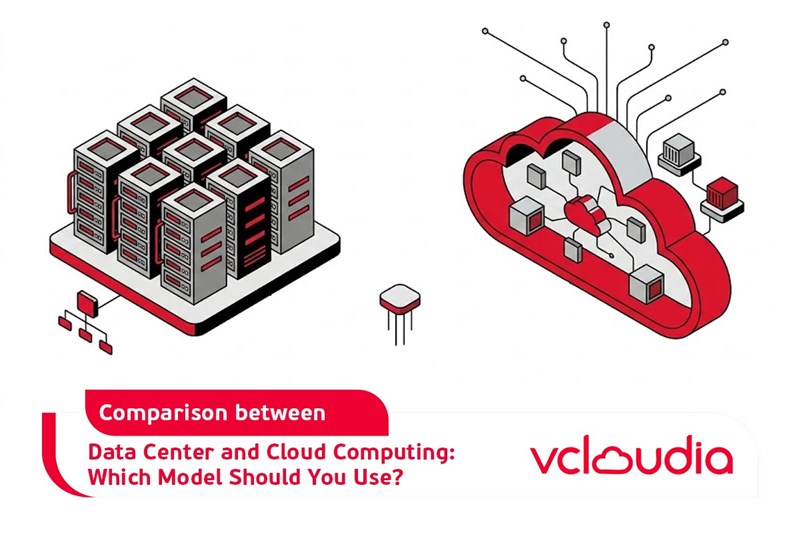
Concepts of Cloud Computing and Data Center
- A Data Center is a physical infrastructure system comprising servers, computer systems, and network connectivity equipment. Businesses can own and operate their own Data Center or lease space from service providers (also known as Colocation services).
- Cloud Computing is a virtualization model that allows businesses to access technology resources over the internet without owning physical infrastructure. Data and applications reside on remote servers managed by service providers, and companies only pay these providers based on the resources consumed.
Similarities between Data Center and Cloud Computing
Despite differences in their structure and operation, Data Center and Cloud Computing share several common characteristics, such as:
- Both are designed for storing and managing data: Both models aim to store, manage, and process data. Businesses can utilize either a Data Center or Cloud Computing to operate their database systems, applications, and other services.
- Ensure security: Both Data Center and Cloud Computing provide robust security capabilities. A Data Center employs physical protection systems like firewalls and access control, while Cloud Computing features data encryption mechanisms and decentralized access rights.
Differences between Data Center and Cloud Computing
The table below summarizes the distinctions between Cloud Computing and Data Center:
The Relationship between Data Center and Cloud Computing
Although Cloud Computing and Data Center differ in structure and operational methods, they share a symbiotic relationship, supporting each other to provide optimal technological solutions for businesses.
- Data Centers provide the essential physical infrastructure for Cloud Computing
Cloud computing is often recognized for its ability to provide virtualized resources via the internet, yet its entire operation relies on Data Centers, which house servers, devices, and network connections. Every cloud service users access depends on one or more data centers to function.
- Cloud Computing expands the capabilities of Data Centers
Cloud Computing enhances the capabilities of traditional data centers by creating a virtualized environment, enabling businesses to easily scale resources without further hardware investments. The Cloud Computing model offers high flexibility, allowing Data Centers to serve numerous customers and process vast amounts of data without being limited by physical infrastructure.
Many businesses today do not merely choose one of the two models but instead combine both Data Center and Cloud Computing to leverage the advantages of each solution. For example, a business might use a private Data Center for storing sensitive data that demands high security. Meanwhile, operations such as big data analytics or managing applications with fluctuating traffic would be carried out through Cloud Computing to save costs and increase flexibility.
Thus, Data Centers and Cloud Computing do not exist independently but are inseparable parts of the modern technology ecosystem. Data centers provide the physical infrastructure, while cloud computing leverages the power of virtualization to bring flexibility and convenience to users. Thanks to this symbiotic relationship, businesses can maximize the benefits of both Data Centers and Cloud Computing, while simultaneously optimizing business performance and costs.
Should You Use a Data Center or Cloud Computing?
Choosing between Cloud Computing and a Data Center depends on the specific needs of each business. The following is a general comparison table of the pros and cons of each model:
When to use a Data Center
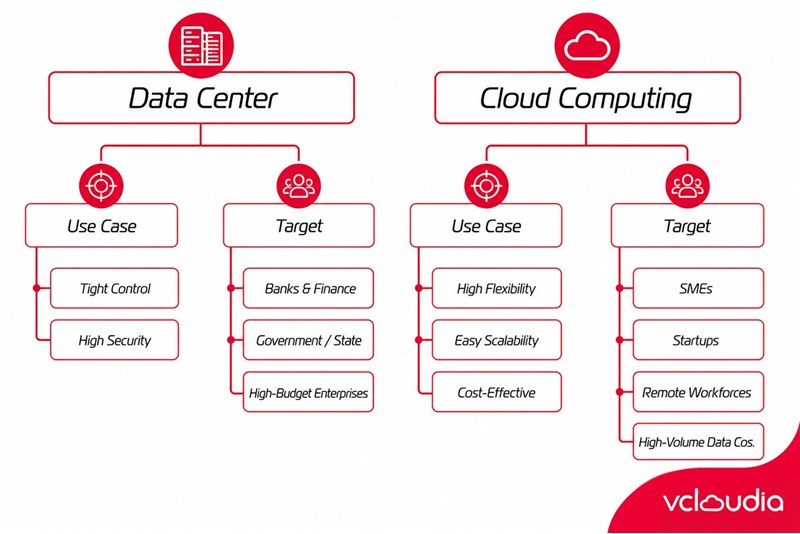
Businesses should choose a Data Center when they need to tightly control data and ensure high security. Businesses suited for a Data Center include:
- Banks and financial institutions with strict information security requirements.
- State-owned enterprises or government organizations with sensitive data to protect.
- Businesses with the capacity for major investments and a highly specialized IT team.
When to use Cloud Computing
Cloud Computing is an ideal solution for businesses that require high flexibility and easy scalability without substantial investments in hardware infrastructure. With a pay-as-you-go model, Cloud Computing is the most cost-effective model, especially when businesses need to quickly adapt to market changes.
Businesses suited for Cloud Computing include:
- Small and medium-sized enterprises (SMEs) with limited resources but a need for an easily scalable system.
- Startups wanting rapid growth without heavy investments in infrastructure.
- Businesses with remote workforces, employees in multiple locations, requiring flexible data access.
- E-commerce, media, or software development companies requiring a model capable of processing massive data volumes.
Conclusion
Choosing between a Data Center and Cloud Computing depends on the needs and budget of each business. While a Data Center offers maximum control and high security, making it particularly suitable for large enterprises and financial institutions, Cloud Computing is a flexible, cost-saving solution, suited for small, medium businesses, and startups. Understanding the characteristics of these two models will help you make the most appropriate decision for your business's long-term development plan.
Vcloudia Cloud Server – The Cloud You Can Count On
If you're concerned about the potential limitations of Cloud Servers, Cloud Server by Vcloudia is a reliable solution for businesses of all sizes. With a modern infrastructure and comprehensive customer support, Vcloudia delivers a cloud experience with:
- Powerful connectivity to ensure stable 24/7 access
- Advanced security standards, compliant with international certifications such as ISO 27001:2013, ISO 20000:2018, ISO 9001:2015
- Flexible pricing packages tailored to your specific business needs
- Expert technical support, making migration and system deployment fast, safe, and compatible
Contact information:
- Hotline: +855 888 55 66 08 (free of charge)
- Fanpage: https://www.facebook.com/vcloudia/
- Website: https://vcloudia.com
Featured news
Related news
What is a Snapshot? The Difference Between Snapshot and Backup
Snapshot is a familiar concept in data management and protection. In the context of the information technology boom, where data is a major asset for businesses, understanding Snapshots as well as their application is a key factor for enterprises to maximize technological efficiency.
What is a Firewall? The Role and Importance of Firewalls for Users
In the context of ever-increasing cyberattacks, system security has become a top priority for many enterprises. Alongside deploying antivirus software and controlling connection ports, firewalls are also considered a key solution to effectively enhance cybersecurity.
What is DDoS? Signs, Mitigation Strategies, and Effective Prevention
DDoS is a highly dangerous cyberattack that leaves severe consequences for enterprises. Therefore, gaining a clear understanding of DDoS attacks, as well as how to detect and prevent them, is a topic of significant interest to many.
What is a Trojan? How to Detect, Avoid, and Prevent It
A Trojan is a type of malicious code or software that can cause severe consequences to computer operations. So, what is a Trojan? How can you prevent a Trojan from infiltrating your computer? In the following article, Vcloudia will provide detailed information on these issues.
What is Cloud Backup? Classification, benefits, and limitations
Cloud Backup is a solution that plays an important role in backing up and recovering data when an incident occurs. So what exactly is Cloud Backup? Let's find out the details with Vcloudia in the following article.
What is Cloud Storage? Features and Benefits of Using It
Cloud Storage is the perfect storage solution alternative to bulky, space-consuming physical hard drives. So, what is Cloud Storage? Let's explore the details with Vcloudia through the following article.
What is an API? Characteristics and applications in website design
API, short for Application Programming Interface, is a concept no longer unfamiliar in the information technology field. So what exactly is an API and why is it so important? Let's find out with Vcloudia.
What is Node.js? Instructions on how to install Node.js on cPanel
Currently, it is easy to see that Node.js is being used by quite a lot of people. This is because Node.js can support users in running on multiple platforms and multiple devices.
What is Vultr VPS? Should you use Vultr VPS?
Vultr VPS is one of the best cloud storage solutions in the world. In this article, you will learn the concept: "What is Vultr VPS?", as well as understand its advantages and disadvantages.
Zoom Cloud Meeting: What is it? Basic Things You Should Know About Zoom Cloud Meeting
In 2020, Zoom Cloud Meeting became one of the leading video conferencing software applications. It allows you to virtually interact with colleagues when in-person meetings aren't possible, and it has also been very successful for social events.