



.png)



















.png)





What Is Serverless Computing? Pros, Cons, and How It Works
Aug 21, 2026Serverless computing offers a flexible way to deploy website services, freeing users from the challenges of server management. This approach is widely considered crucial for the success of many businesses. But what exactly is serverless computing? What are its key advantages and disadvantages? Let's explore these questions with Vcloudia in the following article!
What Is Serverless Computing?
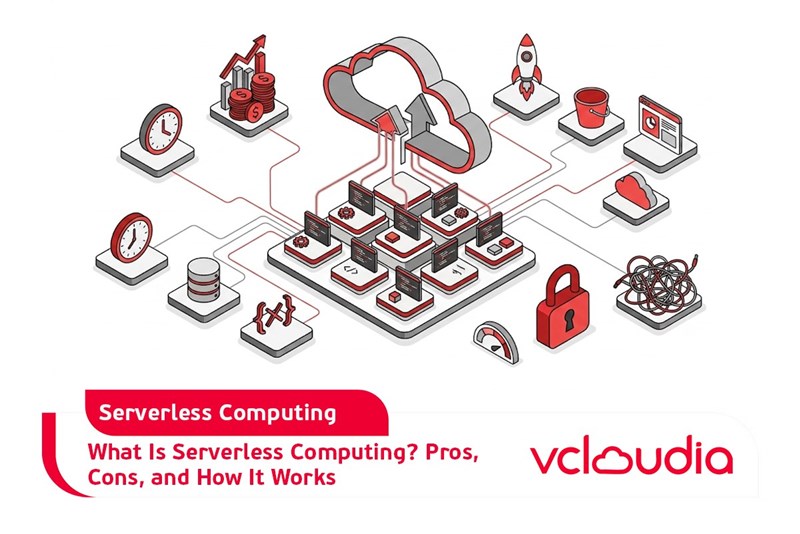
Serverless computing is a model built on a cloud platform that allows organizations to run applications without needing to manage servers or operating systems. Instead, the cloud service provider takes responsibility for resource allocation and server management.
A distinctive characteristic of serverless computing is its flexible pricing structure, which is based on actual usage. Unlike virtual private servers (VPS), where businesses pay a fixed fee regardless of resource utilization, serverless charges only for what is consumed, leading to significant cost optimization.
Furthermore, serverless computing is also seen as an application development approach that can quickly respond to events triggered by other services, promptly meeting user demands.
Pros and Cons of Serverless Computing
To gain a clearer understanding of serverless computing, businesses should examine its benefits and drawbacks, specifically:
Pros:
- Increased productivity: Serverless allows businesses to focus entirely on their core operations rather than infrastructure management. This enables them to dedicate more time to innovation, optimizing application functionalities, and delivering a superior user experience.
- Cost optimization: With serverless, businesses only incur costs based on their actual usage demand. If there are no requests, the cost is virtually zero. Additionally, for tasks involving parallel processing, data stream processing, or specialized data processing, serverless can deliver faster performance at a lower cost compared to alternative methods.
- Support for multi-language development: Serverless enables developers to use any language or framework they are proficient in, such as Java, Python, JavaScript, or Node.js, making application development more flexible and straightforward.
- Optimization of development processes and DevOps: Serverless simplifies deployment processes and DevOps cycles by allowing developers to rapidly integrate, test, and deploy code without spending time defining necessary infrastructure requirements.
- Reduced latency: In a serverless computing environment, source code can be executed closer to the end user, thereby minimizing the delay in processing requests.
- Clear tracking and visibility capabilities: Serverless provides users with the ability to monitor almost every aspect of system performance and how users interact with functions. This offers businesses a clear insight into the effective operation of their applications.
Cons:
- Reduced control: In a serverless environment, businesses must delegate server management responsibilities to the cloud service provider. This implies a loss of direct control over the hardware and execution environment.
- Vendor lock-in: Each serverless computing provider offers unique features that are often incompatible with other providers. This can lead to vendor lock-in, making migration difficult if a business wishes to switch providers.
- Slow start times (cold start): The cold start phenomenon in the serverless model can impact the performance and responsiveness of serverless applications, potentially leading to a poor user experience, especially for applications requiring rapid responses.
- Difficulties in testing and debugging applications: Debugging in a serverless computing model can become more complex because developers lack access to the entire system or the underlying data processing workflows.
- Specialized knowledge requirements: To effectively leverage serverless computing, businesses need to invest time in learning about applying IAM policies, configuring stages, and managing the memory capacity of functions, among other things.
How Serverless Computing Works
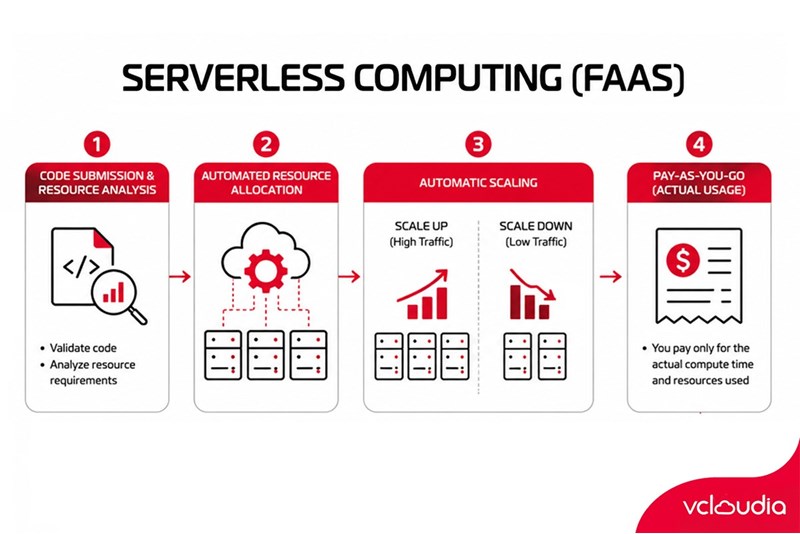
Serverless computing operates on the principle of relieving users from the burden of server management, a concept often referred to as "Function-as-a-Service" (FaaS). Essentially, instead of manually adjusting parameters like storage capacity or memory, the system automatically handles these aspects.
When source code is submitted to the cloud, the system analyzes it to determine the necessary resources for execution. Subsequently, appropriate resources are allocated on the servers to ensure smooth operation.
The server also possesses the capability to automatically scale according to demand. For instance, if a website suddenly experiences a significant surge in visitors, the system will automatically allocate additional resources to maintain performance.
Conversely, when traffic diminishes, the server will reduce resources to maintain operations at a lower cost. Finally, the system tallies the total resources consumed during the month and generates an invoice based on the user's actual needs.
How Does Serverless Computing Differ From Other Cloud Models?
Serverless computing is a cloud model that allows users to run code without managing server infrastructure. This means businesses do not have to worry about configuring, maintaining, or scaling servers; they only pay for the resources actually used, thereby optimizing management costs.
Therefore, in contrast to other cloud models like IaaS, PaaS, or SaaS, which require users to manage the entire infrastructure and applications themselves, serverless stands out due to its automatic scaling flexibility, effectively reducing workloads for businesses.
Vcloudia Cloud Server – The Cloud You Can Count On
If you're concerned about the potential limitations of Cloud Servers, Cloud Server by Vcloudia is a reliable solution for businesses of all sizes. With a modern infrastructure and comprehensive customer support, Vcloudia delivers a cloud experience with:
- Powerful connectivity to ensure stable 24/7 access
- Advanced security standards, compliant with international certifications such as ISO 27001:2013, ISO 20000:2018, ISO 9001:2015
- Flexible pricing packages tailored to your specific business needs
- Expert technical support, making migration and system deployment fast, safe, and compatible
Contact information:
- Hotline: +855 888 55 66 08 (free of charge)
- Fanpage: https://www.facebook.com/vcloudia/
- Website: https://vcloudia.com
Featured news
Related news
What is a Snapshot? The Difference Between Snapshot and Backup
Snapshot is a familiar concept in data management and protection. In the context of the information technology boom, where data is a major asset for businesses, understanding Snapshots as well as their application is a key factor for enterprises to maximize technological efficiency.
What is a Firewall? The Role and Importance of Firewalls for Users
In the context of ever-increasing cyberattacks, system security has become a top priority for many enterprises. Alongside deploying antivirus software and controlling connection ports, firewalls are also considered a key solution to effectively enhance cybersecurity.
What is DDoS? Signs, Mitigation Strategies, and Effective Prevention
DDoS is a highly dangerous cyberattack that leaves severe consequences for enterprises. Therefore, gaining a clear understanding of DDoS attacks, as well as how to detect and prevent them, is a topic of significant interest to many.
What is a Trojan? How to Detect, Avoid, and Prevent It
A Trojan is a type of malicious code or software that can cause severe consequences to computer operations. So, what is a Trojan? How can you prevent a Trojan from infiltrating your computer? In the following article, Vcloudia will provide detailed information on these issues.
What is Cloud Backup? Classification, benefits, and limitations
Cloud Backup is a solution that plays an important role in backing up and recovering data when an incident occurs. So what exactly is Cloud Backup? Let's find out the details with Vcloudia in the following article.
What is Cloud Storage? Features and Benefits of Using It
Cloud Storage is the perfect storage solution alternative to bulky, space-consuming physical hard drives. So, what is Cloud Storage? Let's explore the details with Vcloudia through the following article.
What is an API? Characteristics and applications in website design
API, short for Application Programming Interface, is a concept no longer unfamiliar in the information technology field. So what exactly is an API and why is it so important? Let's find out with Vcloudia.
What is Node.js? Instructions on how to install Node.js on cPanel
Currently, it is easy to see that Node.js is being used by quite a lot of people. This is because Node.js can support users in running on multiple platforms and multiple devices.
What is Vultr VPS? Should you use Vultr VPS?
Vultr VPS is one of the best cloud storage solutions in the world. In this article, you will learn the concept: "What is Vultr VPS?", as well as understand its advantages and disadvantages.
Zoom Cloud Meeting: What is it? Basic Things You Should Know About Zoom Cloud Meeting
In 2020, Zoom Cloud Meeting became one of the leading video conferencing software applications. It allows you to virtually interact with colleagues when in-person meetings aren't possible, and it has also been very successful for social events.