



.png)



















.png)





What is Redundancy in a Data Center? Decoding N+1 and 2N Redundancy Structures
Jun 30, 2026A single minute of server downtime can wipe out millions of dollars in revenue and completely collapse customer trust. To combat the disaster of downtime, network administrators place their full confidence in a vital architectural strategy called data center redundancy.
The following article by Vcloudia will help you dissect the technical essence of this concept, thereby allowing you to confidently choose the most robust backup infrastructure standard for your project.
What is Redundancy in a Data Center?
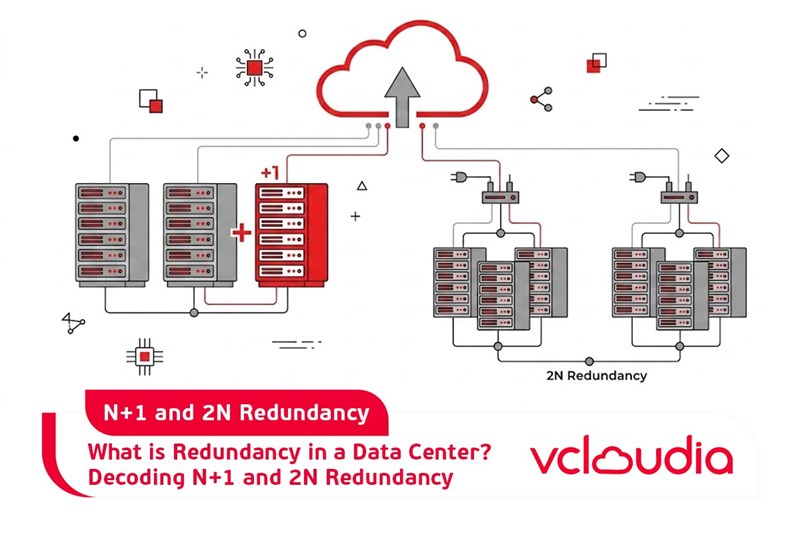
Redundancy in a data center refers to a system design in which infrastructure components are intentionally replicated. Equipping these redundant layers is intended to ensure that in the event of a power outage, hardware failure, or any sudden disruption, the entire core IT equipment block remains unaffected. The clearest evidence is the establishment of a backup power system to keep servers running even when the national power grid experiences an incident.
In today's digital economy, the Maximum Tolerable Period of Disruption (MTPD) is increasingly shrinking, because businesses no longer have tolerance for operational stagnation risks. According to an annual survey from the IT Industry Council (ITIC), up to 98% of businesses admit that just one hour of power outage can cause financial losses of up to more than $100,000.
Benefits of Redundancy Architecture in Data Centers
Implementing a standard redundancy platform provides tremendous operational advantages:
- Enhanced absolute reliability: Redundancy systems are a steel shield ensuring online services operate continuously without interruption, thereby minimizing the risks of downtime and data loss disasters.
- Maintaining optimal performance: Thanks to auxiliary systems always in a state of readiness to take over, data centers can maintain processing performance at the highest level even when some devices are faulty or must be temporarily shut down for periodic maintenance.
- Flexible scalability: A well-designed redundancy architecture creates a solid infrastructure framework, allowing businesses to easily upgrade and expand data center capacity to keep pace with business growth speed.
5 Redundancy Models in Data Centers
Redundancy architecture in data centers is often deployed in 5 core forms, or a flexible combination of these elements to create a comprehensive defense system:
1. Power Redundancy
The goal of this model is to maintain continuous operation even when the power grid encounters a complete power outage. To achieve this, infrastructure facilities need to be equipped with multiple independent power supply sources. This equipment block includes additional power supply lines, Uninterruptible Power Supplies (UPS), and backup generator systems. The type of equipment will determine the duration of operational maintenance; for example, UPS systems only provide temporary energy for a short time to prevent power surges, while industrial generators have the capacity to carry the load for the data center for a much longer period.
2. Cooling Redundancy
If a backup cooling system is lacking, IT equipment will quickly fall into an overheating state, leading to hardware failure and serious data loss. Deploying multiple parallel cooling systems will help prevent this disaster, typically by equipping separate backup power sources for additional air conditioning systems.
For liquid cooling technology, redundant architecture is established by installing multiple independent cooling loops with closed-loop piping systems, heat exchangers, and pumps. Data centers can also apply hot aisle and cold aisle designs to enhance heat dissipation efficiency and optimize airflow circulating through the equipment.
3. Network Redundancy
The focus of this architecture is to provide redundant data transmission routes within the data center. Network continuity is established through the addition of switches, routers, and multi-directional fiber optic systems. Besides upgrading hardware, network interruptions are also prevented by applying loop prevention protocols and ensuring seamless failover capabilities, typically like the STP protocol.
4. Backup Redundancy
Disasters such as hardware failure, cyberattacks, or natural disasters can all lead to permanent data loss. To cope with this risk, backup redundancy focuses on creating and protecting multiple copies of data through measures such as data replication, cloud-based backups, and offline storage.
Owning a second data center at a completely different geographical location acts as an ultimate safety roadblock. When a disaster incident affects the main facility, the secondary data center will immediately maintain business continuity, protecting the system from regional risks and minimizing damage.
5. Server and Hardware Redundancy
Redundantly configured equipment components can operate according to automatic failover or load balancing mechanisms, allowing the system to immediately take over the processing process when hardware failures occur. Equipping redundant servers, network devices, and storage array systems are three key factors that help improve the durability and resilience of the entire technical infrastructure.
Redundancy Levels in Data Centers
Choosing a redundancy level should be based on the level of protection your organization requires. If a business is processing critical data or is at risk of significant revenue loss with even a small period of disruption, equipping a high-level redundancy system is mandatory.
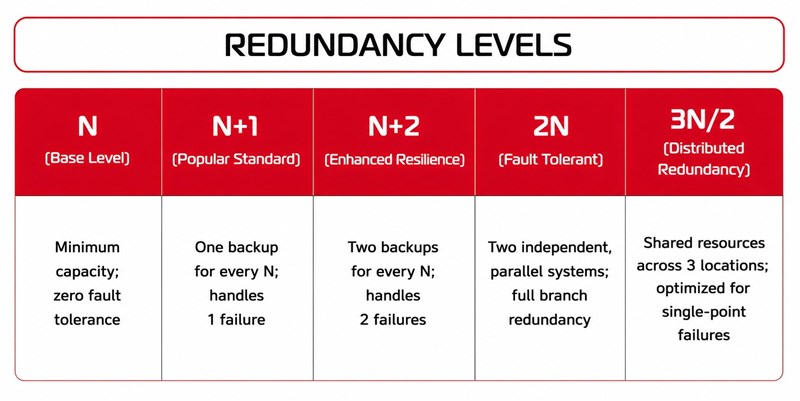
In technical standards, these levels are delineated by the parameter N, where N is the minimum number of base devices required for the data center to operate at full capacity.
- N Structure: This is the foundation infrastructure level just enough for the data center to run at full capacity. There is no redundant equipment in this model, which means that just one component failure will immediately cause downtime for the entire system.
- N+1 Structure: This is the most popular level at data centers. For every N essential devices, the system will be equipped with one corresponding redundant component. However, if two or more devices fail at the same time, the data center's operation will still be interrupted.
- N+2 Structure: Stepping up a notch, this model provides higher fault tolerance by providing two redundant devices for each N cluster. The system allows two components to fail simultaneously without affecting the overall operation process.
- 2N Structure: This is considered the highest level of redundancy, providing complete fault tolerance. Instead of just adding a few auxiliary devices, the data center will build two parallel and independent systems. Even if an entire branch of equipment stops working, the other branch continues to carry the load to maintain a normal state.
- 3N/2 Distributed Redundancy Structure: Although the name seems safer than 2N, in reality, this model shares many similarities with N+1. The system provides two redundant components for each N cluster, but instead of focusing on one facility, they are dispersed at three different geographical locations. This layout helps improve online time when an error occurs at a single point, but the overall level of safety cannot compare to 2N architecture.
Relationship Between Redundancy Architecture and Tier Standards
Redundancy models have a close link to the data center standard hierarchy system. These Tier levels are defined by the Uptime Institute, providing businesses with a clear view of a facility's redundancy capacity even without needing to visit in person. There are four core Tier levels, each accompanied by separate standard sets regarding infrastructure, fault tolerance, and operational capacity.
- Tier 1 Standard: These data centers provide an N redundancy level with 99.671% availability. The infrastructure only possesses one single power and cooling distribution line, with absolutely no redundant equipment. Customers using services here may have to face about 28 to 29 hours of downtime per year.
- Tier 2 Standard: This level begins to integrate some redundant components and is often associated with N+1 architecture. Availability is increased to 99.741%, but the system still only has one path for power and cooling. Maximum downtime per year falls around 22 hours.
- Tier 3 Standard: These are facilities operating according to N+2 or 2N architecture, possessing multiple power distribution lines and alternating cooling systems. The bright point of this level is simultaneous maintainability, allowing the technical team to repair or replace critical equipment without interrupting the overall system. Tier 3 standard ensures 99.982% availability, limiting downtime to an extremely low level of under 1.6 hours per year.
- Tier 4 Standard: This is the pinnacle of availability and redundancy capacity, often applying 2N or 2N+1 structure. These facilities have the capacity for complete fault tolerance with an online rate of up to 99.995%. The system automatically activates protection layers to keep every operation from stalling even if any component encounters an incident. Downtime at Tier 4 infrastructure is very rare, occurring only under 0.5 hours per year.
Frequently Asked Questions (FAQ) About Redundancy in Data Centers
Is the investment cost for a 2N system much more expensive than N+1?
Yes, the price difference is very large. N+1 structure only requires investing in one additional auxiliary device for each functional cluster. Meanwhile, 2N architecture requires businesses to completely double the entire hardware system, physical space as well as periodic maintenance costs.
Which redundancy level is most reasonable for medium-sized businesses?
N+1 structure operating at data centers meeting Tier 3 or Rated 3 standards is the most perfect balance point. This choice helps optimize operational budgets while still maintaining availability of up to 99.982%, ensuring absolute safety for core applications.
How to accurately evaluate the redundancy parameters of a service provider?
The most accurate measurement is to require the provider to supply international data center certificates such as Rated 3 TIA 942 or certification from the Uptime Institute. At the same time, you need to carefully review the online time rate committed for compensation in the Service Level Agreement (SLA).
What is the difference between Failover and Redundancy?
Redundancy is the physical infrastructure foundation, meaning you have prepared backup devices. Meanwhile, Failover is the act of switching, which is the automatic mechanism for redirecting workloads to those backup devices as soon as the main link encounters an incident.
Which infrastructure components must integrate redundancy?
To completely eliminate single points of failure, redundancy architecture must be applied synchronously across essential pillars: power supply systems, precision cooling networks, telecommunications lines, and storage server clusters.
What is the relationship between Redundancy and High Availability?
This is a direct causal relationship. Redundancy is the device replication design method, while High Availability is the achieved result. The more layers of infrastructure redundancy a system possesses, the higher the level of readiness to serve online users.
What do data centers do to ensure the highest Uptime?
They thoroughly apply multi-layer redundancy architecture across the entire ecosystem. Possessing readily available replacement components for power, network connectivity, and servers helps the system automatically withstand all physical failures, thereby maintaining continuous, non-stop uptime.
Vcloudia Cloud Server – The Cloud You Can Count On
If you're concerned about the potential limitations of Cloud Servers, Cloud Server by Vcloudia is a reliable solution for businesses of all sizes. With a modern infrastructure and comprehensive customer support, Vcloudia delivers a cloud experience with:
- Powerful connectivity to ensure stable 24/7 access
- Advanced security standards, compliant with international certifications such as ISO 27001:2013, ISO 20000:2018, ISO 9001:2015
- Flexible pricing packages tailored to your specific business needs
- Expert technical support, making migration and system deployment fast, safe, and compatible
Contact information:
- Hotline: +855 888 55 66 08 (free of charge)
- Fanpage: https://www.facebook.com/vcloudia/
- Website: https://vcloudia.com
Featured news
Related news
What is a Snapshot? The Difference Between Snapshot and Backup
Snapshot is a familiar concept in data management and protection. In the context of the information technology boom, where data is a major asset for businesses, understanding Snapshots as well as their application is a key factor for enterprises to maximize technological efficiency.
What is a Firewall? The Role and Importance of Firewalls for Users
In the context of ever-increasing cyberattacks, system security has become a top priority for many enterprises. Alongside deploying antivirus software and controlling connection ports, firewalls are also considered a key solution to effectively enhance cybersecurity.
What is DDoS? Signs, Mitigation Strategies, and Effective Prevention
DDoS is a highly dangerous cyberattack that leaves severe consequences for enterprises. Therefore, gaining a clear understanding of DDoS attacks, as well as how to detect and prevent them, is a topic of significant interest to many.
What is a Trojan? How to Detect, Avoid, and Prevent It
A Trojan is a type of malicious code or software that can cause severe consequences to computer operations. So, what is a Trojan? How can you prevent a Trojan from infiltrating your computer? In the following article, Vcloudia will provide detailed information on these issues.
What is Cloud Backup? Classification, benefits, and limitations
Cloud Backup is a solution that plays an important role in backing up and recovering data when an incident occurs. So what exactly is Cloud Backup? Let's find out the details with Vcloudia in the following article.
What is Cloud Storage? Features and Benefits of Using It
Cloud Storage is the perfect storage solution alternative to bulky, space-consuming physical hard drives. So, what is Cloud Storage? Let's explore the details with Vcloudia through the following article.
What is an API? Characteristics and applications in website design
API, short for Application Programming Interface, is a concept no longer unfamiliar in the information technology field. So what exactly is an API and why is it so important? Let's find out with Vcloudia.
What is Node.js? Instructions on how to install Node.js on cPanel
Currently, it is easy to see that Node.js is being used by quite a lot of people. This is because Node.js can support users in running on multiple platforms and multiple devices.
What is Vultr VPS? Should you use Vultr VPS?
Vultr VPS is one of the best cloud storage solutions in the world. In this article, you will learn the concept: "What is Vultr VPS?", as well as understand its advantages and disadvantages.
Zoom Cloud Meeting: What is it? Basic Things You Should Know About Zoom Cloud Meeting
In 2020, Zoom Cloud Meeting became one of the leading video conferencing software applications. It allows you to virtually interact with colleagues when in-person meetings aren't possible, and it has also been very successful for social events.