



.png)



















.png)





What is Data Center Automation? Applications and Effective Implementation Methods
Jun 30, 2026The explosive growth of data and artificial intelligence is forcing Data Centers to transform drastically. When manual operations become bottlenecks causing delays and system errors, Data Center Automation emerges as a new operational standard. In this article, Vcloudia will clarify how automation helps streamline processes and minimize human intervention.
What is Data Center Automation?
Data Center Automation is the process of executing routine operational tasks such as provisioning new equipment, auditing, monitoring, and reporting with little or no human intervention.
Today's modern data centers are highly complex and distributed, making traditional management methods inefficient. Relying on disparate tools and manual operations is not only time-consuming but also prone to errors. The consequences of this outdated process can lead to delays in service deployment, inefficient resource utilization, and, more seriously, costly downtime.
To solve this problem, leading experts are moving towards the "automation through integration" model. This method is realized by deploying modern Data Center Infrastructure Management (DCIM) software solutions. These software solutions have built-in connection ports, allowing data to be automatically synchronized to corresponding systems.
As a result, businesses achieve a reduction in manual data entry, eliminate fragmented management, and consolidate processes among the Facility, Operations, and IT teams.
Core Benefits of Data Center Automation
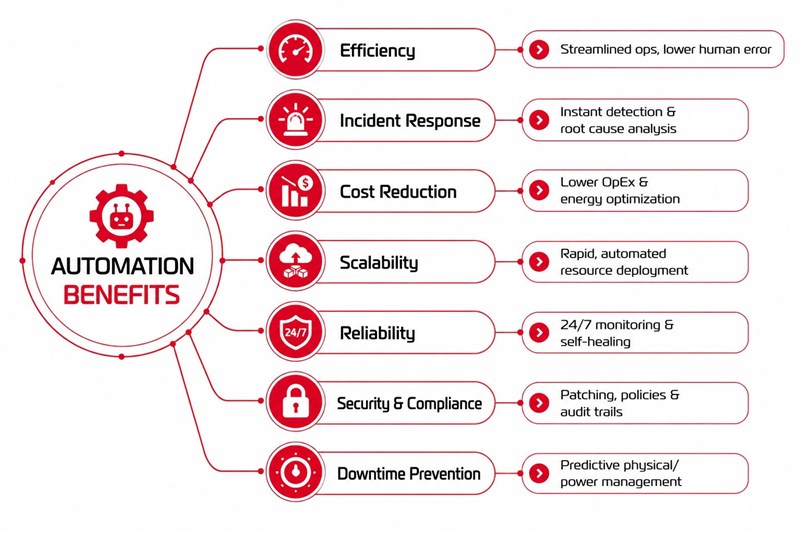
Implementing automation not only helps free up the technical team's labor but also brings 7 strategic values that elevate data center operations:
1. Optimize operational efficiency
Automation helps streamline the entire process, from server provisioning to monitoring and maintenance. DCIM systems automatically eliminate guesswork-based manual operations, helping to make the most of existing resources. This minimizes risks caused by human error and frees up IT personnel so they can focus on more important strategic tasks.
2. Instant incident response
Through real-time monitoring capabilities, automation helps detect anomalies many times faster than humans. This is because the system provides detailed analytical data that helps identify the root cause immediately, preventing minor incidents from escalating into service disasters.
3. Cost reduction
This is the most important economic problem. Automating repetitive tasks like maintenance and provisioning has helped businesses: - Save on personnel and maintenance costs. - Optimize energy consumption through efficient resource management. - Reduce operating expenses (OpEx) in the long run.
4. Flexible scalability
In the digital era, resource demands change by the hour. Data Center Automation allows the deployment and configuration of new infrastructure at breakneck speed. The system can automatically adjust to handle increased workloads without additional manual labor, ensuring the business is always ready as it scales.
5. Enhance reliability
Automation ensures high availability for critical applications thanks to the following mechanisms: - Continuous monitoring: 24/7 system health tracking. - Self-healing: Automatic failover in the event of hardware or network failures, minimizing negative impacts on end users.
6. Strengthen Security and Compliance
Automation is the key to maintaining a consistent security fortress: - Automatically scan for vulnerabilities and update patches simultaneously. - Enforce unified security policies across the entire system. - Maintain accurate audit trails, helping businesses easily meet stringent compliance standards.
7. Prevent Downtime early
Not only dealing with software errors, automation also strictly controls the physical environment. Through power and environmental sensors, the system will immediately report indicators of temperature, humidity, electrical load, or phase balance. Thanks to this, engineers can identify and handle potential risks before they cause system crashes (Unplanned Downtime).
5 effective steps to implement Data Center Automation
To build a sustainable automation system, businesses need a systematic strategy that balances solving immediate operational needs and long-term growth goals. Below is the 5-core-step roadmap to realize that:
1. Assess and identify opportunities
The first and most important step is to thoroughly assess the current state of the data center. Instead of trying to automate everything at once, businesses should focus on identifying the most troublesome areas where manual processes are consuming too much time or frequently causing errors.
The brightest candidates for this stage are usually tedious repetitive tasks such as: virtual machine provisioning, storage resource management, patch updates, or system performance monitoring. Prioritizing the resolution of these bottlenecks will bring immediate tangible results.
2. Choose the right tools
Choosing the wrong tool can lead to data isolation and cause difficulties for future expansion. Businesses should prioritize automation solutions capable of seamless integration with current systems, avoiding the need to replace the entire infrastructure.
An ideal tool should support modularity, allowing the system to scale easily as business needs grow. In particular, orchestration capabilities in Hybrid or Multi-cloud environments are a key factor to ensure flexibility and eliminate operational barriers.
3. Standardize processes
Before applying any automated technology, businesses must standardize workflows. Consistency in processes is the foundation for robots to execute accurately and minimize the risk of errors.
Protocols for resource provisioning, system updates, and incident response need to be clearly and transparently established. This not only helps the system run smoothly but also empowers the IT team to control processes more effectively.
4. Tighten Governance and Security
Automation brings superior speed but also comes with high control requirements. Businesses need to build a solid governance framework, clearly defining roles and data access permissions to ensure information security.
The automation system must always be accompanied by detailed monitoring and reporting features. This gives administrators a comprehensive view of performance, detects security vulnerabilities early, and ensures strict compliance with operational standards as well as legal regulations.
5. Prioritize scalability
Don't build a solution that only works for today. A smart automation strategy must be future-ready, allowing businesses to adapt quickly to market changes or new business priorities.
Investing in Cloud-ready platforms with open architectures and flexible integration capabilities will help businesses scale without having to restructure the entire system. This is the key to ensuring technology investments always deliver sustainable value over time.
Real-world use cases of Data Center Automation
1. Automated resource provisioning
Manual resource provisioning often requires a lot of effort, slows down deployment progress, and is prone to errors. Automation radically solves this problem by using pre-configured templates to allocate servers, storage space, and network resources instantly.
As a result, technical teams can quickly deploy infrastructure to support new applications or respond to sudden spikes in traffic. This not only shortens time to market but also improves scalability, allowing businesses to handle increasingly large workloads without overwhelming the IT department.
2. Smart monitoring and troubleshooting
Monitoring system performance and resolving operational challenges are vital to maintaining uptime. Automation tools use predefined rules to continuously track key metrics such as resource utilization, latency, and application performance.
When an anomaly occurs, automated workflows will instantly identify the root cause and trigger corrective actions, such as restarting services or reallocating resources. These proactive measures help minimize downtime, protect service availability, and drastically limit the need for manual intervention.
3. Disaster recovery and continuity planning
An effective disaster recovery strategy requires maintaining backups and orchestrating failover processes smoothly when an incident occurs. Automating these tasks helps eliminate human error and ensures the recovery process is executed as accurately as possible.
From scheduling regular backups and automatically checking data integrity to pre-programmed recovery scripts, everything creates a solid framework to restore operations. Businesses will benefit from faster recovery times, minimized operational disruptions, and maintained continuity even in the most extreme situations.
4. Security updates
Applying patches and maintaining security compliance are often complex and require timeliness. Automation simplifies this task by using centralized tools to detect vulnerabilities, prioritize updates, and deploy patches simultaneously across the entire infrastructure.
This approach helps organizations significantly reduce risks from cyber threats and consistently adhere to industry standards. As a result, the overall security posture is enhanced without adding to the technical team's workload.
5. Simplify Hybrid and Multi-cloud management
Organizations operating hybrid cloud or multi-cloud architectures often face many difficulties in orchestrating resources across different platforms. Automation provides a centralized control hub, allowing businesses to deploy workloads, balance performance, and monitor usage seamlessly.
These tools help streamline the complex infrastructure management process, support organizations in maximizing resource utilization efficiency and scalability, while reducing cumbersomeness in operations.
Conclusion
Thus, Data Center Automation is completely changing the way organizations manage their IT resources by minimizing inefficiencies, limiting risks, and improving overall performance. From resource provisioning to hybrid cloud environment management, automation brings practical benefits, supports growth, and creates sustainable values for businesses.
However, to actualize automation strategies and manage complex digital infrastructure, businesses first need a solid, secure, and standardized facility foundation.
Looking for a high-performance, secure solution?
Explore the services offered by Vcloudia – a leading provider of Cloud Computing and Data Center solutions. Contact us for expert consultation and find the right model for your needs:
- Hotline: +855 888 55 66 08 (free of charge)
- Fanpage: https://www.facebook.com/vcloudia/
- Website: https://vcloudia.com
Featured news
Related news
What is a Snapshot? The Difference Between Snapshot and Backup
Snapshot is a familiar concept in data management and protection. In the context of the information technology boom, where data is a major asset for businesses, understanding Snapshots as well as their application is a key factor for enterprises to maximize technological efficiency.
What is a Firewall? The Role and Importance of Firewalls for Users
In the context of ever-increasing cyberattacks, system security has become a top priority for many enterprises. Alongside deploying antivirus software and controlling connection ports, firewalls are also considered a key solution to effectively enhance cybersecurity.
What is DDoS? Signs, Mitigation Strategies, and Effective Prevention
DDoS is a highly dangerous cyberattack that leaves severe consequences for enterprises. Therefore, gaining a clear understanding of DDoS attacks, as well as how to detect and prevent them, is a topic of significant interest to many.
What is a Trojan? How to Detect, Avoid, and Prevent It
A Trojan is a type of malicious code or software that can cause severe consequences to computer operations. So, what is a Trojan? How can you prevent a Trojan from infiltrating your computer? In the following article, Vcloudia will provide detailed information on these issues.
What is Cloud Backup? Classification, benefits, and limitations
Cloud Backup is a solution that plays an important role in backing up and recovering data when an incident occurs. So what exactly is Cloud Backup? Let's find out the details with Vcloudia in the following article.
What is Cloud Storage? Features and Benefits of Using It
Cloud Storage is the perfect storage solution alternative to bulky, space-consuming physical hard drives. So, what is Cloud Storage? Let's explore the details with Vcloudia through the following article.
What is an API? Characteristics and applications in website design
API, short for Application Programming Interface, is a concept no longer unfamiliar in the information technology field. So what exactly is an API and why is it so important? Let's find out with Vcloudia.
What is Node.js? Instructions on how to install Node.js on cPanel
Currently, it is easy to see that Node.js is being used by quite a lot of people. This is because Node.js can support users in running on multiple platforms and multiple devices.
What is Vultr VPS? Should you use Vultr VPS?
Vultr VPS is one of the best cloud storage solutions in the world. In this article, you will learn the concept: "What is Vultr VPS?", as well as understand its advantages and disadvantages.
Zoom Cloud Meeting: What is it? Basic Things You Should Know About Zoom Cloud Meeting
In 2020, Zoom Cloud Meeting became one of the leading video conferencing software applications. It allows you to virtually interact with colleagues when in-person meetings aren't possible, and it has also been very successful for social events.