























What is CSM Server? A summary of things to know
Aug 24, 2026In the business world, to enhance convenience and efficiency, CSM Server is an excellent recommendation for billing and management purposes. To gain a deeper understanding of this topic, let's explore the role of CSM Server in the following article with Vcloudia.
What is CSM Server?
CSM Server, an acronym for Cyber Station Manager, is specialized billing software designed to streamline and improve the scientific management of internet cafes and gaming centers. Additionally, it assists computer rooms in overseeing essential data, such as income and transactions, enabling the creation of new strategies or approaches to engage customers. CSM Server can help you achieve this by improving customer service.
Furthermore, in the unfortunate event of unforeseen issues like system overload or power outages, CSM Server includes a login window with administrative privileges, the ability to change the server's IP address, and notably, a debt display feature that allows users to manage both prepaid and postpaid login accounts.
Features of CSM Server
Below, Vcloudia will provide a clearer understanding of CSM Server's features.
- Automatic Billing: This feature helps minimize labor costs while maintaining high work efficiency.
- Member Management: Managing members, printing membership cards, and registering new customers are straightforward processes.
- Workstation Control: Users can remotely close applications, shut down, or restart workstations from the server. They can also monitor workstation screens and continue billing even after a workstation reset.
- Workstation Switching and Communication: CSM Server allows for switching between active workstations and facilitates communication between the server and workstations, simplifying and making information exchange more convenient.
- Sales and Inventory Management: Users can sell food and beverages to customers, efficiently manage inventory and services, oversee advertising, handle promotional policies, and manage workstations with ease.
The management of promotional policies enables users to pre-set pricing strategies and promotional programs for various invoice levels with speed and convenience, significantly reducing setup time. Specifically, users can configure member deposit policies to increase account balances by a percentage based on the deposited amount. This strategy aims to incentivize and attract a larger customer base.
Installation process of CSM Server
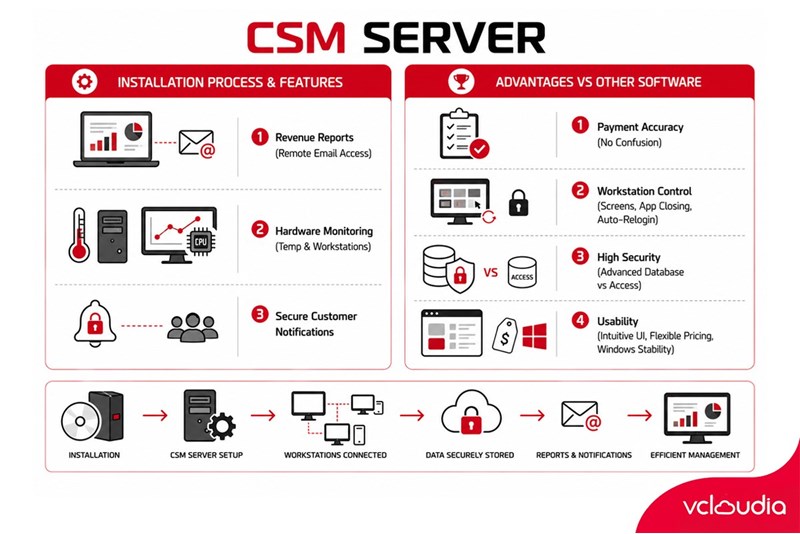
Beyond its easy management capabilities, CSM Server also allows computer room owners to monitor revenue reports remotely, at any time and from anywhere, via personal email. This feature helps users maintain proactive control. Computer room owners can also check workstation temperatures and configurations to manage devices within the computer room, enabling timely solutions. CSM Server offers a unique notification feature for customers, eliminating the need for traditional communication methods like word-of-mouth or advertising, thus ensuring information security, speed, and convenience.
Advantages of CSM Server over other software
Many other software solutions often exhibit inefficiencies in handling customer payments. When numerous customers need to pay simultaneously, this can lead to confusion and errors for the manager. Such software also frequently lacks the ability to view or capture workstation screens and offers limited flexibility in closing workstation applications. CSM Server addresses these shortcomings, playing a crucial role in minimizing unnecessary errors.
When interacting with customers, many software packages fail to provide a server login feature for instances where customers encounter issues requiring a restart. CSM Server has optimized these aspects.
Another crucial factor for many users today is security. CSM Server has overcome the security vulnerabilities found in other software where databases are often stored on less secure Access platforms. Its interface is highly regarded for being visually appealing, user-friendly, and easy to comprehend. The pricing and promotion sections are intuitive and highly flexible. Furthermore, it operates stably across all Windows operating systems.
Conclusion
CSM Server is a user-friendly, highly reputable, and top-quality software solution in Cambodia. It is widely recognized for incorporating many excellent features from other software available in the market. Moreover, the development and integration of new features have made CSM Server a comprehensive solution, highly valued by users. This contributes to improved computer room management, delivering greater efficiency for users and alleviating personnel workload.
Looking for a high-performance, secure solution?
Explore the services offered by Vcloudia – a leading provider of Cloud Computing and Data Center solutions. Contact us for expert consultation and find the right model for your needs:
- Hotline: +855 888 55 66 08 (free of charge)
- Fanpage: https://www.facebook.com/vcloudia/
- Website: https://vcloudia.com
Featured news
Where Are Databases Stored?
20/11/2026Is Free Cloud Storage Worth Considering?
20/11/2026Related news
Where Are Databases Stored?
A database is a collection of structured information that is systematically organized and stored, making data management, querying, and manipulation easier and more efficient. Data within a database may include information about products, customers, transactions, or any other type of information related to business operations.
The Safest Data Storage Methods for Businesses
Data is an invaluable asset for businesses and the foundation of all business operations. Alongside today's rapid technological advancements, data is increasingly exposed to risks of loss, theft, or damage due to various causes. So, what are the safest data storage methods for businesses?
10 Popular and Secure Cloud Storage Services Today
Cloud Storage is currently the most popular solution for storing and managing data online. As a result, this service is continuously evolving, offering users an increasingly diverse range of options.
Is Free Cloud Storage Worth Considering?
Free cloud storage is currently a trend among many businesses because it not only helps optimize time and space to improve work efficiency but also saves the costs of on-premises server storage. However, businesses still face many challenges when using free plans.
On-Premise, Off-Premise, and Cloud – Which Storage Solution Is Right for Businesses?
There are three main infrastructure models that organizations can choose to deploy and manage their systems and applications: On-Premise, Off-Premise, and Cloud. So, which is the most suitable choice for businesses?
Is Cloud Storage Capacity Limited?
Storage capacity is one of the important factors that businesses need to understand before deploying a data storage system on a cloud computing platform. So, is Cloud Storage capacity limited? Join Vcloudia as we explore the answer in the following article.
How Can Small Clinics Securely Store Electronic Medical Records Without Extensive IT Infrastructure?
Does managing electronic medical records necessarily require a massive IT system? How can small clinics securely store electronic medical records without extensive IT infrastructure?
When Should You Stop Using Hard Drives and Switch to Cloud Storage?
In the following article, Vcloudia will help you understand the differences between traditional hard drives and Cloud platforms, while identifying the signs that indicate when businesses should change their storage methods to optimize security and improve system performance.
Should accounting and financial data be stored on the Cloud?
Many businesses remain quite hesitant about the security capabilities of the Cloud, especially when it comes to sensitive data. So, should accounting and financial data be stored on the Cloud? Let's join Vcloudia in finding the answer through the article below.
Differences Between HDD Servers and SSD Servers: Which Should Businesses Choose?
When choosing a storage server, businesses often consider HDD (Hard Disk Drive) and SSD (Solid State Drive) to ensure performance, speed, and costs that meet their needs. So, how do HDD and SSD servers differ? And which is the optimal choice for businesses?