



.png)



















.png)





What is Cloud Service? Benefits and suitable deployment models for businesses
May 29, 2026In 2026, global spending on cloud computing services is expected to surpass the $800 billion mark according to Gartner's forecast, while more than 90% of businesses have adopted at least one form of cloud in their operations. So what is Cloud Service and why has it become the core technology infrastructure of modern businesses? Vcloudia will answer everything about cloud services in the following article.
What is Cloud Service?
Cloud Service or cloud computing service refers to information technology resources such as servers, storage, databases, and software provided on demand over the Internet by third-party providers (AWS, Google Cloud, Azure,...). Users only pay for what they use, eliminating the investment and management of hardware and physical infrastructure on-premises.
In Vietnam, the cloud computing market is booming, estimated to reach $3,575 million in 2024 and will rise to $9,102 million by 2033. The Vietnamese government and businesses are actively developing digital infrastructure, in which cloud services are an important pillar. Even in specific fields such as national defense, cloud computing is also applied to share and store big data, supporting logistics and operational activities of the military.
What are the benefits of using Cloud Service?
In the context of strong digital transformation, Cloud Computing Service is not only a trend but has become the core infrastructure foundation of modern businesses. According to Gartner's report, more than 85% of global businesses will adopt a cloud-first strategy by 2025, demonstrating the popularity and inevitability of cloud computing services.
- Access anytime, anywhere: Cloud Service allows users to access and manage resources remotely via the Internet, whenever there is a network connection. Employees can easily work flexibly, effortlessly viewing data or running applications whether in the office or out in the field.
- Flexible scalability: Businesses can increase or decrease resources (CPU, RAM, storage…) with just a few manipulations in the service management interface, instantly meeting sudden spikes in resource demand. The scalability feature of the cloud helps the system avoid overloading and minimizes performance degradation, especially when traffic fluctuates erratically.
- High availability: Cloud infrastructure is often designed with multi-layer redundancy. If a server or data center encounters an issue, the workload can be shifted to other resources without interrupting the user.
- Cost savings: Businesses do not need to spend large amounts of capital to purchase hardware, build and maintain data centers; instead, they only pay the cost of renting resources on demand. The cloud's pay-as-you-go pricing model helps optimize initial investment costs and reduce IT operational expenses.
- Data security and backup: Many Cloud Service providers implement data encryption solutions, firewalls, multi-factor authentication, and automatic backups on the cloud. At the same time, backing up and replicating data across multiple geographical regions ensures rapid recovery capabilities when disasters or system failures occur.
Examples of popular cloud services today
To better understand what Cloud Service is, you can visualize it through groups of cloud computing services widely used in practice:
- Cloud Storage service (Cloud Storage): Allows users to store and access data remotely via the Internet without using physical hard drives. Popular services include Google Drive, Dropbox, and Microsoft OneDrive.
- Cloud Server service (Cloud Server): Provides virtual servers for businesses to rent and operate systems remotely with flexible configurations according to demand. Typical examples include Amazon Web Services, Microsoft Azure, and Google Compute Engine.
- Cloud Software service (Cloud Software): Provides complete applications over the Internet, which users access directly without installing them on their personal computers. Some familiar platforms include Microsoft 365 and Adobe Creative Cloud.
- Cloud Platform service (Cloud Platform): Supports an environment for building, testing, and deploying applications without having to manage the underlying infrastructure. Notable services include Microsoft Azure App Service and Google App Engine.
Main types of Cloud Services
In the cloud computing model, there are three most popular types of Cloud Computing Services, commonly known as IaaS, PaaS, and SaaS. These three types offer different levels of control and utility:
Infrastructure as a Service (IaaS)
IaaS provides virtualized IT infrastructure resources (virtual servers, storage drives, networking) on a cloud platform. Users have full control to manage and customize system software, applications, and operating system configurations on the virtual machine.
This model is suitable for businesses that want to maintain deep control over their infrastructure but do not want to invest in physical servers. For example: renting virtual servers from AWS EC2, Azure Virtual Machines, or Viettel Cloud Server.
Platform as a Service (PaaS)
PaaS provides a ready-made application development and deployment environment. The PaaS provider is responsible for managing the platform (operating system, database, deployment tools), allowing developers to focus solely on writing code.
Thanks to PaaS, programmers do not have to worry about configuring hardware or updating system software, thereby shortening the time to bring the application into operation. For example: Google App Engine, Heroku, or Cloud Foundry services from domestic Cloud providers.
Software as a Service (SaaS)
SaaS provides complete applications that are deployed and operated on a cloud platform. End users access these software applications via a browser or app without needing installation.
The provider is responsible for updating, maintaining, and ensuring the security of the application. Popular examples are Google Workspace, Microsoft 365, Salesforce, and business management, accounting, CRM applications in Vietnam such as MISA SME, AMIS of Sun,...
Popular cloud computing service deployment models
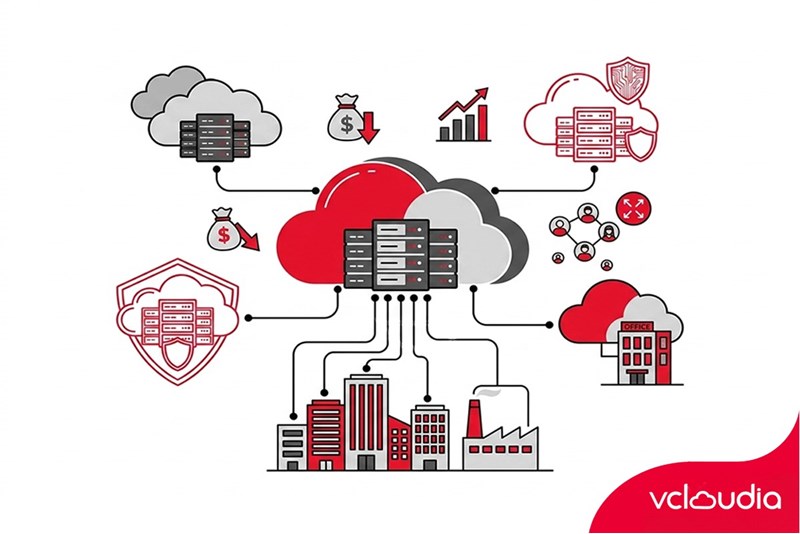
Popular Cloud Computing Services deployment models today include Public Cloud, Private Cloud, and Hybrid Cloud. Each model has its own pros and cons to meet different requirements:
Public Cloud
Public Cloud or public cloud is a model in which the entire infrastructure (servers, storage, networking, platform software) is owned and operated by the service provider over the public Internet. Resources are shared among multiple different customers but still ensure logical separation through virtualization mechanisms.
Advantages
- Helps businesses save initial investment costs as there is no need to purchase physical infrastructure.
- Allows flexible payment based on the actual level of resources used.
- Supports rapidly expanding or shrinking configurations according to demand.
- Can be deployed and put systems into operation in just a few minutes.
- Suitable for startups, SMEs, and systems that need flexible scalability.
Disadvantages
- Businesses do not have full direct management rights over the physical infrastructure behind the system.
- The level of dependence on the operational capacity and policies of the provider is quite high.
- Critical data may carry potential risks if security configurations are not tightly set.
- Costs may increase unexpectedly if resources are not regularly monitored and optimized.
Private Cloud
Private Cloud is a model that provides cloud computing infrastructure dedicated solely to a single organization. Entire resources are not shared with any other customers; they can be deployed at an internal data center (on-premise) or rented from a provider but in a completely isolated environment.
Advantages
- Full control over data and infrastructure.
- High level of security.
- Easy to customize configurations according to specific requirements.
- Suitable for core systems (Core Banking, ERP, national data).
Disadvantages
- High investment and operating costs.
- Longer deployment time.
- Expanding resources requires additional hardware investment.
- Requires a specialized IT team.
Hybrid Cloud
Hybrid Cloud is a combined model between Public Cloud and Private Cloud within the same integrated architecture. Businesses can store critical data in a private environment but leverage public resources to scale when there is a sudden spike in load demand.
Advantages
- Allows flexible coordination and allocation of resources for each system group.
- Helps optimize budgets by leveraging the strengths of both public and private environments.
- Easily scales infrastructure when the business grows or traffic surges abruptly.
- Limits the risk of complete dependence on a single provider.
Disadvantages
- The system structure is more complex compared to standalone models.
- Demands strict data management and synchronization capabilities across environments.
- Requires a highly specialized technical team to operate efficiently.
- Initial deployment and integration costs can be relatively large.
Key parameters to consider when deploying Cloud Service
When deploying cloud services, businesses need to pay attention to various technical and non-technical parameters to ensure the service operates effectively. Below is a summary table of typical parameters and their meanings:
Conclusion
Through this article, you have clearly understood what Cloud Service is, deployment models, practical benefits, and critical parameters when choosing a cloud computing service. In the digital transformation era, the cloud is no longer just a trend but has become a mandatory infrastructure that helps businesses optimize costs, increase scalability, and ensure continuous operation. Choosing the right model and an appropriate Cloud Services provider will determine the long-term effectiveness of your digital transformation strategy.
Vcloudia Cloud Server – The Cloud You Can Count On
If you're concerned about the potential limitations of Cloud Servers, Cloud server by Vcloudia is a reliable solution for businesses of all sizes. With a modern infrastructure and comprehensive customer support, Vcloudia delivers a cloud experience with:
- Powerful connectivity to ensure stable 24/7 access
- Advanced security standards, compliant with international certifications such as ISO 27001:2013, ISO 20000:2018, ISO 9001:2015
- Flexible pricing packages tailored to your specific business needs
- Expert technical support, making migration and system deployment fast, safe, and compatible
Contact information:
- Hotline: +855 888 55 66 08 (free of charge)
- Fanpage: https://www.facebook.com/vcloudia/
- Website: https://vcloudia.com
Featured news
Related news
What is a Snapshot? The Difference Between Snapshot and Backup
Snapshot is a familiar concept in data management and protection. In the context of the information technology boom, where data is a major asset for businesses, understanding Snapshots as well as their application is a key factor for enterprises to maximize technological efficiency.
What is a Firewall? The Role and Importance of Firewalls for Users
In the context of ever-increasing cyberattacks, system security has become a top priority for many enterprises. Alongside deploying antivirus software and controlling connection ports, firewalls are also considered a key solution to effectively enhance cybersecurity.
What is DDoS? Signs, Mitigation Strategies, and Effective Prevention
DDoS is a highly dangerous cyberattack that leaves severe consequences for enterprises. Therefore, gaining a clear understanding of DDoS attacks, as well as how to detect and prevent them, is a topic of significant interest to many.
What is a Trojan? How to Detect, Avoid, and Prevent It
A Trojan is a type of malicious code or software that can cause severe consequences to computer operations. So, what is a Trojan? How can you prevent a Trojan from infiltrating your computer? In the following article, Vcloudia will provide detailed information on these issues.
What is Cloud Backup? Classification, benefits, and limitations
Cloud Backup is a solution that plays an important role in backing up and recovering data when an incident occurs. So what exactly is Cloud Backup? Let's find out the details with Vcloudia in the following article.
What is Cloud Storage? Features and Benefits of Using It
Cloud Storage is the perfect storage solution alternative to bulky, space-consuming physical hard drives. So, what is Cloud Storage? Let's explore the details with Vcloudia through the following article.
What is an API? Characteristics and applications in website design
API, short for Application Programming Interface, is a concept no longer unfamiliar in the information technology field. So what exactly is an API and why is it so important? Let's find out with Vcloudia.
What is Node.js? Instructions on how to install Node.js on cPanel
Currently, it is easy to see that Node.js is being used by quite a lot of people. This is because Node.js can support users in running on multiple platforms and multiple devices.
What is Vultr VPS? Should you use Vultr VPS?
Vultr VPS is one of the best cloud storage solutions in the world. In this article, you will learn the concept: "What is Vultr VPS?", as well as understand its advantages and disadvantages.
Zoom Cloud Meeting: What is it? Basic Things You Should Know About Zoom Cloud Meeting
In 2020, Zoom Cloud Meeting became one of the leading video conferencing software applications. It allows you to virtually interact with colleagues when in-person meetings aren't possible, and it has also been very successful for social events.