



.png)



















.png)





What is a VM (Virtual Machine)? Benefits and How It Works
Aug 21, 2026With a VM (Virtual Machine), individuals can create a "computer within a computer," install any operating system, and run applications independently. This tool is not only useful for software developers but also offers numerous utilities for individual users and businesses. Let's delve into the details of VMs with Vcloudia in the following article.
What is a VM?
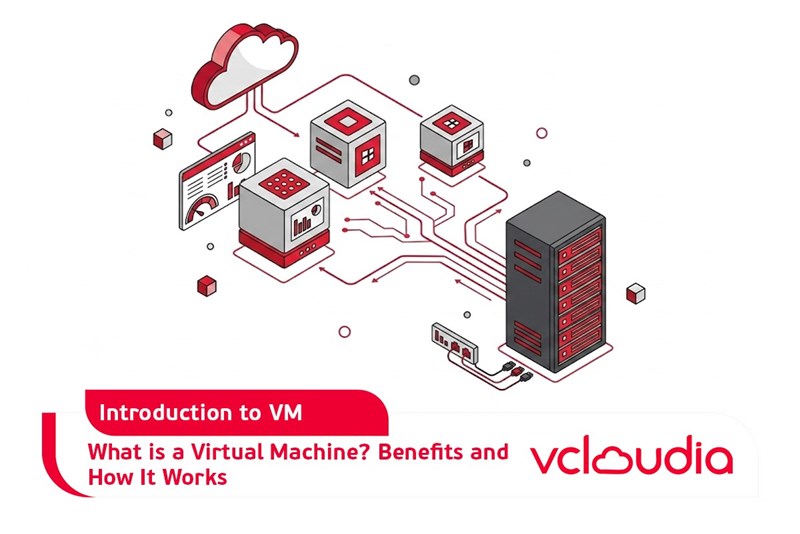
A VM (Virtual Machine) is a virtual instance that mimics a physical computer. It utilizes the physical computer's resources to execute programs while operating entirely separately from that physical machine. A single physical computer can host several distinct virtual machines, each sharing physical resources and functioning independently.
For instance, a virtual machine running the MacOS operating system can operate on a desktop personal computer (PC).
What is a VM Used For?
VMs are frequently employed to:
- Build and deploy information technology systems to the cloud.
- Test new operating systems.
- Set up software testing environments before official release.
- Back up current operating systems.
- Access potentially insecure data.
- Install older operating systems to run legacy applications.
Benefits of a VM (Virtual Machine)
The prominent advantages of VMs include:
- Cost savings: Running multiple virtual machines on a single physical machine helps reduce investment and maintenance expenses for physical hardware.
- Increased work efficiency: Initializing a VM is considerably faster than setting up a new environment for software development and testing. This significantly accelerates the software development process.
- High scalability: Users can easily adjust resources based on their actual needs without requiring investments in physical infrastructure.
- Flexibility: Users can readily migrate VMs from one server to another, or from on-premises hardware into a cloud environment.
- Data security: Virtual machines can run multiple operating systems without impacting the host operating system. They enable the creation of a secure virtual environment for application testing and security vulnerability research without posing risks to the server.
How a VM (Virtual Machine) Works
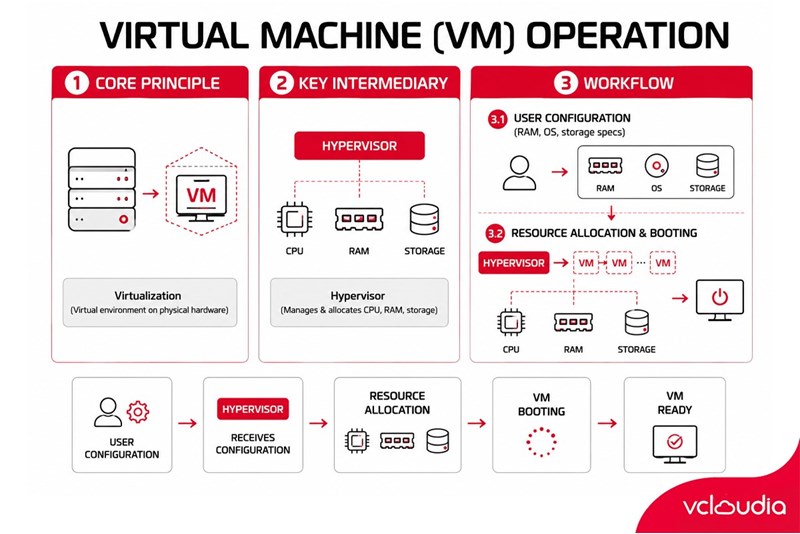
Virtual machines operate based on the principle of virtualization, which involves creating a virtual computer environment within a physical computer. The management and allocation of the physical computer's resources to virtual machines are handled by intermediary software known as a hypervisor. The hypervisor divides the CPU, RAM, hard drive, and other devices into smaller portions and distributes them to each virtual machine.
Users create a new virtual machine by defining its configurations, such as the amount of RAM, hard drive capacity, and operating system type. When the virtual machine is started, the hypervisor allocates the specified resources to it and begins running the operating system.
The functionality of Virtual Machines is heavily reliant on Hypervisor virtual machine monitoring software and the specific requirements from the user.
Experience in Choosing a Virtual Machine (VM) for Businesses
To enhance operational efficiency and reduce costs, businesses should consider the following criteria when selecting a Virtual Machine (VM):
- Determine usage requirements, the necessary number of VMs, anticipated workloads, and the operating system that needs to be supported on the VM.
- Select suitable VM configurations, including the amount of CPU, RAM capacity, and storage drives (SSD or HDD).
- Evaluate the scalability and automation capabilities of the VM.
- Consider supplementary features like data backup, resource management, and security.
- Ensure compatibility with existing software and systems.
- The reputation of the service provider reflects the quality of service and their commitment to customers.
Vcloudia Cloud Server – The Cloud You Can Count On
If you're concerned about the potential limitations of Cloud Servers, Cloud Server by Vcloudia is a reliable solution for businesses of all sizes. With a modern infrastructure and comprehensive customer support, Vcloudia delivers a cloud experience with:
- Powerful connectivity to ensure stable 24/7 access
- Advanced security standards, compliant with international certifications such as ISO 27001:2013, ISO 20000:2018, ISO 9001:2015
- Flexible pricing packages tailored to your specific business needs
- Expert technical support, making migration and system deployment fast, safe, and compatible
Contact information:
- Hotline: +855 888 55 66 08 (free of charge)
- Fanpage: https://www.facebook.com/vcloudia/
- Website: https://vcloudia.com
Featured news
Related news
What is a Snapshot? The Difference Between Snapshot and Backup
Snapshot is a familiar concept in data management and protection. In the context of the information technology boom, where data is a major asset for businesses, understanding Snapshots as well as their application is a key factor for enterprises to maximize technological efficiency.
What is a Firewall? The Role and Importance of Firewalls for Users
In the context of ever-increasing cyberattacks, system security has become a top priority for many enterprises. Alongside deploying antivirus software and controlling connection ports, firewalls are also considered a key solution to effectively enhance cybersecurity.
What is DDoS? Signs, Mitigation Strategies, and Effective Prevention
DDoS is a highly dangerous cyberattack that leaves severe consequences for enterprises. Therefore, gaining a clear understanding of DDoS attacks, as well as how to detect and prevent them, is a topic of significant interest to many.
What is a Trojan? How to Detect, Avoid, and Prevent It
A Trojan is a type of malicious code or software that can cause severe consequences to computer operations. So, what is a Trojan? How can you prevent a Trojan from infiltrating your computer? In the following article, Vcloudia will provide detailed information on these issues.
What is Cloud Backup? Classification, benefits, and limitations
Cloud Backup is a solution that plays an important role in backing up and recovering data when an incident occurs. So what exactly is Cloud Backup? Let's find out the details with Vcloudia in the following article.
What is Cloud Storage? Features and Benefits of Using It
Cloud Storage is the perfect storage solution alternative to bulky, space-consuming physical hard drives. So, what is Cloud Storage? Let's explore the details with Vcloudia through the following article.
What is an API? Characteristics and applications in website design
API, short for Application Programming Interface, is a concept no longer unfamiliar in the information technology field. So what exactly is an API and why is it so important? Let's find out with Vcloudia.
What is Node.js? Instructions on how to install Node.js on cPanel
Currently, it is easy to see that Node.js is being used by quite a lot of people. This is because Node.js can support users in running on multiple platforms and multiple devices.
What is Vultr VPS? Should you use Vultr VPS?
Vultr VPS is one of the best cloud storage solutions in the world. In this article, you will learn the concept: "What is Vultr VPS?", as well as understand its advantages and disadvantages.
Zoom Cloud Meeting: What is it? Basic Things You Should Know About Zoom Cloud Meeting
In 2020, Zoom Cloud Meeting became one of the leading video conferencing software applications. It allows you to virtually interact with colleagues when in-person meetings aren't possible, and it has also been very successful for social events.