



.png)



















.png)





What is a Cluster? Operating Principles in Computer Technology
Aug 21, 2026A cluster is a solution designed to ensure a system continues optimal operation even when server incidents occur. What exactly is a cluster, and what are its operating principles? Vcloudia will explore these details in the following article.
What is a Cluster?
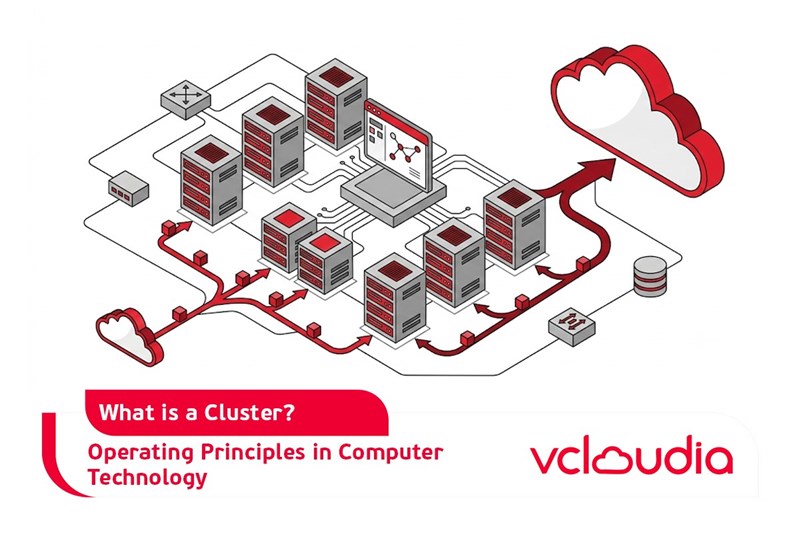
A cluster is a system composed of multiple servers interconnected and functioning as a single, unified entity. Should one server fail, all workloads previously handled by it are automatically transferred to another server within the same cluster, preventing any interruption or disruption to the system's operations. This automatic transfer process is known as "fail-over," while the process of restoring a server's resources within the cluster after an issue is resolved is termed "fail-back."
Terminology Used in a Cluster System
Below are some common terms encountered when working with a cluster:
- Node: Refers to a server that is part of a specific Cluster.
- Failover: The automatic process of switching operations from a failed node to a healthy one.
- Failback: The procedure of returning resource ownership to a node once it has resolved its issue and resumed operation.
- Quorum Resource: This contains essential configurations needed to restore a Cluster Resource. A Cluster Resource itself encompasses elements like a disk drive, network card, IP address, the application, and its associated database.
- Resource Group: A collection of closely related resources within a Cluster. This group typically includes applications, peripheral devices, and data linked to the applications. When necessary, a Resource Group can also contain cluster entities such as virtual servers and IP addresses.
Components of a Cluster
- Backup/Restore Manager: To back up the cluster's database, the Cluster provides an API called BackupClusterDatabase. This API works with the fault management component to identify the current master node within the cluster. Subsequently, the backup request is forwarded to this master node. On the master node, the database management system initiates a backup of the quorum's log files and checkpoint files, which are critical for database restoration if needed.
- Resource Monitor: This component acts as an intermediary between resource DLLs (Dynamic Link Libraries) and the Cluster. When information needs to be retrieved from a resource, the Resource Monitor sends the request to the appropriate DLL. Conversely, DLLs report their status or events to the Resource Monitor, which then transmits this information to the Cluster service.
- Node Manager: This component is responsible for detecting failed nodes and determining which nodes are added to or removed from the cluster.
- Checkpoint Manager: Its function is to ensure recovery from resource failures. When a resource comes online, this manager verifies the relevant registry keys. If the resource goes offline, the manager records checkpoint information to the quorum resource, facilitating future data recovery.
Requirements When Designing and Installing Clusters
- High availability requirement: Network resources must consistently offer high availability to provision and serve end users, minimizing unexpected system downtime.
- High reliability requirement: The high reliability of a cluster implies its ability to reduce the frequency of incidents and enhance the system's fault tolerance.
- Scalability requirement: The system must be easily upgradable and expandable in the future. Upgrading and expanding involves adding devices and computers to the system to improve service quality, as well as increasing the number of users, adding applications, services, and other network resources.
These three requirements are collectively abbreviated as RAS (Reliability-Availability-Scalability). Systems that fulfill these three requirements are referred to as RAS systems (distinct from Remote Access Service).
Operating Mechanisms of a Cluster
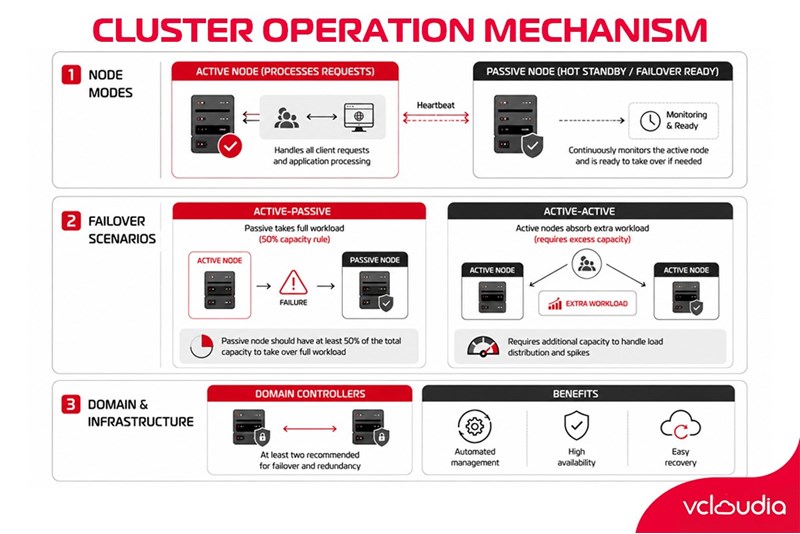
Each server in a cluster is termed a node (cluster node) and can be configured in either active or passive mode. An active node actively processes requests, while a passive node remains in hot standby, ready to take over if another node fails.
A Multi-node Cluster can incorporate both active and passive nodes. In such configurations, deciding whether a node is active or passive is critical. To understand why, consider these scenarios:
- If an active node fails and a passive node is prepared, the applications and services running on the failed node can be immediately transferred to the passive node. Since the passive node server is not currently running any applications or services, it can handle the entire workload of the failed server without impacting the applications and services provided to end users (assuming servers in the cluster share the same hardware architecture).
- If all servers in the cluster are active and one node fails, the applications and services from the failed server must be transferred to another server that is also acting as an active node. Being an active node, this server typically handles specific applications or services under normal conditions. In the event of an incident, it will have to accommodate the additional workload of the failed server. Therefore, to ensure normal system operation even during an incident, servers in the Cluster must possess sufficient excess configuration to handle the workload of another server when necessary.
In a Cluster architecture where each active node is supported by a passive node, servers need to be configured to utilize approximately 50% of their CPU and memory capacity under average workloads.
In a Cluster architecture where the number of active nodes surpasses the number of passive nodes, servers require even more robust CPU and memory resource configurations to manage the necessary workload when a particular node fails.
The nodes within a cluster are typically part of the same domain and can be configured as domain controllers or member servers. Ideally, each multi-node Cluster should include at least two nodes functioning as domain controllers to manage failover for essential domain services. Otherwise, the availability of resources on the cluster will depend on the availability of the domain's controllers.
Thanks to these outstanding features, Cluster technology has been applied to servers, facilitating automated data management, ensuring safety, and enabling easy recovery during incidents.
Applications of Clusters in Database Management
Clusters are employed for Stateful applications (applications that operate continuously over extended periods), which include database servers such as Microsoft SQL Server, Microsoft Exchange Server, File and Print Server, and others.
All nodes within a Cluster share a single data storage location, which can utilize SCSI or Storage Area Network (SAN) technology. Windows Server 2003 Enterprise and Datacenter editions support clusters of up to 8 nodes, while Windows 2000 Advanced Server supports 2 nodes, and Windows 2000 Datacenter Server supports 4 nodes.
Vcloudia Cloud Server – The Cloud You Can Count On
If you're concerned about the potential limitations of Cloud Servers, Cloud Server by Vcloudia is a reliable solution for businesses of all sizes. With a modern infrastructure and comprehensive customer support, Vcloudia delivers a cloud experience with:
- Powerful connectivity to ensure stable 24/7 access
- Advanced security standards, compliant with international certifications such as ISO 27001:2013, ISO 20000:2018, ISO 9001:2015
- Flexible pricing packages tailored to your specific business needs
- Expert technical support, making migration and system deployment fast, safe, and compatible
Contact information:
- Hotline: +855 888 55 66 08 (free of charge)
- Fanpage: https://www.facebook.com/vcloudia/
- Website: https://vcloudia.com
Featured news
Related news
What is a Snapshot? The Difference Between Snapshot and Backup
Snapshot is a familiar concept in data management and protection. In the context of the information technology boom, where data is a major asset for businesses, understanding Snapshots as well as their application is a key factor for enterprises to maximize technological efficiency.
What is a Firewall? The Role and Importance of Firewalls for Users
In the context of ever-increasing cyberattacks, system security has become a top priority for many enterprises. Alongside deploying antivirus software and controlling connection ports, firewalls are also considered a key solution to effectively enhance cybersecurity.
What is DDoS? Signs, Mitigation Strategies, and Effective Prevention
DDoS is a highly dangerous cyberattack that leaves severe consequences for enterprises. Therefore, gaining a clear understanding of DDoS attacks, as well as how to detect and prevent them, is a topic of significant interest to many.
What is a Trojan? How to Detect, Avoid, and Prevent It
A Trojan is a type of malicious code or software that can cause severe consequences to computer operations. So, what is a Trojan? How can you prevent a Trojan from infiltrating your computer? In the following article, Vcloudia will provide detailed information on these issues.
What is Cloud Backup? Classification, benefits, and limitations
Cloud Backup is a solution that plays an important role in backing up and recovering data when an incident occurs. So what exactly is Cloud Backup? Let's find out the details with Vcloudia in the following article.
What is Cloud Storage? Features and Benefits of Using It
Cloud Storage is the perfect storage solution alternative to bulky, space-consuming physical hard drives. So, what is Cloud Storage? Let's explore the details with Vcloudia through the following article.
What is an API? Characteristics and applications in website design
API, short for Application Programming Interface, is a concept no longer unfamiliar in the information technology field. So what exactly is an API and why is it so important? Let's find out with Vcloudia.
What is Node.js? Instructions on how to install Node.js on cPanel
Currently, it is easy to see that Node.js is being used by quite a lot of people. This is because Node.js can support users in running on multiple platforms and multiple devices.
What is Vultr VPS? Should you use Vultr VPS?
Vultr VPS is one of the best cloud storage solutions in the world. In this article, you will learn the concept: "What is Vultr VPS?", as well as understand its advantages and disadvantages.
Zoom Cloud Meeting: What is it? Basic Things You Should Know About Zoom Cloud Meeting
In 2020, Zoom Cloud Meeting became one of the leading video conferencing software applications. It allows you to virtually interact with colleagues when in-person meetings aren't possible, and it has also been very successful for social events.