



.png)



















.png)





What are the consequences of overheating in a Data Center? Causes, risks, and preventive solutions
Jun 30, 2026In a modern Data Center environment, temperature is not merely a technical factor but a decisive variable for the stability, equipment lifespan, and uptime commitment of the entire system. Just by having the temperature exceed the allowable threshold for a short period, the system can face a series of risks ranging from performance degradation and hardware failure to severe downtime.
So, what are the consequences of overheating in a Data Center? Where do the causes come from, and what do enterprises need to do to prevent it? The article below by Vcloudia will comprehensively analyze to help you clearly understand the severity of the problem and how to build an effective cooling strategy.
What is overheating in a Data Center?
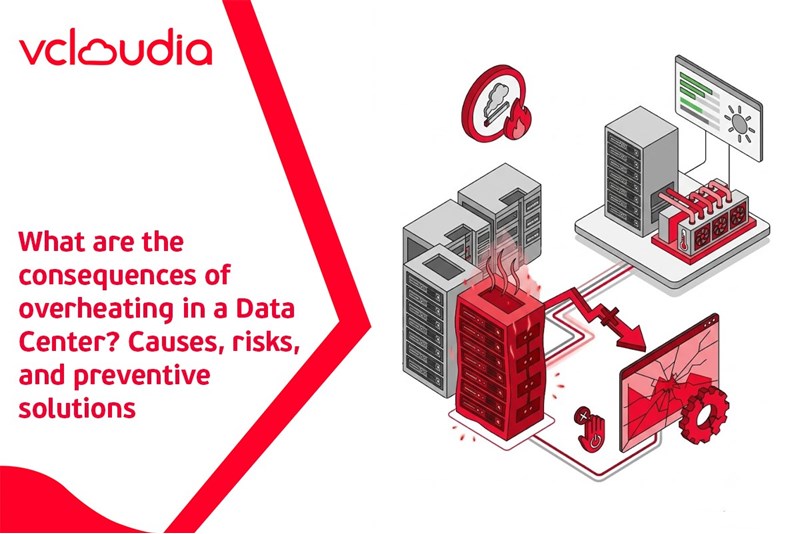
Overheating in a Data Center is a condition where the ambient temperature or the temperature at the server rack exceeds the standard allowable threshold, affecting the performance and stability of IT equipment. In a data center, servers, network equipment, storage systems, and UPS all continuously generate heat when operating. If the cooling system does not have sufficient capacity to control and dissipate the heat load, the temperature will gradually rise and accumulate into hot spots.
According to industry recommendations, the server room temperature is usually maintained within a safe range to ensure stable equipment operation and extend its lifespan. When this threshold is exceeded, the system begins to exhibit phenomena such as CPU throttling (automatically reducing clock speed to avoid overheating), increased internal cooling fan speed, or even automatic shutdown to protect hardware.
What is concerning is that overheating does not only occur at the server room level, but can also appear locally at individual racks or specific devices. This makes the risk difficult to control without a strict environmental monitoring system.
Causes of overheating in a Data Center
High IT equipment density
The development of virtualization technologies, containers, and cloud computing makes the equipment density per rack increasingly higher. A rack can contain dozens of high-performance servers with large power consumption, which equals a very high amount of generated heat. When the initial design does not correctly calculate the load density, the cooling system may lack the capacity to handle the generated heat.
Additionally, the trend of using GPUs for AI, Big Data, and machine learning also significantly increases heat output. These devices typically consume more power than traditional servers, demanding specialized cooling solutions.
Suboptimal airflow design
Airflow plays a key role in controlling temperature. If cold air and hot air streams are not clearly separated, air mixing will occur, reducing cooling efficiency. Some Data Centers arrange racks without following principles or lack air stream control solutions, resulting in hot air returning to the equipment intakes. Just a single bottleneck in the airflow can cause the entire surrounding area to form hot spots, leading to local overload.
Insufficient cooling system capacity
The cooling system is designed based on the projected heat load. However, when a Data Center expands or upgrades equipment without correspondingly upgrading the cooling system, the risk of overheating rises. A cooling capacity that cannot keep up with IT capacity will cause the temperature to gradually increase over time. Furthermore, the lack of a redundant system (N+1 or 2N) also leaves the data center vulnerable to risks if a cooling device encounters a malfunction.
Precision air conditioning (CRAC/CRAH) failures
CRAC (Computer Room Air Conditioner) and CRAH (Computer Room Air Handler) are specialized devices in Data Centers. When these systems experience malfunctions such as sensor failures, compressor errors, or power loss, the temperature control capability will be immediately affected. In many cases, just a minor incident in the cooling system can trigger a domino effect, causing the temperature to rise rapidly and exceed the safe threshold in a short time.
Blocked hot air exhaust paths
Messily arranged network cables, blocked exhaust slots, or racks without blanking panels can all obstruct hot air from escaping outside. When hot air is not properly released, it will accumulate behind the rack and return to the server's cold air intake area, reducing cooling efficiency.
What are the consequences of overheating in a Data Center?
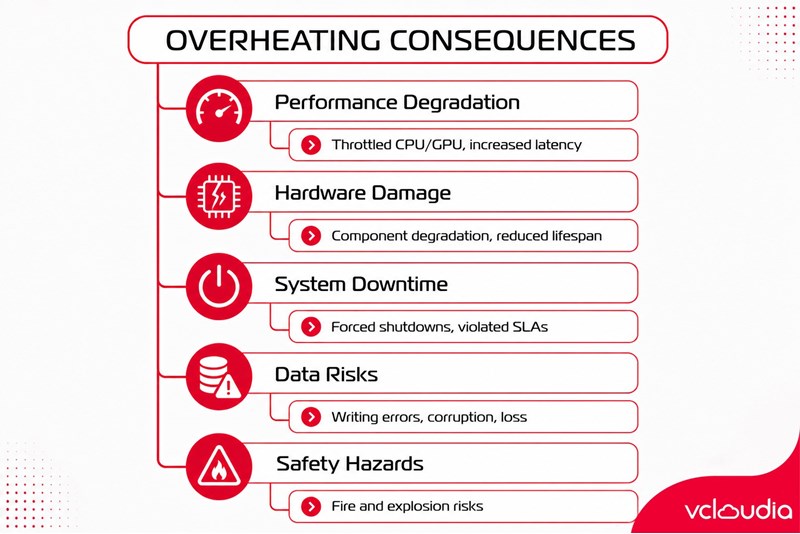
Overheating in a Data Center causes many severe consequences such as:
- Reduced IT equipment performance: When temperatures rise high, CPUs and GPUs will automatically reduce their clock speed to protect the hardware. This leads to reduced processing performance, increased latency, and directly affects the user experience. In an e-commerce or financial environment, just a few seconds of delay can cause significant damage.
- Increased risk of hardware failure: Prolonged high temperatures degrade electronic components, especially motherboards, hard drives, and power supplies. Equipment lifespan decreases faster compared to standard operating conditions. Replacing hardware is not only costly but also harbors the risk of service interruption.
-System downtime and service interruption: When the temperature exceeds dangerous thresholds, the system may automatically shut down to prevent fires and explosions. This results in sudden downtime, affecting SLAs and commitments to customers. For enterprises providing 24/7 services, downtime means lost revenue and diminished reputation.
- Data loss or system errors: Overheating can cause data writing errors on hard drives or disrupt the replication process. In the worst-case scenario, data can be corrupted or completely lost if there is no timely backup mechanism.
- Fire and explosion hazards and safety risks: High temperatures combined with large capacity electrical systems can increase the risk of fire and explosion. This is a severe risk not only to the infrastructure but also affects human safety.
Signs to recognize a Data Center is experiencing overheating
One of the most obvious signs is alerts from the environmental monitoring system. Temperature sensors at the rack or server room can send signals when the set threshold is exceeded. Besides, if server fans run continuously at high speeds, CPUs frequently throttle their clock speeds, or unusual hardware errors appear, those can be signs of overheating. Uneven temperatures among racks or the appearance of localized hot spots are also warnings that need to be addressed promptly.
Preventive solutions for overheating in a Data Center
Controlling temperature in a Data Center does not just stop at installing high-capacity air conditioners, but also requires a comprehensive strategy from infrastructure design, rack arrangement, and airflow optimization to real-time environmental monitoring. Below are the core solutions that help minimize overheating risks and maintain a stable long-term operating environment.
Standard hot aisle - cold aisle airflow design
Hot aisle - cold aisle is the foundational principle in modern Data Center cooling design. Instead of placing racks arbitrarily, this model requires arranging server racks into parallel rows, alternating between front and back. The front of the servers (where cold air is drawn in) face each other to form a cold aisle, while the back (where hot air is exhausted) face each other to form a hot aisle. This arrangement helps clearly separate cold and hot air streams, limiting air mixing phenomena that reduce cooling efficiency. When hot air does not recirculate back to the server intakes, the inlet temperature remains stable, helping equipment operate at optimal levels.
To achieve higher efficiency, enterprises need to pay attention to factors such as raised floor height, vent locations, distance between racks, and blowing direction of the air conditioning system. Calculating airflow right from the design stage will help significantly reduce power costs and the risk of hot spot formation later on.
Application of containment systems
A containment system is a crucial upgrade step from the traditional hot aisle - cold aisle model. Instead of just arranging racks by airflow diversion principles, containment uses partitions, sliding doors, and sealed ceilings to completely isolate the hot or cold air zones. There are two common forms: cold aisle containment (enclosing the cold air zone) and hot aisle containment (enclosing the hot air zone). Both methods aim to prevent the two air streams from mixing together, thereby increasing cooling efficiency and reducing the load on the air conditioning system.
Containment not only helps stabilize temperature but also improves the PUE (Power Usage Effectiveness) index, reducing power consumption and optimizing long-term operational costs. For high-density Data Centers or those using large-capacity equipment like GPU servers, containment is almost a mandatory solution for effective heat control.
Use of specialized precision air conditioning
Unlike residential air conditioners, precision air conditioning systems (CRAC or CRAH) are specifically designed for Data Center environments with the ability to control temperature and humidity at highly precise levels. This equipment can maintain a stable environment 24/7, meeting the continuous operation requirements of data centers. Precision air conditioning has the ability to respond quickly when the heat load changes abruptly, for example, when workloads surge. Furthermore, the system is also integrated with an automatic monitoring and warning mechanism, helping the operation team detect abnormalities early.
To ensure safety, enterprises should deploy N+1 or 2N redundant configurations for the cooling system. When a device malfunctions, the redundant system will automatically take its place without affecting the overall temperature of the server room.
Optimizing rack density and load distribution
A common mistake is concentrating too much high-capacity equipment in the same area. This easily creates localized hot spots, even if the total cooling capacity of the room is sufficient. Optimizing rack density needs to be based on an analysis of the actual heat load of each device. High power consumption servers should be distributed evenly throughout the server room space rather than placed adjacently. Additionally, using blanking panels to cover empty spaces in the rack also helps prevent hot air from reversing to the front.
Temperature monitoring via smart sensors
24/7 environmental monitoring is an indispensable element in an overheating prevention strategy. Sensor systems should be placed at multiple different locations: in front of the racks, behind the racks, overhead, under raised floors, and at cooling equipment areas.
Temperature and humidity data collected continuously will help the operation team early detect abnormal temperature rise trends. When combined with DCIM (Data Center Infrastructure Management) software, enterprises can analyze historical data to optimize cooling strategies, predict hot spots, and adjust capacity accordingly.
When should enterprises re-evaluate their cooling systems?
Enterprises should consider re-evaluating their cooling systems when expanding infrastructure, deploying high-capacity equipment, frequently receiving temperature warnings, or when power costs increase abnormally. Additionally, if a Data Center is preparing to upgrade technology or transition to heavy workloads like AI, reviewing the cooling system is a mandatory thing to ensure safety.
Conclusion
Overheating in a Data Center is not only a technical issue but also a strategic risk that directly affects uptime, operational costs, and corporate reputation. From degraded performance and hardware failure to fire and explosion risks, the consequences of overheating can be extremely severe if not controlled promptly. Investing in standard airflow design, specialized cooling systems, and smart environmental monitoring is the key to helping data centers operate stably, safely, and sustainably in the long term.
Looking for a high-performance, secure solution?
Explore the services offered by Vcloudia – a leading provider of Cloud Computing and Data Center solutions. Contact us for expert consultation and find the right model for your needs:
- Hotline: +855 888 55 66 08 (free of charge)
- Fanpage: https://www.facebook.com/vcloudia/
- Website: https://vcloudia.com
Featured news
Related news
What is a Snapshot? The Difference Between Snapshot and Backup
Snapshot is a familiar concept in data management and protection. In the context of the information technology boom, where data is a major asset for businesses, understanding Snapshots as well as their application is a key factor for enterprises to maximize technological efficiency.
What is a Firewall? The Role and Importance of Firewalls for Users
In the context of ever-increasing cyberattacks, system security has become a top priority for many enterprises. Alongside deploying antivirus software and controlling connection ports, firewalls are also considered a key solution to effectively enhance cybersecurity.
What is DDoS? Signs, Mitigation Strategies, and Effective Prevention
DDoS is a highly dangerous cyberattack that leaves severe consequences for enterprises. Therefore, gaining a clear understanding of DDoS attacks, as well as how to detect and prevent them, is a topic of significant interest to many.
What is a Trojan? How to Detect, Avoid, and Prevent It
A Trojan is a type of malicious code or software that can cause severe consequences to computer operations. So, what is a Trojan? How can you prevent a Trojan from infiltrating your computer? In the following article, Vcloudia will provide detailed information on these issues.
What is Cloud Backup? Classification, benefits, and limitations
Cloud Backup is a solution that plays an important role in backing up and recovering data when an incident occurs. So what exactly is Cloud Backup? Let's find out the details with Vcloudia in the following article.
What is Cloud Storage? Features and Benefits of Using It
Cloud Storage is the perfect storage solution alternative to bulky, space-consuming physical hard drives. So, what is Cloud Storage? Let's explore the details with Vcloudia through the following article.
What is an API? Characteristics and applications in website design
API, short for Application Programming Interface, is a concept no longer unfamiliar in the information technology field. So what exactly is an API and why is it so important? Let's find out with Vcloudia.
What is Node.js? Instructions on how to install Node.js on cPanel
Currently, it is easy to see that Node.js is being used by quite a lot of people. This is because Node.js can support users in running on multiple platforms and multiple devices.
What is Vultr VPS? Should you use Vultr VPS?
Vultr VPS is one of the best cloud storage solutions in the world. In this article, you will learn the concept: "What is Vultr VPS?", as well as understand its advantages and disadvantages.
Zoom Cloud Meeting: What is it? Basic Things You Should Know About Zoom Cloud Meeting
In 2020, Zoom Cloud Meeting became one of the leading video conferencing software applications. It allows you to virtually interact with colleagues when in-person meetings aren't possible, and it has also been very successful for social events.