



.png)



















.png)





Is a physical server suitable for startups?
Jun 30, 2026Is a physical server suitable for startups is a question many newly established businesses are concerned about when building their initial IT infrastructure. Choosing the right solution from the beginning not only helps save costs but also directly impacts the scalability, operations, and growth speed of a startup. Join Vcloudia for a detailed answer in the article below.
What is a physical server?
A physical server (Physical Server) is an independent hardware server, including full CPU, RAM, hard drive, power supply, and network card, used to store data, run websites, software, internal systems, or enterprise applications. Unlike VPS or Cloud Server, a physical server provides entire separate resources for an organization or business, helping to ensure stable performance, high security, and flexible customization capabilities.
Is a physical server suitable for startups?
A physical server is suitable for startups, but it is not the most optimal choice, especially in the early stages. The choice of renting a server for a startup depends heavily on budget, data load requirements, and the specific characteristics of the enterprise's product. Startups may consider renting a physical server in some of the following cases:
- Products requiring extremely high & stable performance: AI, Machine Learning, image/video processing, or e-commerce startups need to process large, continuous data loads and cannot accept latency.
- Demanding absolute security: When businesses want to control the hardware themselves and store data on-site to ensure security, avoiding shared resources like Cloud.
- Long-term stable configuration: The system has clearly defined requirements and does not need frequent configuration changes.
- SaaS (Software as a Service) startups: SaaS applications require rented physical servers to ensure data security and handle high loads.
According to the Uptime Institute, more than 50% of serious infrastructure incidents recently caused damages of over $100,000, with 16% exceeding the $1 million mark. Notably, about 80% of incidents can be completely mitigated or avoided if operational processes, system configuration, and management are better.
Simply put, if a startup invests in and manages physical servers too early, it not only wastes money on buying servers but also bears additional operational risks. Meanwhile, in the early stages, most startups lack sufficient IT personnel, experience, and processes to control infrastructure effectively.
Pros and cons of renting a physical server for startups
When high performance, separate resources, and better system control than a shared environment are needed, many startups often consider renting a physical server. Before deciding whether a startup should buy a physical server, businesses should carefully consider the pros and cons of this solution.
Pros
When answering the question of whether a physical server is suitable for a startup, one must first look at the advantages this model brings. A physical server is still a solution worth considering if the startup has clear usage needs and a long-term direction.
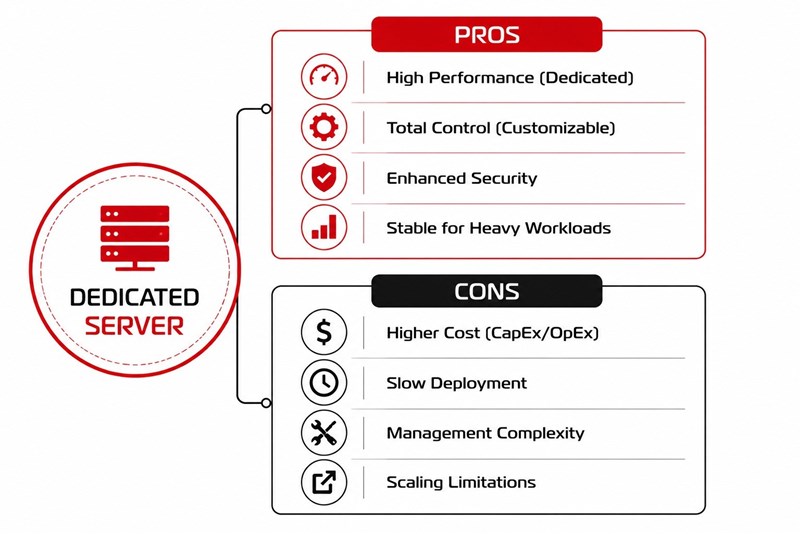
- High, stable performance: All CPU, RAM, and hard drives are used exclusively, helping the system operate more powerfully and stably under heavy loads.
- Separate resources: Startups do not have to share resources with other users like VPS or shared Cloud, thereby limiting performance bottlenecks.
- Better security: Data and applications operate in a separate environment, helping businesses control access rights more strictly.
- Full system configuration authority: Allows customization of hardware, operating system, firewall, or software according to exact usage needs.
- Suitable for heavy workloads: This is a good choice for AI, Machine Learning, game servers, large databases, or continuous data processing systems.
- Long-term stability: If usage needs are clearly defined, a physical server can maintain good performance for a long time.
Cons
Besides certain advantages, this choice also involves many factors that startups need to consider carefully before investing. Especially in the early stages, infrastructure decisions can directly affect operational costs and future growth potential.
- Higher initial cost: Compared to common Cloud, renting a physical server has a higher monthly price.
- Difficult to scale quickly: When needing to increase resources, businesses may have to upgrade hardware or move to another server.
- Requires management expertise: Startups need IT personnel or to hire management services to operate the system effectively.
- Slower deployment than cloud: Physical servers usually take 3–14 days to purchase, deliver, install, and configure.
- Risk of resource waste: If choosing a configuration that is too high for actual needs, startups may have to pay unnecessary costs.
- Dependency on the provider: The quality of the network, hardware, and technical support will directly affect the usage experience.
Should startup businesses use a physical server or Cloud Server?
For most startup businesses, a Cloud Server will be a more reasonable choice than a Physical Server in the early stages. The biggest reason is that startups need to conserve capital to develop products, market, and find customers instead of pouring budget into IT infrastructure right from the start.
A physical server for businesses usually costs from tens to hundreds of millions of VND depending on the configuration, not including costs for rack cabinets, electricity, UPS, network, software licenses, and operational personnel. Meanwhile, cloud allows renting resources by the month, even for just a few hundred thousand to a few million VND/month in the initial phase, significantly reducing cash flow pressure.
Besides the cost factor, cloud is also suitable because of its fast deployment speed and easy scalability. Businesses can create new servers in just a few minutes instead of taking many days or weeks to purchase, install, and configure a physical server. This is a huge advantage for startups when needing to test an MVP, run marketing campaigns, or handle sudden spikes in traffic.
In fact, many large tech startups have utilized Cloud Computing right from the early stages to accelerate development. Airbnb, when first expanding its market, used cloud infrastructure to quickly respond to traffic spikes without investing in its own data centers. Similarly, Netflix, during its rapid growth phase, chose the cloud to flexibly expand resources according to demand across many regions, serving millions of users without being limited by traditional infrastructure.
Conversely, a physical server only becomes suitable when a startup has a stable business model, continuous 24/7 system load, and long-term predictable resource needs. For example: a SaaS company with tens of thousands of fixed users, an AI studio needing GPUs running continuously, or a business with strict internal data storage requirements. When that happens, investing in a physical server can optimize long-term costs better than the cloud.
Comparison of physical server vs cloud server for startups
Alternative solutions to physical servers for early-stage startups
If a startup wants to optimize initial investment costs but still ensure scalability, Viettel IDC Cloud Server is a solution worth considering. Businesses can create servers in just a few minutes, flexibly upgrade resources almost immediately when demand grows, and reduce the pressure of initial hardware purchasing. The service integrates many backup, security, and automated management options, suitable for startups needing lean operations. The infrastructure is deployed at internationally standardized Data Centers with equipment from major brands like Cisco, Dell EMC, etc.
Conclusion
Whether a physical server is suitable for a startup depends on the budget, usage needs, and development stage of the business. For businesses in the stage of finding product-market fit and needing to optimize runway, a cloud server is almost a safer and more effective choice. When the business grows large enough, that is when you should consider migrating a portion or the entirety to a physical server.
Vcloudia Cloud Server – The Cloud You Can Count On
If you're concerned about the potential limitations of Cloud Servers, Cloud Server by Vcloudia is a reliable solution for businesses of all sizes. With a modern infrastructure and comprehensive customer support, Vcloudia delivers a cloud experience with:
- Powerful connectivity to ensure stable 24/7 access
- Advanced security standards, compliant with international certifications such as ISO 27001:2013, ISO 20000:2018, ISO 9001:2015
- Flexible pricing packages tailored to your specific business needs
- Expert technical support, making migration and system deployment fast, safe, and compatible
Contact information:
- Hotline: +855 888 55 66 08 (free of charge)
- Fanpage: https://www.facebook.com/vcloudia/
- Website: https://vcloudia.com
Featured news
Related news
What is a Snapshot? The Difference Between Snapshot and Backup
Snapshot is a familiar concept in data management and protection. In the context of the information technology boom, where data is a major asset for businesses, understanding Snapshots as well as their application is a key factor for enterprises to maximize technological efficiency.
What is a Firewall? The Role and Importance of Firewalls for Users
In the context of ever-increasing cyberattacks, system security has become a top priority for many enterprises. Alongside deploying antivirus software and controlling connection ports, firewalls are also considered a key solution to effectively enhance cybersecurity.
What is DDoS? Signs, Mitigation Strategies, and Effective Prevention
DDoS is a highly dangerous cyberattack that leaves severe consequences for enterprises. Therefore, gaining a clear understanding of DDoS attacks, as well as how to detect and prevent them, is a topic of significant interest to many.
What is a Trojan? How to Detect, Avoid, and Prevent It
A Trojan is a type of malicious code or software that can cause severe consequences to computer operations. So, what is a Trojan? How can you prevent a Trojan from infiltrating your computer? In the following article, Vcloudia will provide detailed information on these issues.
What is Cloud Backup? Classification, benefits, and limitations
Cloud Backup is a solution that plays an important role in backing up and recovering data when an incident occurs. So what exactly is Cloud Backup? Let's find out the details with Vcloudia in the following article.
What is Cloud Storage? Features and Benefits of Using It
Cloud Storage is the perfect storage solution alternative to bulky, space-consuming physical hard drives. So, what is Cloud Storage? Let's explore the details with Vcloudia through the following article.
What is an API? Characteristics and applications in website design
API, short for Application Programming Interface, is a concept no longer unfamiliar in the information technology field. So what exactly is an API and why is it so important? Let's find out with Vcloudia.
What is Node.js? Instructions on how to install Node.js on cPanel
Currently, it is easy to see that Node.js is being used by quite a lot of people. This is because Node.js can support users in running on multiple platforms and multiple devices.
What is Vultr VPS? Should you use Vultr VPS?
Vultr VPS is one of the best cloud storage solutions in the world. In this article, you will learn the concept: "What is Vultr VPS?", as well as understand its advantages and disadvantages.
Zoom Cloud Meeting: What is it? Basic Things You Should Know About Zoom Cloud Meeting
In 2020, Zoom Cloud Meeting became one of the leading video conferencing software applications. It allows you to virtually interact with colleagues when in-person meetings aren't possible, and it has also been very successful for social events.