






















How does Cloud Storage differ from Cloud Server? Detailed service comparison
May 29, 2026How Cloud Storage differs from Cloud Server is a common question for many businesses when they start using cloud computing services. Although both belong to the cloud platform, Cloud Storage and Cloud Server have completely different usage purposes and functions in storing and operating systems. Join Vcloudia in a detailed comparison of Cloud Storage vs Cloud Server in the following article.
What is Cloud Storage?
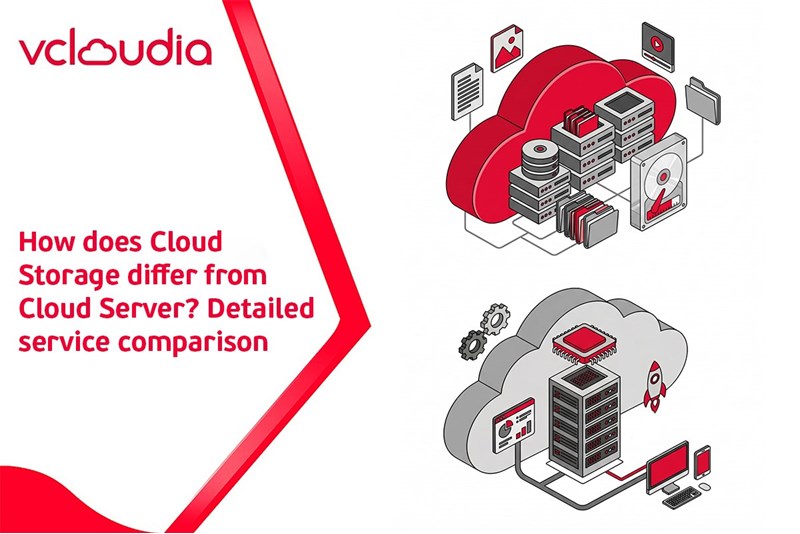
Cloud Storage is a data storage service on the cloud platform, allowing users to save, manage, and access files from anywhere with an Internet connection. Data is stored on servers located at the cloud service provider's data centers.
This service is commonly used to store files, images, videos, system data, or backup crucial data. Cloud Storage helps businesses eliminate the need to invest in physical storage systems while still being able to flexibly scale storage capacity according to their needs.
What is Cloud Server?
Cloud Server is a virtual server created on a cloud computing platform, enabling businesses to deploy websites, applications, or IT systems without the need to use physical servers.
Unlike Cloud Storage, which is solely used to store data, a Cloud Server operates like a complete server with a CPU, RAM, and an operating system. Users can install software, operate systems, and manage server resources through the cloud administration platform.
How does Cloud Storage differ from Cloud Server?
Even though both are cloud services, Cloud Storage and Cloud Server have clear differences in terms of functions and usage purposes.
Usage purpose
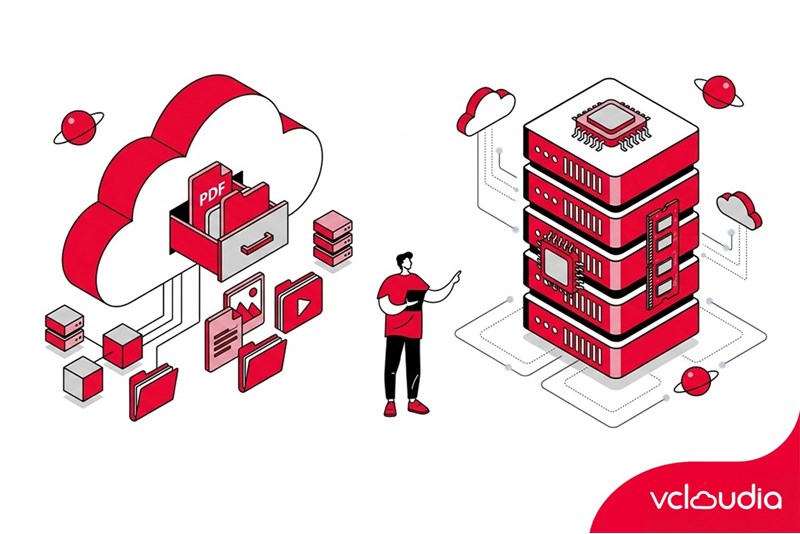
Cloud Storage is designed primarily to store and manage data on the cloud platform. Users can upload, store, and access data from anywhere via the internet. This service is frequently utilized to store files, images, videos, or back up critical data. Meanwhile, Cloud Server is used to deploy websites, applications, or software systems running in a server environment.
System configuration
Cloud Storage only provides data storage capacity, so users do not need to worry about hardware configurations. Elements such as CPU, RAM, or the operating system are not the main components of this service. In contrast, a Cloud Server operates like a complete server with a full CPU, RAM, and hard drive. Users can install an operating system, software, and configure the system according to their usage needs.
Administration capability
Cloud Storage features a relatively straightforward management approach because it primarily serves data storage and sharing. Users only need to upload data, download it, or set access permissions for files. On the other hand, Cloud Server allows the administration of the entire server system through server management tools. Administrators can configure the system, install applications, and monitor the server's operational performance.
Usage cost
The usage cost of Cloud Storage is usually calculated based on the data storage capacity. This helps users easily scale up capacity without requiring a high initial investment cost. Cloud Server typically incurs higher costs because it provides additional computational resources such as CPU, RAM, and network bandwidth. However, this service delivers more robust and flexible system operational capabilities.
Comparison table between Cloud Storage and Cloud Server
When should you use Cloud Storage and Cloud Server?
Choosing between Cloud Storage and Cloud Server depends on the business's usage needs. If a business only needs to store data, back up systems, or share files, then Cloud Storage is an appropriate solution. This service helps save costs and makes it easy to expand capacity when needed.
In case a business needs to deploy a website, application, or IT system, a Cloud Server will be the suitable choice. This platform provides sufficient resources to operate software systems and online applications.
Conclusion
Through the above comparison, it can be seen that the difference between Cloud Storage and Cloud Server lies in their functions and usage purposes. Cloud Storage is primarily used to store data, whereas Cloud Server is utilized to deploy and operate IT systems on a cloud computing platform.
Vcloudia Cloud Server – The Cloud You Can Count On
If you're concerned about the potential limitations of Cloud Servers, Cloud server by Vcloudia is a reliable solution for businesses of all sizes. With a modern infrastructure and comprehensive customer support, Vcloudia delivers a cloud experience with:
- Powerful connectivity to ensure stable 24/7 access
- Advanced security standards, compliant with international certifications such as ISO 27001:2013, ISO 20000:2018, ISO 9001:2015
- Flexible pricing packages tailored to your specific business needs
- Expert technical support, making migration and system deployment fast, safe, and compatible
Contact information:
- Hotline: +855 888 55 66 08 (free of charge)
- Fanpage: https://www.facebook.com/vcloudia/
- Website: https://vcloudia.com
Featured news
Related news
What Is Computer Vision? Applications of Computer Vision in Business
In an era where image and video data are increasingly dominant, the ability of machines to "see" and "understand" is no longer science fiction. This is precisely where Computer Vision enters the game. Far from being confined to high-tech fields, Computer Vision is progressively penetrating every corner of business - from manufacturing and retail to logistics and customer service.
What Is Pentest? Why Is Penetration Testing Necessary?
With the rapid advancement of technology and the internet, businesses are facing numerous information security risks. Alongside this, protecting data also requires more effective preventive and management measures to ensure the security of critical information, preventing risks of loss and unauthorized access.
What is Overflow? How to Identify and Fix Overflow Errors
Overflow in general, and Buffer Overflow in particular, are very common errors in the fields of computer security and programming. Not only do they cause applications to lose data and stop running, but they also harbor numerous other security risks that make it easy for hackers to launch attacks.
What is Redirect 302? Redirection Techniques and How to Fix Issues
Redirect 302 (Moved Temporarily) is a temporary redirection status code used when accessing a website without negatively impacting SEO. In this article, Vcloudia will help you gain a better understanding of Redirect 302, how to handle errors, and how to distinguish it from Redirect 301 (Moved Permanently) to implement it effectively for your website.
What is a 301 Redirect Error? How to Fix 301, 302, and 303 Errors
In the fields of website management and search engine optimization, understanding redirect status codes such as 301, 302, and 303 is extremely important. They play a decisive role in redirecting website URLs, directly impacting user experience and search performance.
What Is a 404 Not Found Error? Causes and Detailed, Fast Solutions
The 404 Not Found error is one of the most common HTTP status codes that Internet users encounter, appearing when the server cannot find the requested page or resource.
What is the 503 Service Unavailable Error? Causes & How to Fix It
503 Service Unavailable is an error encountered very frequently when using computers. Accordingly, this is a very common condition on websites because the server is unable to receive responses. So specifically, what is the 503 Service Unavailable error, what are its causes, and how can it be fixed?
What Is 500 Internal Server Error? Causes and How to Fix It
A 500 Internal Server Error occurs when a server encounters an issue while processing a request but cannot return a specific cause. This error can appear when visiting a website, using an application, calling an API, or operating a web system.
What is Fake IP? Latest Safe Ways to Fake IP in 2026
Faking your IP is a solution that helps change or conceal your real IP address when accessing the Internet in order to enhance privacy, strengthen security, and bypass regional restrictions.
What Is the Dark Web? Warnings When Accessing the Dark Web
the Dark Web What the Dark Web is sparks considerable curiosity, especially among users who are interested in and passionate about exploring the internet. Considered a small, dark corner of the internet and a hiding place for negative activities, the anonymous space of the dark web harbors many mysteries that not everyone fully understands.