



.png)



















.png)





Colocation vs On-premise: A Detailed Analysis of 5 Core Infrastructure Differences
Jun 30, 2026Choosing between colocation vs on-premise is a strategic IT infrastructure decision, directly affecting the performance, security, and operating costs of an enterprise. Both models allow businesses to own and have full control over hardware devices, but the core difference lies in the server location and the responsibility of managing the physical environment.
In the article below, Vcloudia joins you in analyzing in detail their technical similarities and differences.
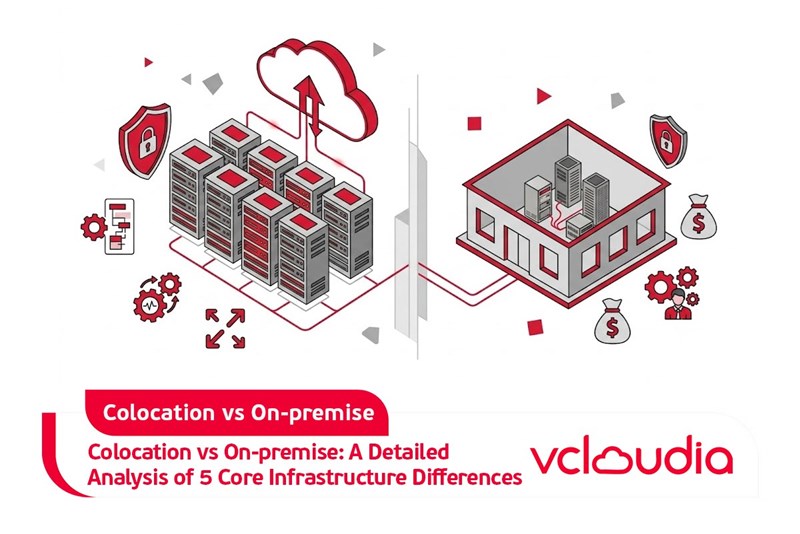
1. Definition of Colocation vs On-premise
To accurately evaluate colocation vs on-premise, you need to firmly grasp the technical operational nature of these two data center models:
Colocation (Server Colocation)
This is an infrastructure model operated by a professional service provider. Instead of building their own server rooms, enterprises rent physical space, racks, power, and accompanying management services at the provider's infrastructure facility.
Many corporate customers will place their equipment together inside a colocation data center. As technology standards evolve, colocation providers will actively invest in upgrading their physical infrastructure systems, and enterprises benefit directly from these upgrades without incurring additional infrastructure investment costs.
On-premise (On-premises Infrastructure)
This is a data center system invested in, built, owned, and fully operated by the enterprise itself to house internal information technology equipment.
Enterprises are responsible for designing the infrastructure according to their own technical standards, deploying power and cooling systems themselves to maintain server operations. The internal technical team must also handle the entire daily administration process, system maintenance, and directly procure upgrade equipment when there is a need to deploy new technologies.
2. System Security and Access Control Capabilities
Protecting data and core operational applications is a mandatory technical requirement for every IT system. When analyzing colocation vs on-premise regarding the security aspect, the most distinct difference lies in the scale of deployment and physical access control capabilities.
On-premise
This model gives you direct system control. However, establishing and maintaining security for the entire data center by yourself requires massive resources. You must be responsible for building strict access permission processes, as well as investing in the deployment of physical monitoring systems to prevent unauthorized intrusion risks.
Colocation
Colocation data centers offer a closed multi-layer physical security architecture. Access to the server area is strictly vetted and only granted to personnel who have gone through verification processes. With security staff on duty 24/7/365, the risk of physical security incidents is minimized.
Standard data centers like Viettel IDC are always equipped with biometric security systems, comprehensive surveillance cameras, and conduct periodic security audits. At the same time, Viettel IDC also supports periodic equipment inspections 2 times a day.
3. Availability and Service Level Agreement (SLA)
When evaluating colocation vs on-premise, system availability is one of the technical metrics that directly determines business continuity.
On-premise
Self-maintaining infrastructure and maintaining continuous uptime requires extremely expensive redundant investment costs. You must bear all the risks and financial damages arising when the internal system experiences service interruptions (downtime).
Colocation
Colocation data centers always concentrate massive resources to establish in-depth redundant infrastructure in order to meet uptime commitments. When choosing a provider, you should prioritize facilities with high SLA (Service Level Agreement) commitments, reaching from 99.9% to 100%.
With this level of reliability, even if your main headquarters experiences a widespread physical incident, the data store housed in the data center still operates stably. This helps the system quickly restore routing connections and minimizes service interruption downtime.
4. System Scalability
In a technological environment, businesses need to maintain flexibility to respond quickly to growing data processing requirements. When analyzing colocation vs on-premise, technical infrastructure scalability is a core criterion that needs to be evaluated in detail.
On-premise
Expanding hardware on-premises often prolongs deployment time and encounters many physical barriers. The space for installing rack cabinets, the maximum capacity of the power system, and network transmission limits are technical factors that directly narrow down the upgrade capability when your resource demands increase.
Colocation
Standard data centers are designed with a resource allocation architecture ready for both current and future needs. The infrastructure here allows for the rapid addition of bandwidth, storage space, or computing capacity. Whether you set up vertical expansion plans (increasing hardware configuration for current servers) or horizontal ones (adding new servers to the cluster), colocation infrastructure always has enough space and power capacity to meet system expansion requirements immediately.
5. Investment and Operational Cost Efficiency
The cost equation is always the deciding factor when comparing colocation vs on-premise.
On-premise
Although self-establishing initially seems to control the investment limit, ongoing maintenance costs, periodic hardware upgrade requirements, and unexpected technical incidents will drive the Total Cost of Ownership (TCO) very high over time.
Colocation
Sharing foundational resources at the data center allows you to access high-standard infrastructure without bearing the full burden of individual operational costs. By sharing cooling system, power, and network infrastructure costs with other customers, the colocation model becomes a more economical solution, helping your IT team focus resources on software development projects and core business operations.
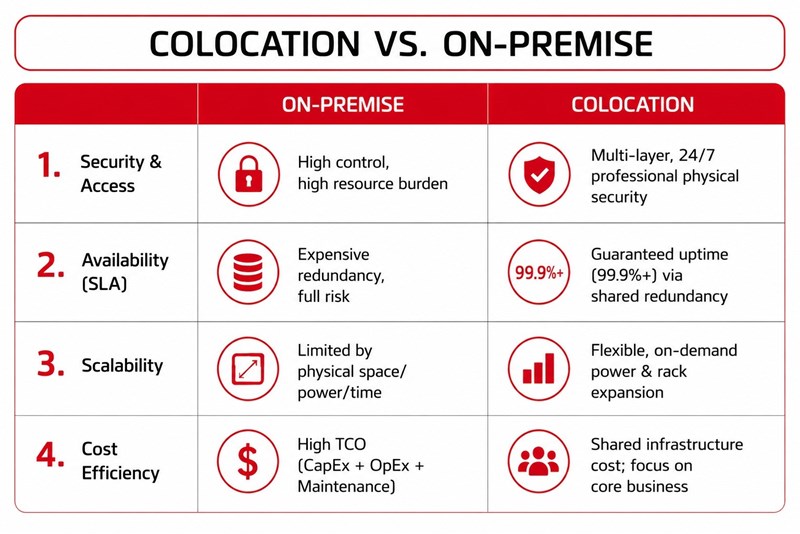
Colocation vs On-premise Comparison Overview Table
To help you gain the most systematic and intuitive view when evaluating colocation vs on-premise, below is a summary table of the core technical criteria between these two hosting models:
Conclusion
Through the detailed analysis of colocation vs on-premise, you can see that each model addresses specific technical problems. Establishing and maintaining an on-premises system brings direct physical control but requires a huge initial capital expenditure (CapEx), accompanied by the burden of continuous maintenance and infrastructure upgrades. Meanwhile, colocation thoroughly solves limits on space, power, and bandwidth, helping convert costs into monthly operating expenditures (OpEx) while ensuring the highest Service Level Agreement (SLA) for uptime.
Vcloudia Cloud Server – The Cloud You Can Count On
If you're concerned about the potential limitations of Cloud Servers, Cloud Server by Vcloudia is a reliable solution for businesses of all sizes. With a modern infrastructure and comprehensive customer support, Vcloudia delivers a cloud experience with:
- Powerful connectivity to ensure stable 24/7 access
- Advanced security standards, compliant with international certifications such as ISO 27001:2013, ISO 20000:2018, ISO 9001:2015
- Flexible pricing packages tailored to your specific business needs
- Expert technical support, making migration and system deployment fast, safe, and compatible
Contact information:
- Hotline: +855 888 55 66 08 (free of charge)
- Fanpage: https://www.facebook.com/vcloudia/
- Website: https://vcloudia.com
Featured news
Related news
What is a Snapshot? The Difference Between Snapshot and Backup
Snapshot is a familiar concept in data management and protection. In the context of the information technology boom, where data is a major asset for businesses, understanding Snapshots as well as their application is a key factor for enterprises to maximize technological efficiency.
What is a Firewall? The Role and Importance of Firewalls for Users
In the context of ever-increasing cyberattacks, system security has become a top priority for many enterprises. Alongside deploying antivirus software and controlling connection ports, firewalls are also considered a key solution to effectively enhance cybersecurity.
What is DDoS? Signs, Mitigation Strategies, and Effective Prevention
DDoS is a highly dangerous cyberattack that leaves severe consequences for enterprises. Therefore, gaining a clear understanding of DDoS attacks, as well as how to detect and prevent them, is a topic of significant interest to many.
What is a Trojan? How to Detect, Avoid, and Prevent It
A Trojan is a type of malicious code or software that can cause severe consequences to computer operations. So, what is a Trojan? How can you prevent a Trojan from infiltrating your computer? In the following article, Vcloudia will provide detailed information on these issues.
What is Cloud Backup? Classification, benefits, and limitations
Cloud Backup is a solution that plays an important role in backing up and recovering data when an incident occurs. So what exactly is Cloud Backup? Let's find out the details with Vcloudia in the following article.
What is Cloud Storage? Features and Benefits of Using It
Cloud Storage is the perfect storage solution alternative to bulky, space-consuming physical hard drives. So, what is Cloud Storage? Let's explore the details with Vcloudia through the following article.
What is an API? Characteristics and applications in website design
API, short for Application Programming Interface, is a concept no longer unfamiliar in the information technology field. So what exactly is an API and why is it so important? Let's find out with Vcloudia.
What is Node.js? Instructions on how to install Node.js on cPanel
Currently, it is easy to see that Node.js is being used by quite a lot of people. This is because Node.js can support users in running on multiple platforms and multiple devices.
What is Vultr VPS? Should you use Vultr VPS?
Vultr VPS is one of the best cloud storage solutions in the world. In this article, you will learn the concept: "What is Vultr VPS?", as well as understand its advantages and disadvantages.
Zoom Cloud Meeting: What is it? Basic Things You Should Know About Zoom Cloud Meeting
In 2020, Zoom Cloud Meeting became one of the leading video conferencing software applications. It allows you to virtually interact with colleagues when in-person meetings aren't possible, and it has also been very successful for social events.