



.png)



















.png)





Asset Management in Data Centers is the Key to Optimizing Digital Infrastructure
Jun 30, 2026Asset Management in Data Centers is not merely an equipment inventory activity, but a core strategy to optimize the infrastructure lifecycle and control operational risks. Systematic asset management helps businesses accurately grasp the current state of resources, thereby minimizing waste and ensuring the highest availability for critical IT services. Join Vcloudia to delve deeper in the article below.
What is Asset Management in Data Centers?
Asset Management in Data Centers (DCAM) is the process of strategically managing and tracking all physical assets inside a data center. This process includes controlling everything from servers, storage devices, and network equipment to other auxiliary systems. The ultimate goal of Asset Management in Data Centers is to optimize asset utilization efficiency, minimize service disruption time, and ensure compliance with strict industry standards.
Implementing Asset Management in Data Centers brings strategic value to businesses thanks to:
- Consistency: Using common terminology and definitions across departments, helping to eliminate communication barriers.
- Financial transparency: Providing objective measurement indicators and benchmark reports to convince stakeholders to approve investment budgets.
- Legal compliance: Meeting strict requirements for data management and information security, minimizing legal risks for businesses.
Why is Asset Management in Data Centers important?
To clearly understand why Asset Management in Data Centers plays a vital role in digital infrastructure, we need to look at 4 practical challenges that every business must face:
1. The problem of complexity management
A data center is a complex ecosystem with thousands of tightly connected hardware components. Without a proper asset management strategy, accurately tracking the location, configuration, and actual condition of each device will become an "impossible mission", easily leading to operational errors.
2. Cost risks from Downtime
In the digital economy, downtime is not just a technical incident but a direct loss of revenue and reputation. The longer the system is offline, the greater the loss. An effective Asset Management in Data Centers process helps minimize this risk by allowing technical teams to quickly identify and promptly handle incidents as soon as they arise.
3. Scalability and sustainable growth
IT needs are constantly fluctuating according to the development of the business. As the scale expands, the Data Center infrastructure must also be upgraded accordingly. Strict asset management ensures that new devices are seamlessly integrated into the existing system while still maintaining optimal performance.
4. Compliance with legal and security regulations
Privacy and data security regulations are becoming increasingly strict (such as ISO 27001 or standards on electronic waste disposal). Asset Management in Data Centers helps businesses comply with these rules by providing transparent control records of the asset circulation and disposal process, thereby minimizing legal risks.
8 core components of Asset Management in Data Centers
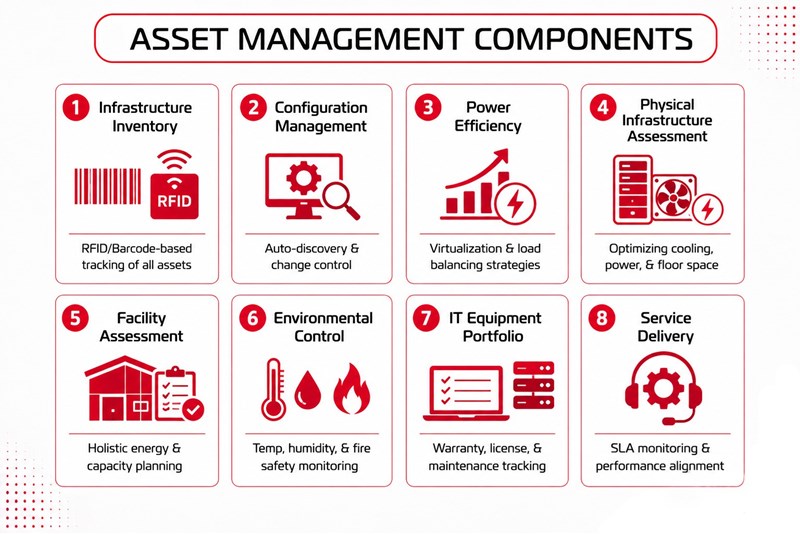
To build a successful Asset Management in Data Centers strategy, businesses need to focus on 8 foundational components. These components not only help make assets transparent but also serve as a basis to optimize costs and enhance operational capacity.
1. Infrastructure asset inventory
This is the first and most important step: maintaining accurate records of all hardware devices, software, and network components. This includes brand, model, serial number, installation location, and maintenance schedule.
Instead of using error-prone manual spreadsheets, professional operating units prioritize the use of barcodes or RFID technology to automate the real-time inventory process.
2. Configuration management
This component allows organizations to track all changes to assets over time. Effective configuration management ensures system availability and security through:
- Asset Discovery: Automatically identifying new devices in the network.
- Change Management: Controlling and approving all configuration changes, ensuring transparent documentation.
3. Power efficiency optimization
Although asset management focuses on equipment, monitoring how these devices consume power is the key to reducing OPEX costs. Strategies such as virtualization, load balancing, and cooling management help significantly improve overall energy efficiency.
4. Physical infrastructure assessment
Periodic assessments of the physical environment include power, cooling, and floor space systems. As technology changes, infrastructure utilization models also change; assessment helps identify areas that can be improved to increase space efficiency and save costs.
5. Overall facility assessment
Unlike physical infrastructure, facility assessment focuses on the efficiency of the entire Data Center building. This process involves collecting data on energy usage, equipment performance, and Capacity Planning to ensure reliability and economic efficiency.
6. Environmental condition control
Temperature, humidity, and air quality directly affect equipment lifespan.
- Temperature & humidity control: Preventing overheating or damage caused by humidity.
- Air filtration & Fire prevention: Minimizing the risk of equipment contamination and fire damage.
7. In-depth IT equipment inventory
A detailed IT equipment portfolio (Server, Switch, Storage...) is mandatory to comply with security regulations and prevent data leaks. Professional asset management software helps track warranty periods, software licenses, and periodic maintenance schedules.
8. Service delivery management
This component ensures infrastructure services correctly meet the needs of customers and the organization. It includes defining Service Level Agreements (SLAs), monitoring performance, and ensuring customer satisfaction through accurate asset data.
Asset Management lifecycle administration in Data Centers
In critical environments like Data Centers, where every second of disruption can cause hundreds of thousands of dollars in damage, the Asset Management in Data Centers process is not just an inventory activity but a comprehensive lifecycle administration strategy. Optimizing the 5 stages from planning to disposal helps businesses maximize asset value and minimize the Total Cost of Ownership (TCO).
1. Strategic planning and Procurement
The foundation of a solid Asset Management system in Data Centers starts from matching infrastructure needs with business goals.
- Technological orientation: Building a scientific device Refresh Cycle. For example: Servers are often planned on a 3-year cycle to balance performance and investment costs.
- TCO calculation: Smart procurement is not just based on the cheapest price but on the total operating cost (including power, maintenance, and end-of-life processing).
2. Deployment and Configuration management
This stage establishes a "digital profile" for every physical device.
Asset Tagging identification system: Using QR codes or RFID technology to link physical devices with the digital database. This helps technicians instantly retrieve configuration parameters and warranty history at the machine station.
Baseline establishment: Recording initial performance parameters as a reference point, helping to early detect signs of equipment degradation during operation.
3. Operational monitoring and Maintenance
This is the longest-lasting stage and determines the reliability of the entire system.
- Predictive maintenance: Instead of passively performing periodic maintenance, the system uses data from sensors to predict the time of failure, allowing for processing before the incident actually occurs.
- Performance optimization: Continuously monitoring temperature, humidity, and power load indicators to ensure equipment always operates within the ideal parameter range.
4. Optimization and Lifecycle extension
Before deciding to replace, modern Asset Management strategies in Data Centers will prioritize optimization solutions:
- Local upgrade: Replacing RAM or SSD to extend Server lifespan by 1-2 years without investing in a new system.
- Energy efficiency improvement: Updating Firmware or adjusting cold airflow to reduce power costs (PUE) for older devices.
5. End of lifecycle and Asset disposal
The final stage focuses on data security and environmental responsibility.
- Data destruction: Implementing internationally standardized data erasure protocols (such as NIST) to ensure sensitive information is not leaked when devices leave the data center.
- Sustainable recycling: Partnering with professional electronic waste processing units to recover components and protect the environment, while optimizing the disposal value for the business.
Conclusion
In the context of increasingly expanding digital infrastructure, Asset Management in Data Centers is the foundation for businesses to transform from a passive operating model to a proactive and optimal one. Mastering the 8 core components as well as strictly managing the asset lifecycle not only helps cut operating costs but is also a shield protecting the system against risks of service disruption and data security.
Vcloudia Cloud Server – The Cloud You Can Count On
If you're concerned about the potential limitations of Cloud Servers, Cloud Server by Vcloudia is a reliable solution for businesses of all sizes. With a modern infrastructure and comprehensive customer support, Vcloudia delivers a cloud experience with:
- Powerful connectivity to ensure stable 24/7 access
- Advanced security standards, compliant with international certifications such as ISO 27001:2013, ISO 20000:2018, ISO 9001:2015
- Flexible pricing packages tailored to your specific business needs
- Expert technical support, making migration and system deployment fast, safe, and compatible
Contact information:
- Hotline: +855 888 55 66 08 (free of charge)
- Fanpage: https://www.facebook.com/vcloudia/
- Website: https://vcloudia.com
Featured news
Related news
What is a Snapshot? The Difference Between Snapshot and Backup
Snapshot is a familiar concept in data management and protection. In the context of the information technology boom, where data is a major asset for businesses, understanding Snapshots as well as their application is a key factor for enterprises to maximize technological efficiency.
What is a Firewall? The Role and Importance of Firewalls for Users
In the context of ever-increasing cyberattacks, system security has become a top priority for many enterprises. Alongside deploying antivirus software and controlling connection ports, firewalls are also considered a key solution to effectively enhance cybersecurity.
What is DDoS? Signs, Mitigation Strategies, and Effective Prevention
DDoS is a highly dangerous cyberattack that leaves severe consequences for enterprises. Therefore, gaining a clear understanding of DDoS attacks, as well as how to detect and prevent them, is a topic of significant interest to many.
What is a Trojan? How to Detect, Avoid, and Prevent It
A Trojan is a type of malicious code or software that can cause severe consequences to computer operations. So, what is a Trojan? How can you prevent a Trojan from infiltrating your computer? In the following article, Vcloudia will provide detailed information on these issues.
What is Cloud Backup? Classification, benefits, and limitations
Cloud Backup is a solution that plays an important role in backing up and recovering data when an incident occurs. So what exactly is Cloud Backup? Let's find out the details with Vcloudia in the following article.
What is Cloud Storage? Features and Benefits of Using It
Cloud Storage is the perfect storage solution alternative to bulky, space-consuming physical hard drives. So, what is Cloud Storage? Let's explore the details with Vcloudia through the following article.
What is an API? Characteristics and applications in website design
API, short for Application Programming Interface, is a concept no longer unfamiliar in the information technology field. So what exactly is an API and why is it so important? Let's find out with Vcloudia.
What is Node.js? Instructions on how to install Node.js on cPanel
Currently, it is easy to see that Node.js is being used by quite a lot of people. This is because Node.js can support users in running on multiple platforms and multiple devices.
What is Vultr VPS? Should you use Vultr VPS?
Vultr VPS is one of the best cloud storage solutions in the world. In this article, you will learn the concept: "What is Vultr VPS?", as well as understand its advantages and disadvantages.
Zoom Cloud Meeting: What is it? Basic Things You Should Know About Zoom Cloud Meeting
In 2020, Zoom Cloud Meeting became one of the leading video conferencing software applications. It allows you to virtually interact with colleagues when in-person meetings aren't possible, and it has also been very successful for social events.