



.png)



















.png)





When to scale up, when to scale out? A guide to choosing an effective model
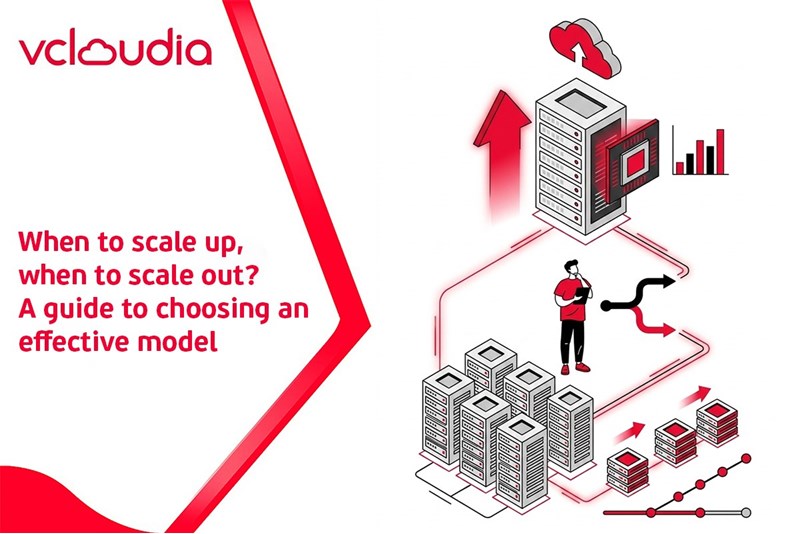
May 29, 2026In the process of operating IT systems, especially websites, web applications, and digital service platforms, the problem of resource expansion (scaling) is almost inevitable. However, how to expand is a question that leaves many businesses and technical teams confused. This article from Vcloudia will help you clearly understand when to scale up, when to scale out, comprehensively compare the two models, while providing practical guidance to select the most suitable solution for your system.
What is scale up?
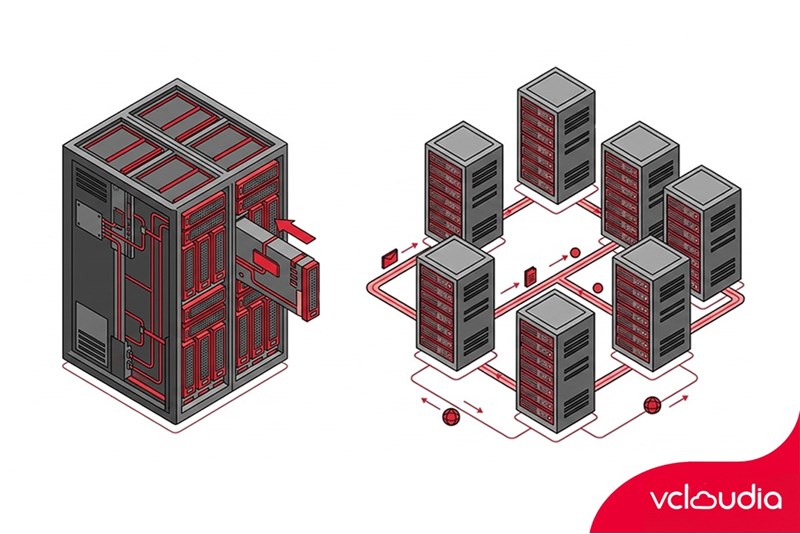
Scale up (also known as vertical scaling) is a method of expanding a system by upgrading resources on the same existing server or node. Instead of adding a new server, you increase the power of the current server by upgrading the CPU, RAM, hard drive, or other hardware components. Simply understood, scale up is like upgrading a computer: replacing with a more powerful CPU, adding RAM, or using a higher-capacity SSD to process tasks faster and in greater quantities.
In traditional environments, scale up is often associated with hardware replacement. In a Cloud Server environment, scale up becomes more flexible as you can upgrade configurations with just a few operations on the management interface without needing to purchase physical equipment.
Outstanding features of scale up:
- System architecture remains almost unchanged
- Easy to deploy, easy to manage
- Suitable for monolithic applications
- Limited in scalability due to finite hardware
Scale up is often chosen in the early stages when the system is still small, traffic is not excessively high, and the technical team wants to prioritize operational simplicity.
What is scale out?
Scale out (or horizontal scaling) is a method of expanding a system by increasing the number of servers, nodes, or instances, instead of upgrading the resources of a single server. Instead of having one really powerful server, you have multiple servers operating in parallel and sharing the load with each other. User requests will be distributed through a load balancer to ensure the system operates stably and efficiently.
A typical example of scale out is adding multiple web servers to serve high traffic, or adding multiple nodes in a Kubernetes cluster to run application containers.
Outstanding features of scale out:
- Almost unlimited scalability
- Increases availability and fault tolerance
- Suitable for distributed architecture and microservices
- Deployment and operation are more complex than scale up
Comparing scale up and scale out
When to scale up the system?
Small system or load is not yet too high
For small business websites, blogs, landing pages, or internal applications, traffic is usually stable and not excessively high. Scaling out during this stage can cause resource waste and unnecessarily increase complexity. Scale up helps you quickly improve performance without having to invest much effort into redesigning the system. This is a popular choice for early-stage startups, when the main goal is to bring the product to market quickly.
Applications heavily dependent on single resources
Many legacy applications or monolithic software are designed to run best on a single server. Traditional databases also often benefit more from powerful CPUs and large RAM instead of being distributed across multiple nodes. In these cases, scale up helps optimize performance without needing deep intervention into the application architecture.
Need quick upgrades with few architectural changes
When the system begins to slow down due to a lack of resources, scale up is the fastest way to troubleshoot. You can upgrade server configurations in just a few minutes, limit downtime, and require no code changes. This is particularly suitable for businesses with thin technical teams, prioritizing stability and operational simplicity.
When to scale out the system?
High traffic and unstable growth
E-commerce websites, SaaS platforms, or systems serving marketing campaigns often experience heavy traffic fluctuations over time. Scale out allows you to flexibly add or remove servers depending on actual needs, avoiding overload or resource waste.
Applications designed for distributed architectures
If an application is built on microservices or cloud-native architecture, scale out is almost a mandatory choice. Each service can be scaled independently, helping the system operate effectively and making it easier to maintain. Containers and Kubernetes make scale out even more popular and easier to deploy than ever before.
High requirements for availability and fault tolerance
For systems operating 24/7, downtime can cause significant damage to revenue and reputation. Scale out helps distribute risks: when one node encounters an incident, other nodes still ensure the system operates normally.
Benefits of scaling up the system
Scale up (vertical scaling) brings many distinct benefits during stages when the system is not overly complex or needs to expand rapidly without wanting deep architectural intervention. First of all, scale up helps make deployment quick and simple. Administrators only need to upgrade CPU, RAM, SSD, or IOPS for the current server without having to redesign the system, configure a load balancer, or synchronize data across multiple nodes. This is especially suitable for small businesses, startups, or thin technical teams.
Secondly, high single-processing performance is a major advantage of scale up. When all resources are concentrated on a powerful server, tasks requiring continuous processing such as traditional databases, accounting software, internal ERPs, or monolithic applications will operate more stably, avoiding latency due to distribution.
Additionally, low initial costs are also a reason many systems choose to scale up in the early stages. Businesses do not need to invest in many additional servers, complex monitoring systems, or specialized personnel for distributed architectures.
Benefits of scaling out the system
Scale out (horizontal scaling) is considered a sustainable expansion strategy for modern systems, especially in Cloud environments and applications with heavy traffic. The most prominent benefit of scale out is the almost unlimited scalability. When demand increases, the system merely needs to add new servers, instances, or containers to share the load, instead of relying on the hardware limits of a single server.
Next, fault tolerance and high availability make scale out an ideal choice for 24/7 operating systems. If one node encounters an incident, the remaining nodes continue to process, minimizing downtime and ensuring user experience.
Scale out is also perfectly suitable for Cloud-native and microservices architectures. Cloud platforms like AWS, Azure, or GCP support auto scaling, allowing the system to automatically increase or decrease the number of servers based on actual traffic, thereby optimizing operational costs.
Common mistakes when scaling a system
One of the most common mistakes is scaling too early when there is no clear data. Expanding the system based on intuition easily leads to wasted resources and costs. Many businesses also make the mistake of scaling at the wrong layer, focusing on expanding the application while the bottleneck lies in the database or network. Furthermore, the lack of a monitoring system means scaling does not bring the desired efficiency. Effective scaling requires being data-driven, precise measurement, and having a clear strategy.
Conclusion
Scale up and scale out are both important strategies in the process of expanding IT systems. Clearly understanding the nature, pros and cons, and the timing of application for each model will help you make the right decisions, save costs, and ensure the system operates stably in the long term.
Vcloudia Cloud Server – The Cloud You Can Count On
If you're concerned about the potential limitations of Cloud Servers, Cloud server by Vcloudia is a reliable solution for businesses of all sizes. With a modern infrastructure and comprehensive customer support, Vcloudia delivers a cloud experience with:
- Powerful connectivity to ensure stable 24/7 access
- Advanced security standards, compliant with international certifications such as ISO 27001:2013, ISO 20000:2018, ISO 9001:2015
- Flexible pricing packages tailored to your specific business needs
- Expert technical support, making migration and system deployment fast, safe, and compatible
Contact information:
- Hotline: +855 888 55 66 08 (free of charge)
- Fanpage: https://www.facebook.com/vcloudia/
- Website: https://vcloudia.com
Featured news
Related news
What is a Snapshot? The Difference Between Snapshot and Backup
Snapshot is a familiar concept in data management and protection. In the context of the information technology boom, where data is a major asset for businesses, understanding Snapshots as well as their application is a key factor for enterprises to maximize technological efficiency.
What is a Firewall? The Role and Importance of Firewalls for Users
In the context of ever-increasing cyberattacks, system security has become a top priority for many enterprises. Alongside deploying antivirus software and controlling connection ports, firewalls are also considered a key solution to effectively enhance cybersecurity.
What is DDoS? Signs, Mitigation Strategies, and Effective Prevention
DDoS is a highly dangerous cyberattack that leaves severe consequences for enterprises. Therefore, gaining a clear understanding of DDoS attacks, as well as how to detect and prevent them, is a topic of significant interest to many.
What is a Trojan? How to Detect, Avoid, and Prevent It
A Trojan is a type of malicious code or software that can cause severe consequences to computer operations. So, what is a Trojan? How can you prevent a Trojan from infiltrating your computer? In the following article, Vcloudia will provide detailed information on these issues.
What is Cloud Backup? Classification, benefits, and limitations
Cloud Backup is a solution that plays an important role in backing up and recovering data when an incident occurs. So what exactly is Cloud Backup? Let's find out the details with Vcloudia in the following article.
What is Cloud Storage? Features and Benefits of Using It
Cloud Storage is the perfect storage solution alternative to bulky, space-consuming physical hard drives. So, what is Cloud Storage? Let's explore the details with Vcloudia through the following article.
What is an API? Characteristics and applications in website design
API, short for Application Programming Interface, is a concept no longer unfamiliar in the information technology field. So what exactly is an API and why is it so important? Let's find out with Vcloudia.
What is Node.js? Instructions on how to install Node.js on cPanel
Currently, it is easy to see that Node.js is being used by quite a lot of people. This is because Node.js can support users in running on multiple platforms and multiple devices.
What is Vultr VPS? Should you use Vultr VPS?
Vultr VPS is one of the best cloud storage solutions in the world. In this article, you will learn the concept: "What is Vultr VPS?", as well as understand its advantages and disadvantages.
Zoom Cloud Meeting: What is it? Basic Things You Should Know About Zoom Cloud Meeting
In 2020, Zoom Cloud Meeting became one of the leading video conferencing software applications. It allows you to virtually interact with colleagues when in-person meetings aren't possible, and it has also been very successful for social events.