



.png)



















.png)





What is Cloud Lifecycle? The main stages of cloud lifecycle management
28/05/2026The cloud lifecycle describes the entire cycle of managing an application, service, or data on a cloud computing environment. Clearly managing the cloud computing lifecycle helps businesses deploy systems methodically, limit resource waste, and improve long-term operational efficiency. Let's learn more about the stages in the following article with Vcloudia.
What is Cloud Lifecycle?
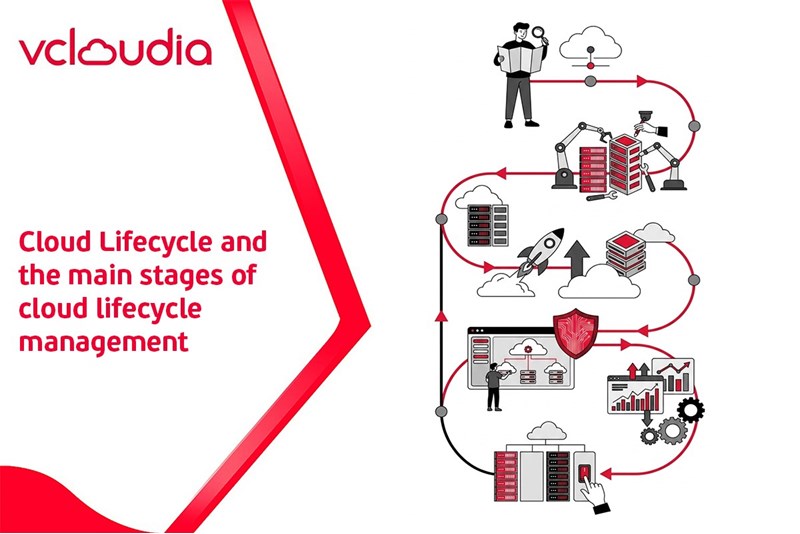
Cloud Lifecycle is the entire cycle of managing an application, service, or data in a cloud environment. The process includes stages from ideation, design, development, deployment, operation, optimization, and expansion to retirement. By clearly managing the lifecycle, businesses can ensure that the steps are carried out systematically, avoiding resource waste and improving operational efficiency.
Why is cloud computing lifecycle management necessary?
Cloud computing brings many practical values to businesses. However, if not managed according to a clear lifecycle, the system is very prone to high costs, difficult to control, and potentially carries security risks. Applying strict cloud lifecycle management brings many practical benefits, especially for small businesses and IT teams:
- Cost control and optimization: The cloud lifecycle helps to provision resources only when truly necessary, and automatically reclaims them when no longer in use, thereby limiting waste and controlling the budget more effectively.
- Increase performance and automation level: Applying Infrastructure as Code and lifecycle management tools helps to deploy infrastructure quickly, uniformly, and with fewer errors. Standardized processes make the IT team more flexible in scaling, changing, or restoring the system when needed.
- Enhance security and compliance: Lifecycle management allows the consistent application of security policies and access controls throughout the cloud usage process. Automated mechanisms help businesses better meet security standards and compliance requirements such as ISO or industry-specific regulations.
The stages of Cloud Lifecycle
Strategy and planning
The first stage of the cloud lifecycle focuses on defining business objectives and the direction of cloud utilization. Businesses need to answer core questions such as what the cloud is deployed for, which target users it serves, what the budget is, and what the risk tolerance level is.
Additionally, requirements for compliance, data security, and technical risks also need to be evaluated right from the start. A clear strategy helps the cloud deployment stay on track, avoiding unnecessary incurred costs or having to change the architecture later.
Service design
Once the direction is established, the design of the cloud infrastructure begins to be deployed in more detail. This is when businesses make technical decisions, such as choosing a public cloud, a private cloud, or a hybrid model. In parallel with this is designing the network system, allocating server and storage resources, as well as building security layers and backup plans.
Deployment
The deployment stage focuses on bringing the design into reality. Currently, most businesses apply Infrastructure as Code (IaC) to automate the infrastructure provisioning process, helping to reduce manual errors and increase consistency. This is one of the most important steps in the software cloud lifecycle management.
Operation
Operation plays a pivotal role in the stages of the cloud lifecycle.
Once the system is up and running, the focus shifts to maintaining stability and safety. Operational tasks occur continuously, ranging from performance monitoring and troubleshooting to patch updates and data backups.
Improvement/Optimization
Unlike traditional infrastructure, the cloud allows flexible adjustments according to actual needs. The system is periodically evaluated to identify non-optimal points, from performance to costs.
Businesses can fine-tune configurations, add new features, or apply optimization measures to improve the user experience. Continuous improvement helps the cloud system avoid becoming obsolete and remain aligned with long-term development directions.
Retirement
When a cloud service is no longer necessary or has reached the end of its usable lifecycle, the business proceeds to retire it. Important data will be archived or transferred to another system, after which the cloud resources are de-provisioned. Retiring services according to the proper process helps avoid wasting maintenance costs and ensures that data is handled safely, complying with relevant regulations.
Why is cloud computing lifecycle management necessary?
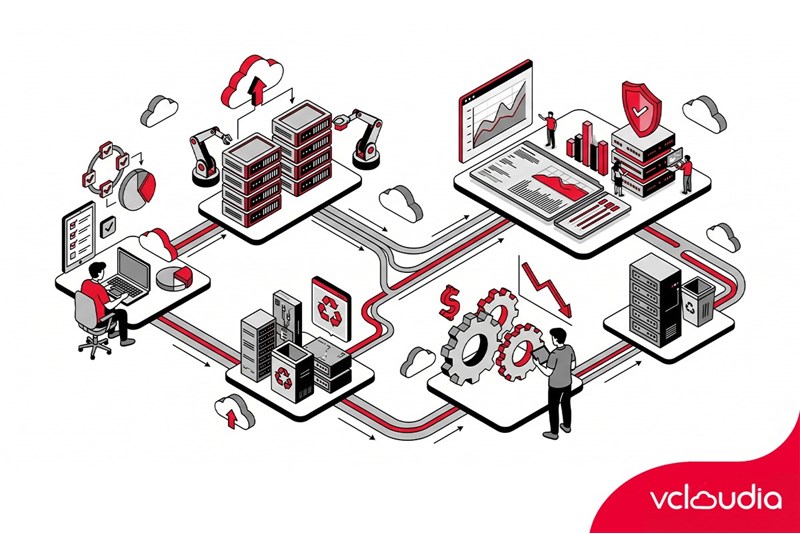
Applying strict cloud lifecycle management brings many practical benefits to businesses, especially for small businesses and IT teams:
- Cost control and optimization: Cloud costs are a major challenge for many businesses, as resources are easily over-provisioned or forgotten. Lifecycle management helps to provision resources only when truly necessary, and automatically reclaims them when no longer in use. From there, it limits waste and controls the budget more effectively.
- Increase performance and automation level: Applying Infrastructure as Code and lifecycle management tools helps to deploy infrastructure quickly, uniformly, and with fewer errors. Standardized processes make the IT team more flexible in scaling, changing, or restoring the system when needed.
- Enhance security and compliance: Lifecycle management allows the consistent application of security policies and access controls throughout the cloud usage process. Automated mechanisms help businesses better meet security standards and compliance requirements such as ISO or industry-specific regulations.
Challenges in deploying and managing the cloud lifecycle
Despite bringing many benefits, managing the cloud lifecycle also faces quite a few challenges:
- Complexity in costs and management: Deploying multiple cloud platforms and integrating them with legacy infrastructure can be highly complex. According to a report from Spacelift, 82% of CIOs consider cloud cost management a top priority because it is very easy to exceed the budget without monitoring tools.
- Security and compliance: Ensuring that data is encrypted, access is strictly managed, and continuously updated is a mandatory requirement, demanding standardized and automated processes.
- Resources and expertise: The team needs to understand multiple technologies (AWS, Azure, Kubernetes…) and new automation tools to deploy effectively. A shortage of human resources can cause the deployment and maintenance process to be delayed.
- Tool integration and monitoring: Each cloud provider has its own management tools and interfaces. Combining them into a unified platform to monitor the entire system requires investing in an additional overarching governance solution, avoiding a situation of "cramming" multiple dashboards and losing the holistic view.
Tools supporting cloud lifecycle management
VMware vRealize Suite
VMware vRealize Suite supports cloud lifecycle management in a hybrid environment, where on-premise infrastructure and public cloud coexist. This platform provides the capability to automate deployments, monitor performance, and optimize resources.
AWS CloudFormation
AWS CloudFormation is the Infrastructure as Code tool of AWS, allowing the definition and deployment of infrastructure through configuration files. All resources are created, updated, or deleted according to the same standard, helping to control the software and infrastructure cloud lifecycle well. CloudFormation supports rapid deployment, reduces configuration drifts, and is convenient for reclaiming resources when the service concludes.
Google Cloud Deployment Manager
Google Cloud Deployment Manager is the IaC tool of Google Cloud Platform, allowing the deployment and management of the cloud lifecycle using configuration files. This tool supports the automation of creating and updating resources, ensuring that the infrastructure is deployed consistently. Deployment Manager is suitable for managing the cloud lifecycle stages in environments that need to scale or change frequently.
Azure Resource Manager
Azure Resource Manager is the central management layer for the cloud computing lifecycle on the Azure platform. Through ARM Templates or Bicep, businesses control the creation, updating, and deletion of resources in each stage. Role-based access control, tagging, and policy application mechanisms help ARM effectively support object lifecycle management, especially in controlling costs and access to cloud resources.
BMC Cloud Lifecycle Management
BMC Cloud Lifecycle Management is BMC's solution for managing the comprehensive cloud service lifecycle. The self-service system and service catalog help standardize processes, support object lifecycle management, and maintain strict control in a hybrid cloud environment.
Conclusion
The Cloud Lifecycle plays a foundational role in the cloud computing strategy of businesses. Clearly understanding the stages, challenges, and management tools helps the system operate stably, control costs, and be ready to scale according to actual needs. In the management process, the infrastructure platform plays a decisive role in the capability for stable deployment and operation.
Vcloudia Cloud Server – The Cloud You Can Count On
If you're concerned about the potential limitations of Cloud Servers, Cloud server by Vcloudia is a reliable solution for businesses of all sizes. With a modern infrastructure and comprehensive customer support, Vcloudia delivers a cloud experience with:
- Powerful connectivity to ensure stable 24/7 access
- Advanced security standards, compliant with international certifications such as ISO 27001:2013, ISO 20000:2018, ISO 9001:2015
- Flexible pricing packages tailored to your specific business needs
- Expert technical support, making migration and system deployment fast, safe, and compatible
Contact information:
- Hotline: +855 888 55 66 08 (free of charge)
- Fanpage: https://www.facebook.com/vcloudia/
- Website: https://vcloudia.com
ព័ត៌មានពិសេស
ព័ត៌មានដែលទាក់ទង
What is a Snapshot? The Difference Between Snapshot and Backup
Snapshot is a familiar concept in data management and protection. In the context of the information technology boom, where data is a major asset for businesses, understanding Snapshots as well as their application is a key factor for enterprises to maximize technological efficiency.
What is a Firewall? The Role and Importance of Firewalls for Users
In the context of ever-increasing cyberattacks, system security has become a top priority for many enterprises. Alongside deploying antivirus software and controlling connection ports, firewalls are also considered a key solution to effectively enhance cybersecurity.
What is DDoS? Signs, Mitigation Strategies, and Effective Prevention
DDoS is a highly dangerous cyberattack that leaves severe consequences for enterprises. Therefore, gaining a clear understanding of DDoS attacks, as well as how to detect and prevent them, is a topic of significant interest to many.
What is a Trojan? How to Detect, Avoid, and Prevent It
A Trojan is a type of malicious code or software that can cause severe consequences to computer operations. So, what is a Trojan? How can you prevent a Trojan from infiltrating your computer? In the following article, Vcloudia will provide detailed information on these issues.
What is Cloud Backup? Classification, benefits, and limitations
Cloud Backup is a solution that plays an important role in backing up and recovering data when an incident occurs. So what exactly is Cloud Backup? Let's find out the details with Vcloudia in the following article.
What is Cloud Storage? Features and Benefits of Using It
Cloud Storage is the perfect storage solution alternative to bulky, space-consuming physical hard drives. So, what is Cloud Storage? Let's explore the details with Vcloudia through the following article.
What is an API? Characteristics and applications in website design
API, short for Application Programming Interface, is a concept no longer unfamiliar in the information technology field. So what exactly is an API and why is it so important? Let's find out with Vcloudia.
What is Node.js? Instructions on how to install Node.js on cPanel
Currently, it is easy to see that Node.js is being used by quite a lot of people. This is because Node.js can support users in running on multiple platforms and multiple devices.
What is Vultr VPS? Should you use Vultr VPS?
Vultr VPS is one of the best cloud storage solutions in the world. In this article, you will learn the concept: "What is Vultr VPS?", as well as understand its advantages and disadvantages.
Zoom Cloud Meeting: What is it? Basic Things You Should Know About Zoom Cloud Meeting
In 2020, Zoom Cloud Meeting became one of the leading video conferencing software applications. It allows you to virtually interact with colleagues when in-person meetings aren't possible, and it has also been very successful for social events.